Solutions · HR & People Ops

The handbook answers itself.
The judgment calls stay human.

Your people team became the company's help desk: the same handbook questions hundreds of times, onboarding scattered across five systems, letters requested and forgotten. An AI-native people-ops function puts the whole desk on a workforce, while every letter and every commitment still waits for HR.

Installed in minutes, not months. Governed and audited from the first run.

OVERNIGHTThis morning's desk
23 handbook questions answered
2 onboardings run to completion
1 verification letter holding for HR
1 policy edge case routed to a person
one workforce · governed · audited · cfg v4
The whole function, on one workforce

Not a bot bolted onto HR.
The people desk, end to end.

Every stage of the desk is worked by the right kind of worker (an unattended play, a team that faces your employees, a room of specialists), all reading and writing one shared record, with HR at the gates that matter.

You delegate the people desk to one coworker. It runs the day and brings you the calls that need a person.
runs on its own
Answer from the handbook
  • Reply from policy docs
  • Cite the section
  • Escalate the gaps
runs on its own
Run onboarding
  • Drive the checklist
  • Across every system
  • Nothing dropped
runs on its own
Draft the documents
  • Employment letters
  • Verification letters
  • Attach the rationale
a room of specialists
Hold for HR
  • Letters, comp, offers hold
  • Terminations hold
  • Release only for a person
holds for a person
runs on its own
Track & report
  • Keep the people table
  • Compile the briefing
  • Protect the PII
One shared record underneath: people, policies and checklists, read and written by every stage under one rulebook of gates, budgets, audit and a strict PII policy.
Every step lands in the audit trail, pinned to the config that ran, so the whole day is provable afterwards.
One workforce, several kinds of worker

One team. The right shape of worker for each job.

You don't wire this together or choose an architecture. You describe the outcome; the workforce brings the right kind of worker to each part of the day, and they all work from one shared record, under one set of rules.

Workers that run a play to the end

The repeatable plays (answering a handbook question, running an onboarding checklist) go start to finish on their own, unattended, day or night. No one keeps the checklist alive in their head.

A team that faces your employees

Employee questions are met in the moment by a team that answers from your handbook, cites the section it used, and escalates the second the docs don't cover the question.

A room of specialists for the sensitive cases

When a case needs policy, comp and the employee record weighed together, a room of specialists works it as one, each owning its part, and the decision still holds for a person.

A coworker you delegate the help desk to

You don't operate a portal. You talk to one coworker that runs the people desk, remembers your standing instructions, and surfaces only what needs you.

One shared record, one rulebook

Every worker reads and writes the same people, policies and checklists, and every one obeys the same gates, budgets, audit and a strict PII policy. No worker is ever off the leash.

What you never build

There's no integration project and no architecture to pick. You delegate the outcome, the workforce assembles the right workers, and every one of them lands under the same gates, PII policy and audit.

What this makes possible

The people team's day goes back to people.

Not a chatbot bolted onto HR: a workforce that owns the repeatable questions and checklists, and structurally cannot touch the decisions that are yours. The week shifts like this (a worked scenario, not a benchmark):

01
The handbook answers itself, or hands off

Employee questions are answered from your own handbook and policy docs, retrieved and cited. When the docs don't cover it, the question escalates to a person, because an improvised leave-policy answer is a liability, so it never happens.

02
Onboarding and offboarding run to completion

Accounts, forms, welcome docs and checklists across every system a new hire or leaver touches, driven to done, with nothing dropped between tools and nothing living in one coordinator's head.

03
Letters drafted on request, sent on your sign-off

Employment and verification letters are drafted the hour they're asked for, and every one holds at the approval gate. One single-use grant releases exactly one letter, then the next one asks again.

04
Comp, offers and terminations stay human

The decisions that carry the most weight are structurally human: the writes that would enact them always stop for a person. The workforce prepares context and keeps records straight, but the judgment stays with your team.

People ops todayWith the workforce
Policy questionsanswered one ping at a timecited answers, or a clean escalation
Day-one onboardinga checklist across five systemsrun to completion, nothing dropped
Verification lettersrequested, then forgottendrafted same day, held for sign-off
Employee data accessimpossible to reconstructevery touch in the audit trail
The team's daythe company's help deskcomp, performance, people
What running it feels like

You run the people desk from one conversation.

June isn't a portal you administer, it's the coworker you delegate the desk to. The day's questions arrive answered and cited, the escalations arrive exactly as asked, and the one document that needs you is already holding with its draft attached, each approval releasing exactly one thing.

Every message, tool call and approval in this exchange lands in the audit trail. How the gates work →

LIVEEnd-of-day check-in with Junepeople workspace
June, how did today go on the people desk?
JU
June · People ops coordinatorSteady. I answered 23 handbook questions with citations, and 2 onboardings ran to completion, accounts, forms and welcome docs all out. Two things touched you: one verification letter holding for your sign-off, and one policy edge case I escalated instead of answering.23 answered2 onboardings done1 held · 1 escalated
draft_document(employment-verification · Daniel R.) → from the HR letter template, rationale attached
send_document · employment-verification letter · Daniel R., employee-facing, holds for HR sign-off
Letter reads right. Approved.
JU
June · People ops coordinatorSent. That grant covered exactly this one letter, so nothing else releases on it. The escalation is still in your queue exactly as the employee asked it, no improvised policy answer, and every access today is logged under the PII policy.single-use grantcfg v4
letter sent · access logged under PII policy · audit trail, cfg v4
Proof, not promises

One new hire's day one, across the whole desk.

A scenario: a growing company, a start date, and the usual stream of policy questions. These are real screens, not mockups.
LIVEOne day one, end to endrun #2867 · people ops workspace
8:20 AM
arrivedA new hire's day one beginsPriya's start date hits and the onboarding checklist opens: accounts, forms, and a welcome doc drafted from the handbook, each step recorded as it lands.
11:15 AM
workforcePolicy question, answered with a citationAn employee asks about parental leave. The answer comes from the handbook, §4.2, citation attached, not from a model's memory.
11:40 AM
workforceThe edge case escalates, not guessedAnother employee asks how leave interacts with a phased return. The handbook doesn't cover it, so the question routes to HR as asked. A wrong policy answer is a liability; a handoff isn't.
12:05 PM
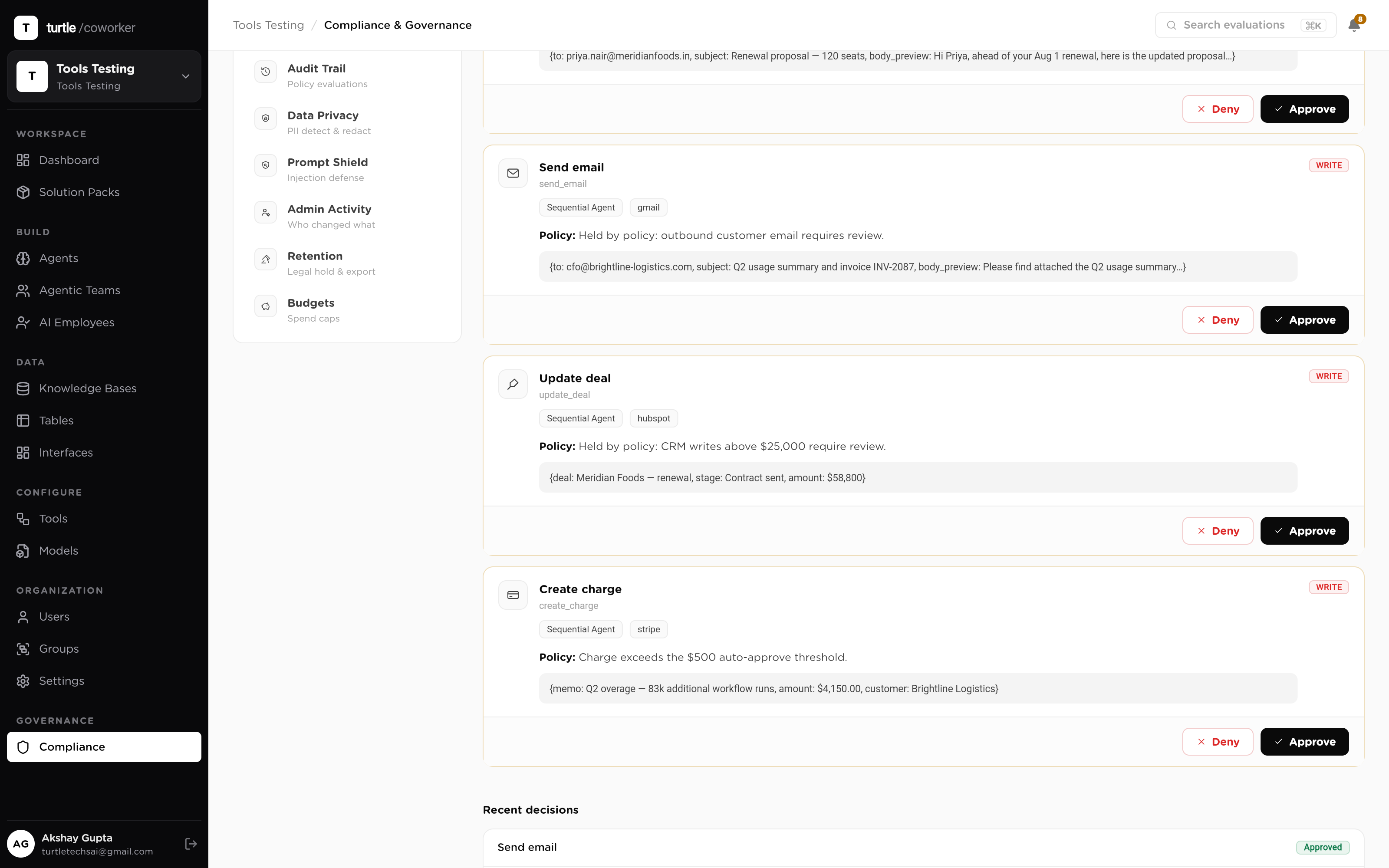
heldA verification letter holdsAn employment-verification letter for Daniel R. is drafted and, because it's employee-facing, stops at the gate with the draft attached. Nothing leaves without a person.
2:00 PM
humanHR reviews and signs offThe people lead reads the draft and approves. A single-use grant releases exactly this letter, then expires.
2:01 PM
doneSent, closed, and on the recordLetter delivered, checklist completed, the day summarized in tomorrow's briefing, every access logged under the PII policy, pinned to cfg v4.
The approvals queue in the platform: a list of held actions, each showing the action awaiting review and the rule that held it, with approve and deny controls
Everything employee-facing waits here, with the rule that held each shown
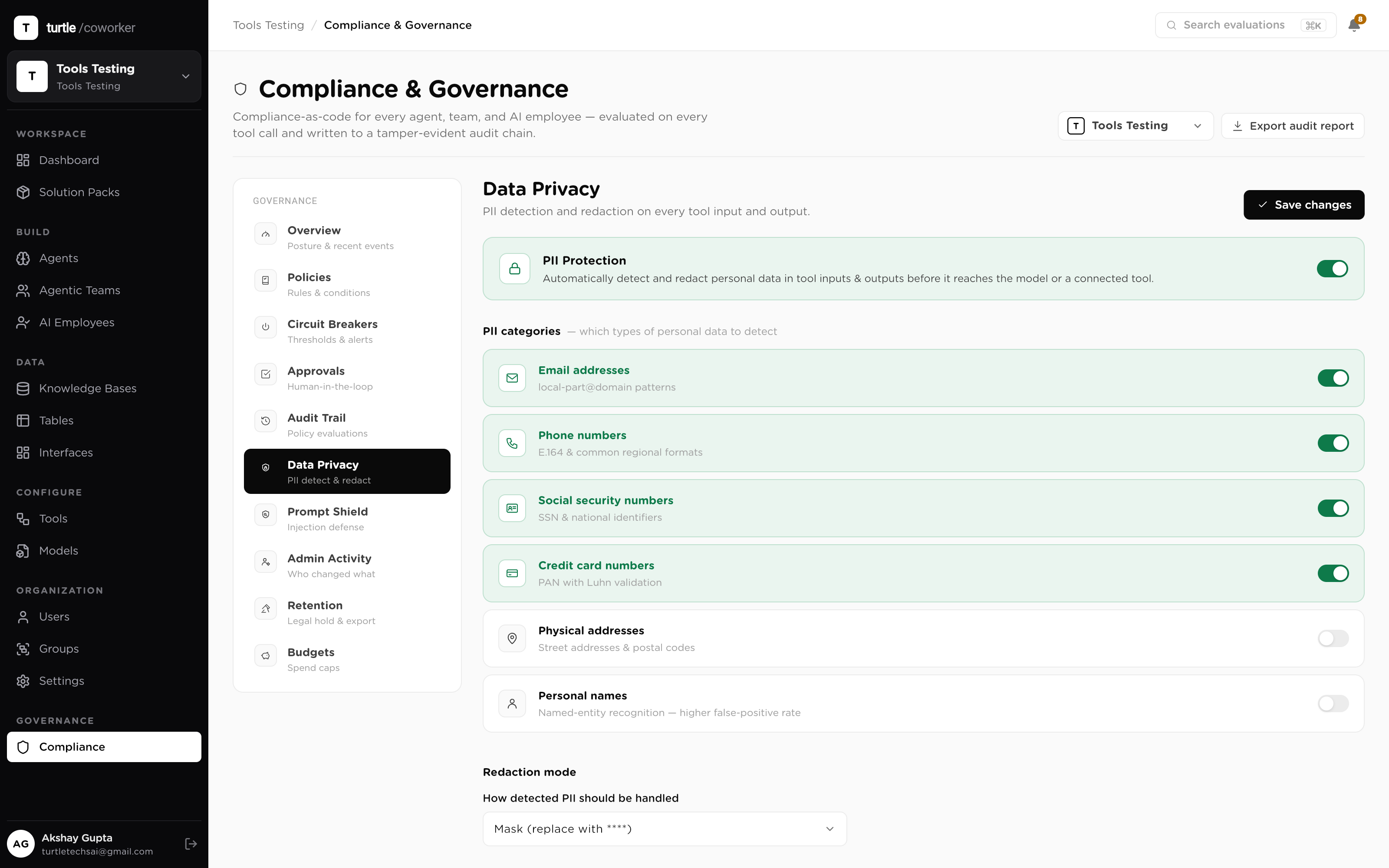
The data-protection policy configuration screen: PII handling and redaction settings that govern how sensitive fields are treated across runs
The PII policy that governs every touch of employee data
Governed by default

The gates ship with the system.

01 · GROUNDED, NOT GUESSED

Answers cite your handbook

Every policy answer is retrieved from your handbook and cites what it used; what the docs don't answer escalates to a person instead of being improvised. Inbound employee messages are untrusted input, so a prompt-injection shield screens them before they reach a model. The control plane →

02 · DOCUMENTS HOLD

Nothing employee-facing sends itself

Letters and every employee-facing send hold for review, enforced at the tool call, at runtime, so an unapproved send is a no-op. Each approval is single-use: one grant, one letter, 24-hour expiry, then the next one asks again. Comp, offers, performance and terminations are structurally human. How approvals work →

03 · PII, DEFENSIBLE

Every access on the record

Employee data sits under an explicit PII policy with redaction, table access scoped by role, and every read and write in the audit trail, pinned to the config version that ran. The most sensitive data you hold, handled in a way you can defend.

Questions

Before you install.

Is this one AI, or a lot of them?
One workforce, several kinds of worker. Some jobs run as unattended plays that go start to finish on their own; employee questions are met by a team that answers from your handbook; a sensitive case is worked by a room of specialists; and you talk to one coworker that runs the people desk. You never wire this together or choose an architecture. You delegate the outcome, and the workforce brings the right shape of worker to each part of the day. Every one of them reads and writes the same record and obeys the same gates and PII policy.
Will it improvise a policy answer?
No, that's the point. Answers to employee questions are retrieved from your own handbook and policy documents and cited, and when the docs don't answer, the question escalates to a named person instead of being guessed at. A wrong parental-leave answer in an employee's inbox is a real liability, so the failure mode here is a handoff, not an invented policy.
How is employee data protected?
Employee records are the most sensitive PII in the building, and they're treated that way: an explicit PII policy governs handling, sensitive values are redacted before they're stored in logs, table access is scoped by role, and every single access lands in the audit trail pinned to the config version that ran. When you need to answer who saw what and when, it's a query.
Can it send a letter or a document to an employee on its own?
No. Everything employee-facing (verification letters, employment letters, any document that leaves the building) holds at an approval gate by default, enforced at the tool call, at runtime. HR reviews the draft and approves it with a single-use grant: one grant releases exactly one letter, expires within 24 hours, and the next letter asks again.
What about compensation, offers, performance and terminations?
Structurally human. Those aren't areas where the gates happen to be tight, they're decisions the system cannot make, because the writes that would enact them always stop for a person. June can prepare context and keep records straight, but the judgment calls stay with your team, and the gates make it impossible to be otherwise.
How long until it's running?
Minutes, not months. You point it at your handbook and policy docs, answer a few setup questions (which checklists, which approval gates, who signs off), connect the tools you already run, and the workforce is wired together with June and verified with a smoke test before its first real request.
Solutions · HR & People Ops

The handbook answers itself by morning. The letters wait for your sign-off.

Book a demo Browse Solution Packs
