Software for the leads that come to you. A lead lands from your website, a demo form, a booking or a referral. Within a minute the desk has looked up the company, scored how well it fits, picked an owner, and drafted the first reply with two time slots. You read it and send it from your own inbox. Leads that go quiet get a nudge drafted. Demos get a one-page brief. Monday tells you which sources bring the leads that book. Nothing reaches a lead without a person.
For founders and small sales teams handling inbound leads
The pack is built for whoever answers the leads that arrive. It fits three kinds of team.
You get five to thirty leads a week and each one waits until you have a minute. The desk drafts the reply in a minute; you send it in one click.
Leads are scored and given an owner on arrival. Each owner sends from their own inbox. The public "Talk to us" page replaces the contact form.
A regional or product-line team in an MNC handling website and event leads, with a rule that a person sends every reply. The desk gives them that by design; the CRM stays the record.
| Sales / Inbound | Scoring, first replies, nudges, demo briefs, the reply queue. |
| Marketing | Which sources bring the leads that book, with cost per source, every Monday. |
| Revenue Operations | The CRM sync: contact, company and deal created and updated as the lead moves. |
| Customer Success | Leads that are existing customers are routed to the right person. |
Everything the software produces is a draft for a person. It never sends a reply on its own, never closes a lead in the CRM, never books a meeting without approval, and never replies to a lead that is not a fit without you seeing it first.
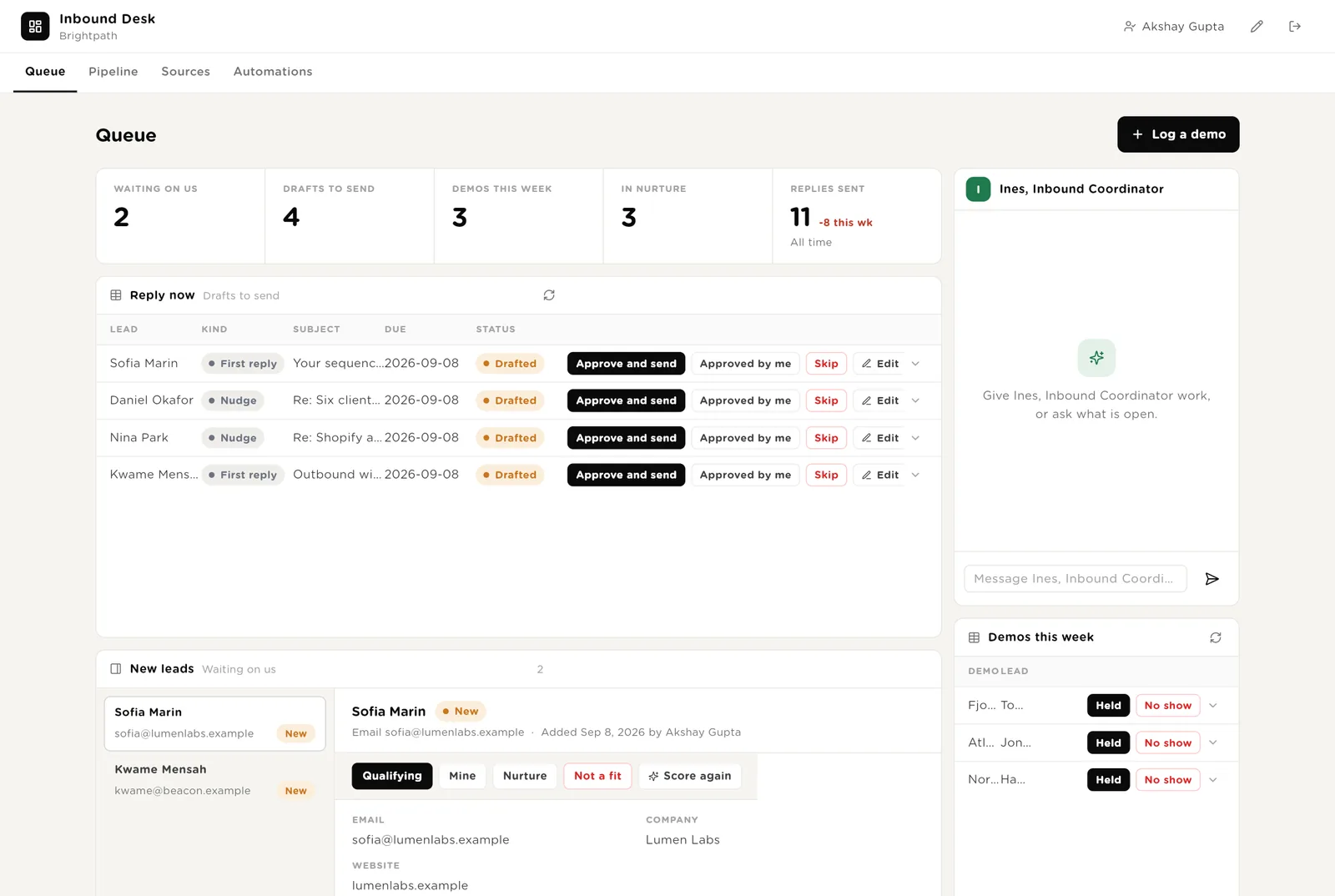
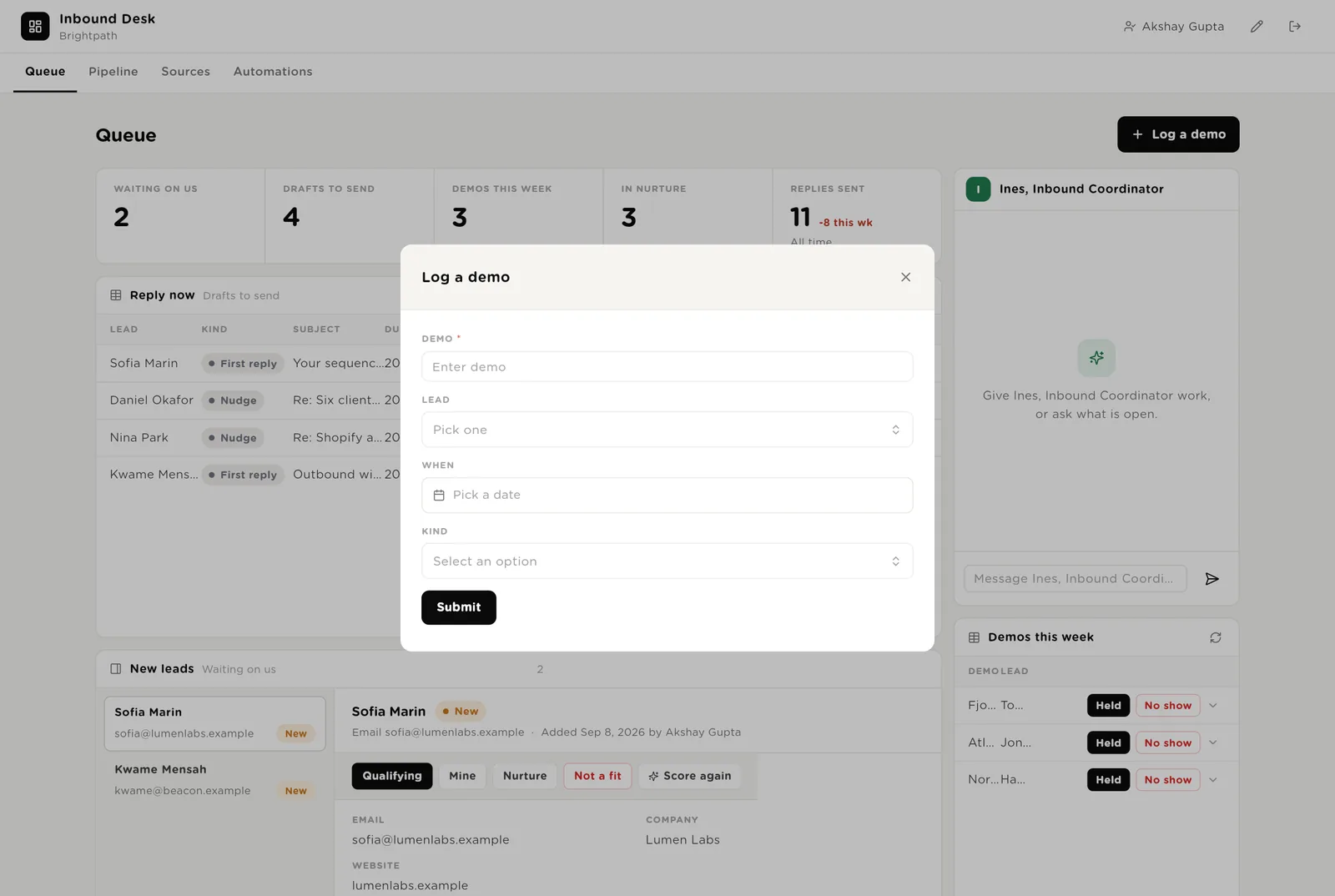
The morning screen. Five live numbers. The replies drafted and due, each with Approve and send. The new leads with their fit score and the reason. Ines beside them. This week's demos. A button to log a demo booked elsewhere.
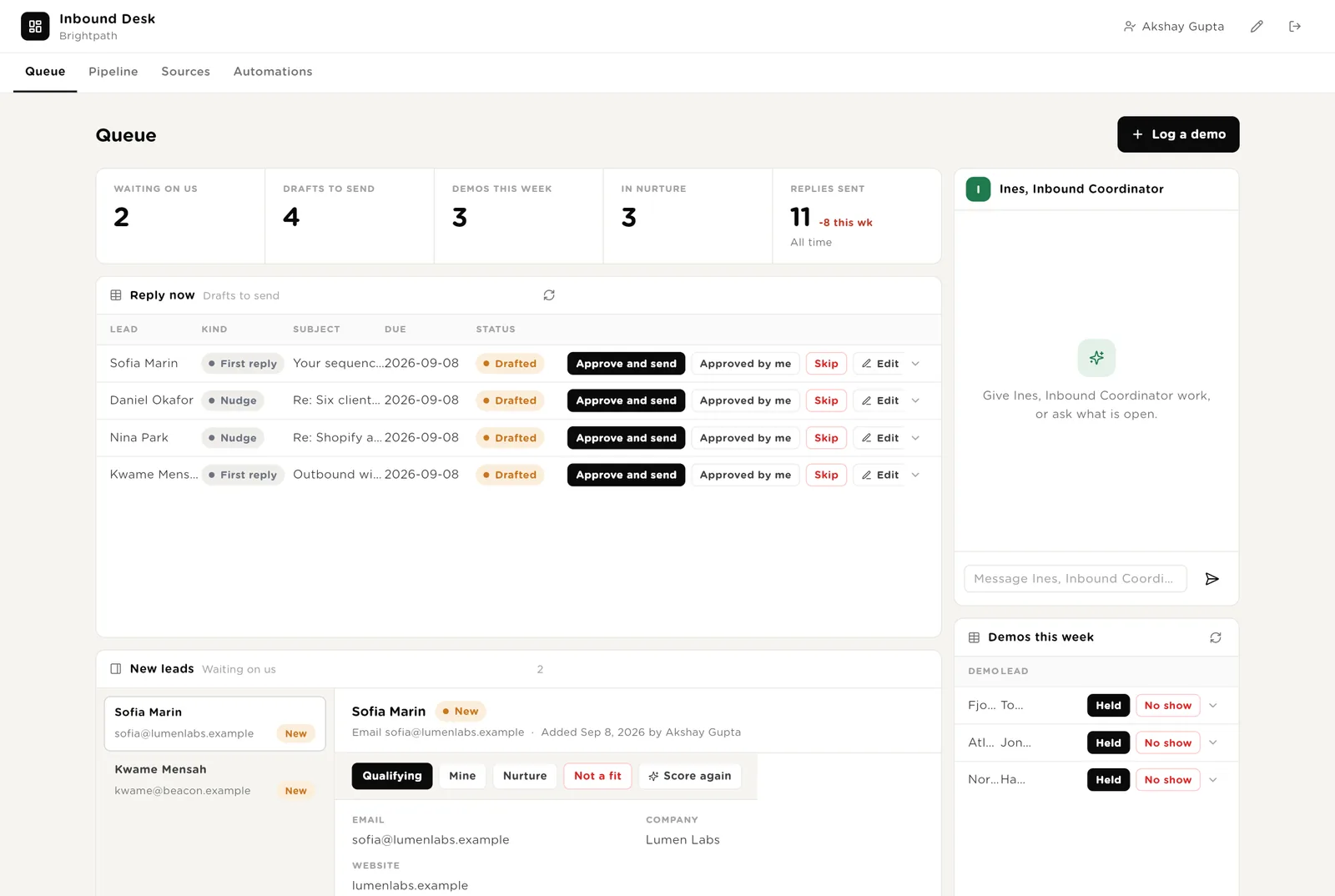
The reply goes exactly as shown, from your own Gmail, and the lead is marked Replied.
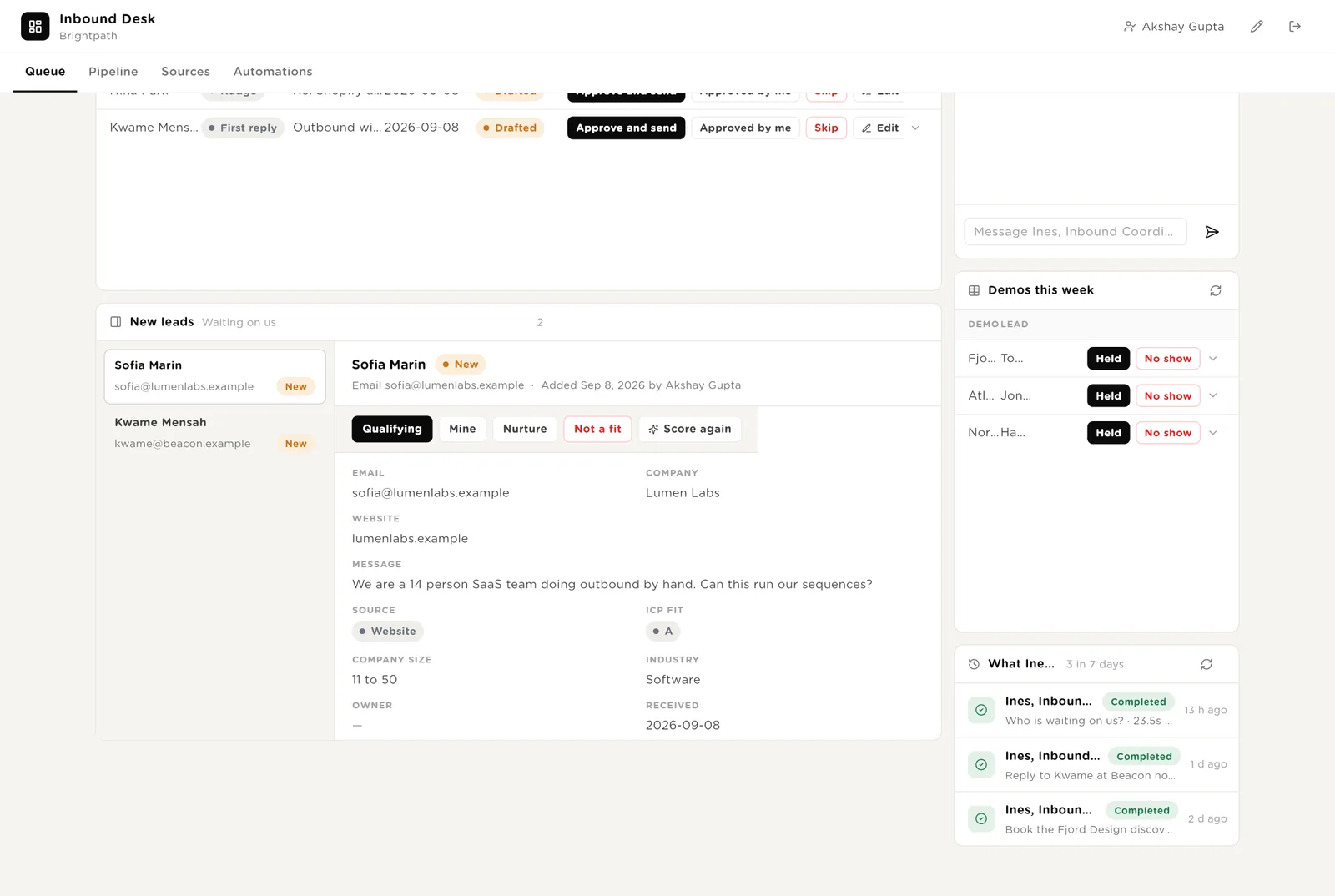
Puts your name on the lead so nobody else replies.
Disqualifies the lead on the desk. Nothing is sent unless you approve a polite no.
This week's demos with Held / No show, and Ines's recent work.
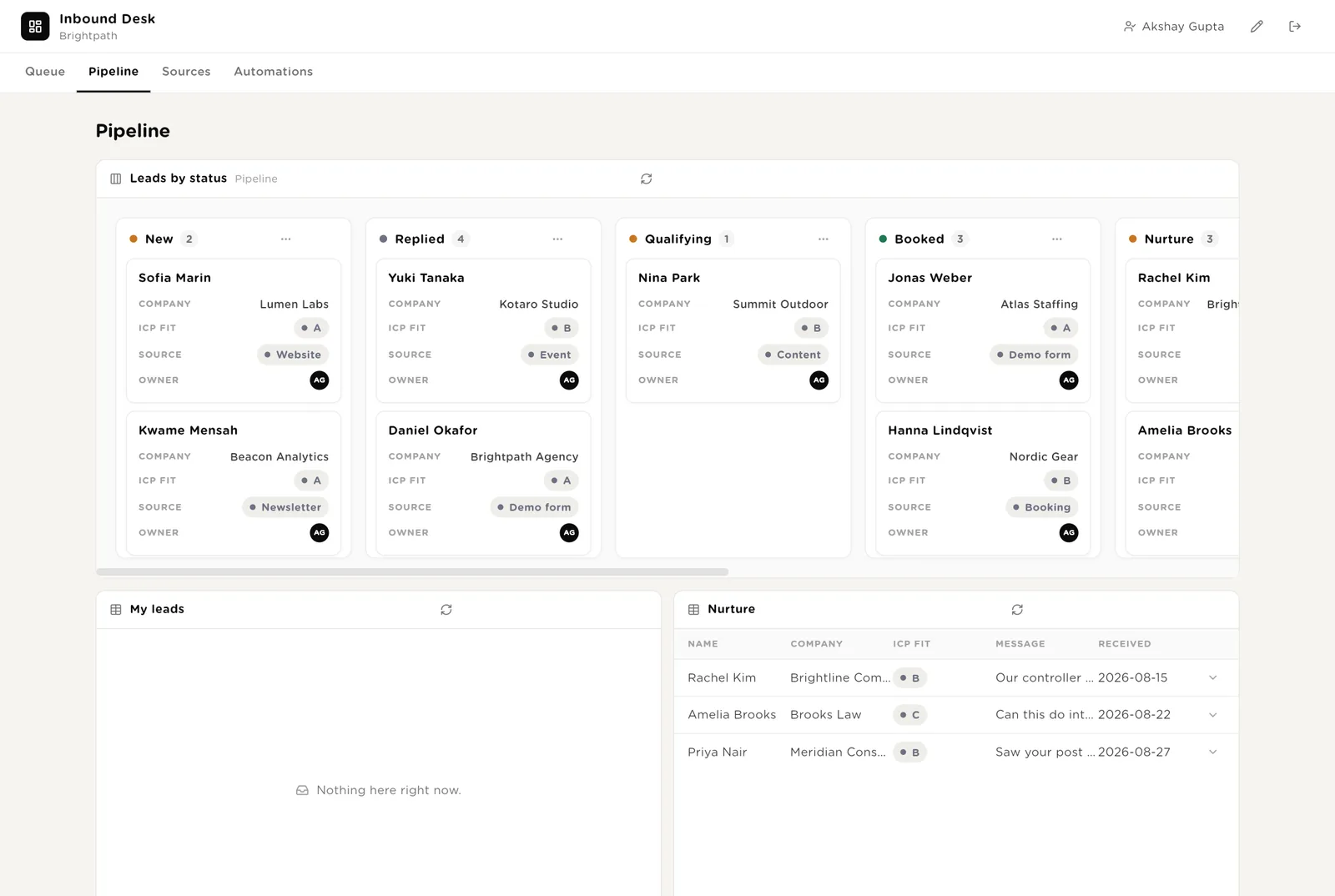
Every lead as a card by status: New, Replied, Qualifying, Booked, Nurture, Won, Lost. Your own leads. The leads in nurture with their next check-in.
A heat map of leads by source and fit. Leads by status. Each source with its monthly cost and how many booked. All demos.
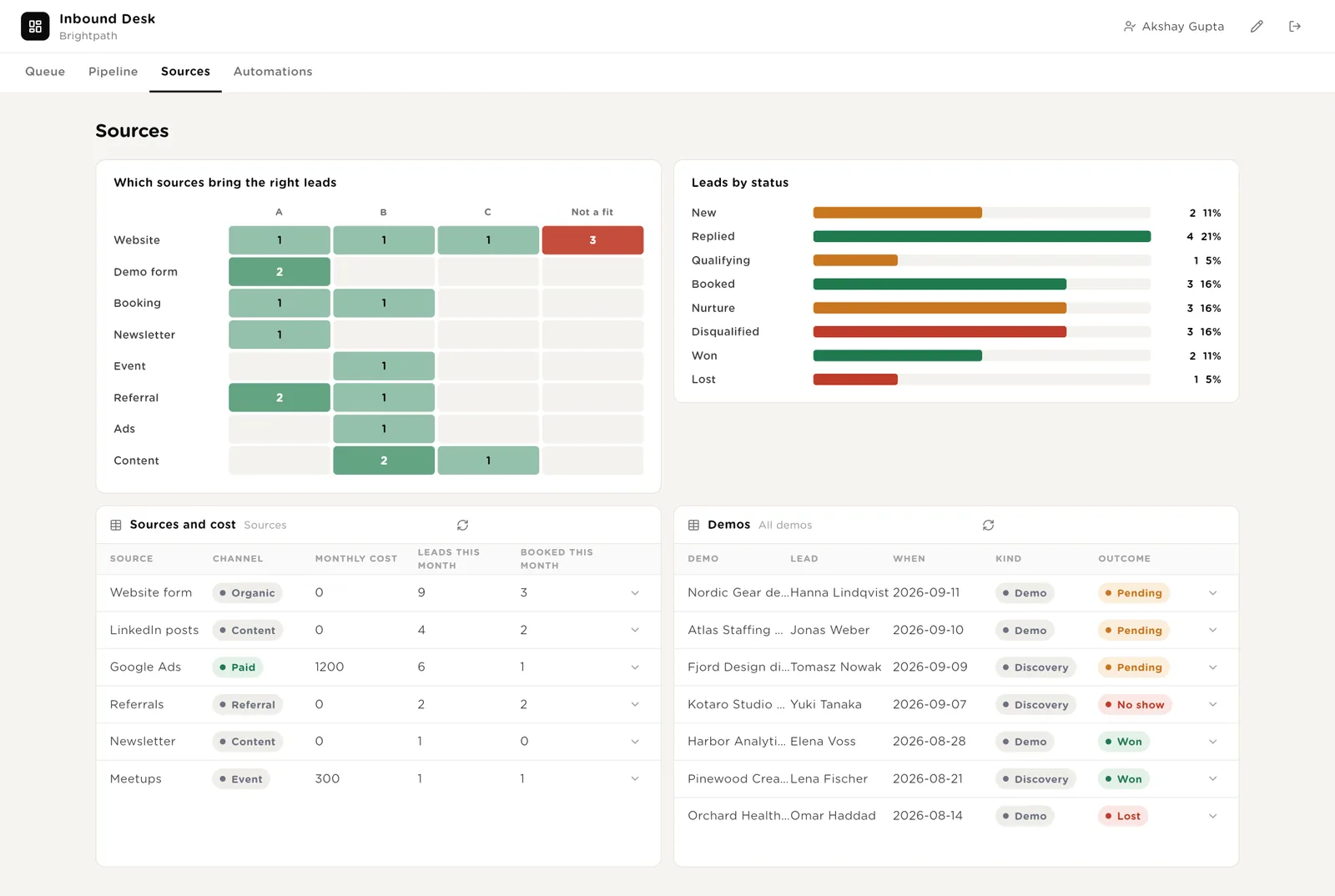
After a month it shows the truth: referrals are A-fit, ads are C-fit, the newsletter books.
Monthly cost next to leads and bookings. What to spend more on is on one screen.
Every automation with its switch. The pack's guard rails. Everything waiting for your Approve. The record of leads scored, replies sent and briefs written.
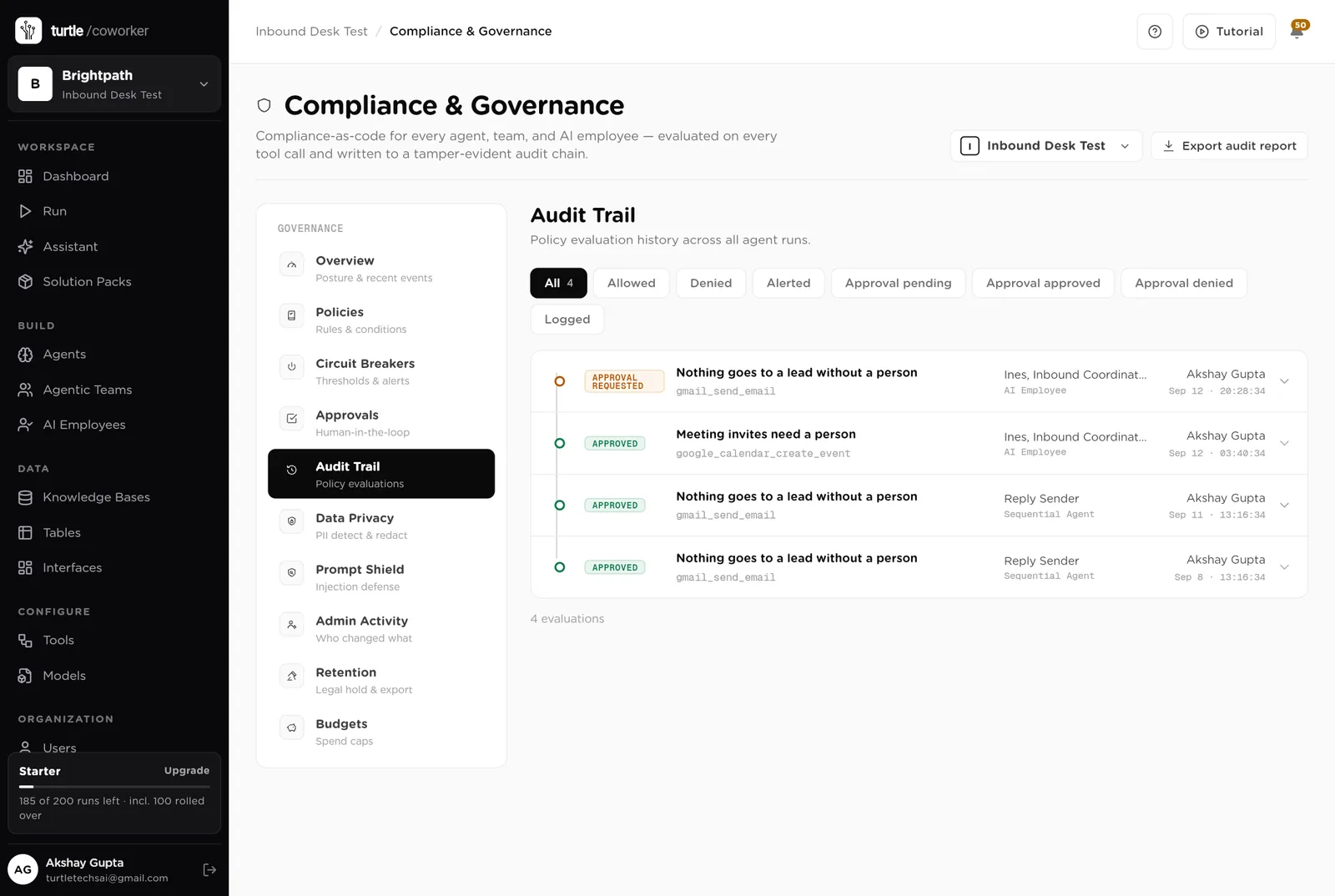
Every lead scored, every reply sent and every brief written, with duration and what it touched.
A public page with your company card, one sentence, and one short form. No login. A person reads every message and replies within the hour. It replaces the contact form that nobody answers.
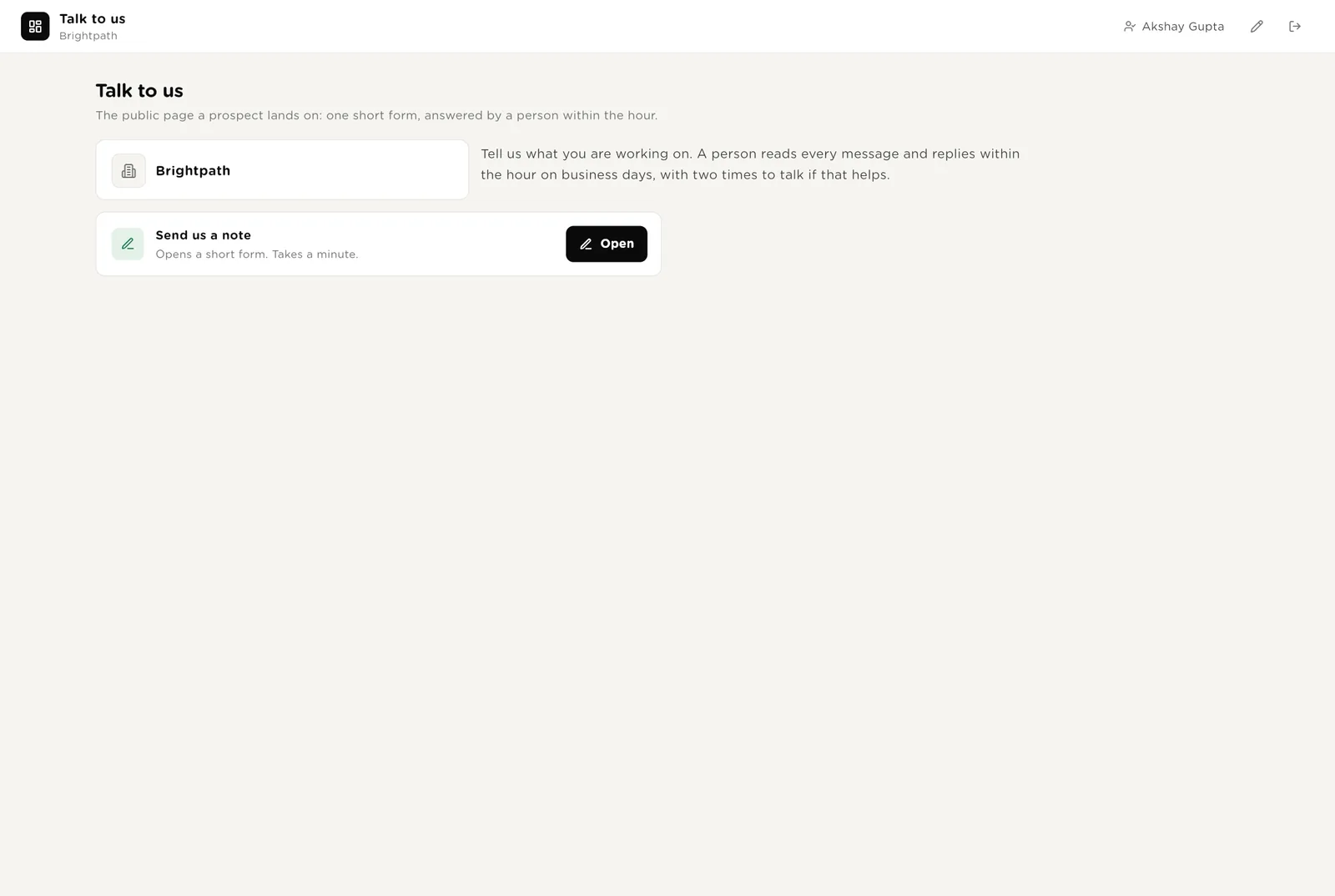
Name, email, company, what they are working on. Saving it creates the lead; the scorer runs within a minute; the reply is drafted for the owner.
A thank-you. Then a real reply from a real inbox, usually within the hour.
Most demos are logged when a lead books. When one is booked on a call, one short form adds it and the brief is written.
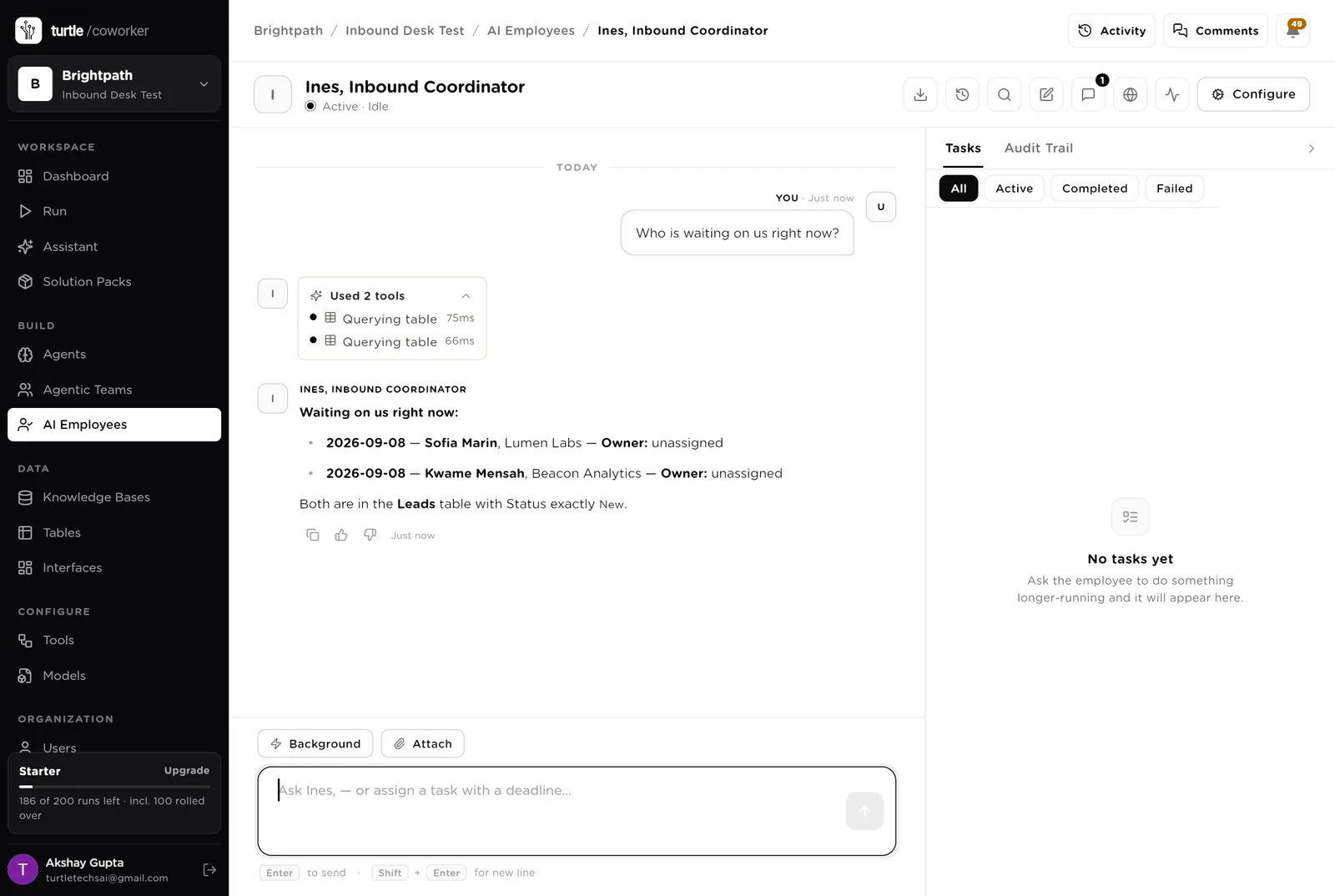
Ines is a software colleague you can chat with. Ines runs the morning list, knows which agent to use for what, and turns a sentence into a plan you approve before it runs. Ines never sends anything.
Every morning: the leads waiting on us, the drafts past their due date, the demos in the next two days, the leads in nurture due a check-in. Oldest first, with the owner. Tools: Gmail, Google Calendar, HubSpot, Turtle Notify.
You typed a question. Ines turned it into a short task and started reading the tables. Reading is allowed on its own; anything that sends or books stops for your approval.
An agent does one job. It starts when a lead arrives, on a schedule, or when Ines asks it. It reads your tables and your playbook, writes its result into the record, and stops. Only one agent ever sends, and only after a person approves.
When a lead arrives it looks up the company, scores the fit from your playbook (A, B, C, not a fit), picks the owner, and drafts the first reply with two time slots.
The only agent that sends. When you approve a follow-up, it sends exactly that subject and body from your Gmail, records it, and marks the lead Replied.
Every weekday morning it finds leads you replied to two days ago with nothing since, and drafts a short nudge. Never sends.
The jobs that get skipped when the week is busy.
When a demo is booked, it writes one page: what they asked, who they are, what we said, the likely objections, and the pack or plan to show.
When a lead's status changes, it creates or updates the contact, the company and the deal in your CRM. It never closes a record on its own.
Leads by source and fit, how fast you replied, demos booked and held, what went quiet, and which sources bring the leads that book.
Tables are where everything is stored. They look like spreadsheets and your team can open and edit them. Your CRM stays the record; the desk holds the working queue.
| Table | What is in it | Stages |
|---|---|---|
| Leads | Every inbound lead from every source, scored on arrival. | New → Replied → Qualifying → Booked → Won · Nurture · Disqualified · Lost |
| Follow-ups | Every message to a lead, drafted by the desk. | Drafted → Approved → Sent · Skipped · Bounced |
| Demos | Booked calls with their brief. | Pending · Held · No show · Rescheduled · Won · Lost |
| Sources | Where leads come from and what each source costs. | One row per source |
The software knows nothing about who is a fit except what the tables and your playbook tell it.
One document: who is a fit and who is not, how you reply, the slots you offer, and what you never promise. Every agent reads it. Replace the starter text with your own.
The desk uses whichever AI model your company has already connected. You do not choose or manage a model for each agent.
Scoring, sending and briefs run from day one. The chaser and the digest are off until you switch them on.
| Automation | Agent | When | Ships |
|---|---|---|---|
| Score and draft the first reply | Lead Scorer | The moment a lead arrives | On |
| Send an approved reply | Reply Sender | The moment you approve a follow-up | On |
| Write the demo brief | Demo Brief Writer | The moment a demo is booked | On |
| Keep the CRM in step | CRM Sync | The moment a status changes | On |
| Chase leads that went quiet | Go-quiet Chaser | Weekdays 09:00 | Off until you switch it on |
| Monday digest | Monday Digest | Monday 08:00 | Off until you switch it on |
Buttons on the desk run agents too. "Score again" runs the scorer for one lead.
Two things always need a person. The software stops and waits at each one.
Every reply leaves through Approve and send on the Queue page. You read the exact subject and body. It goes from your own Gmail. Skip means it never goes.
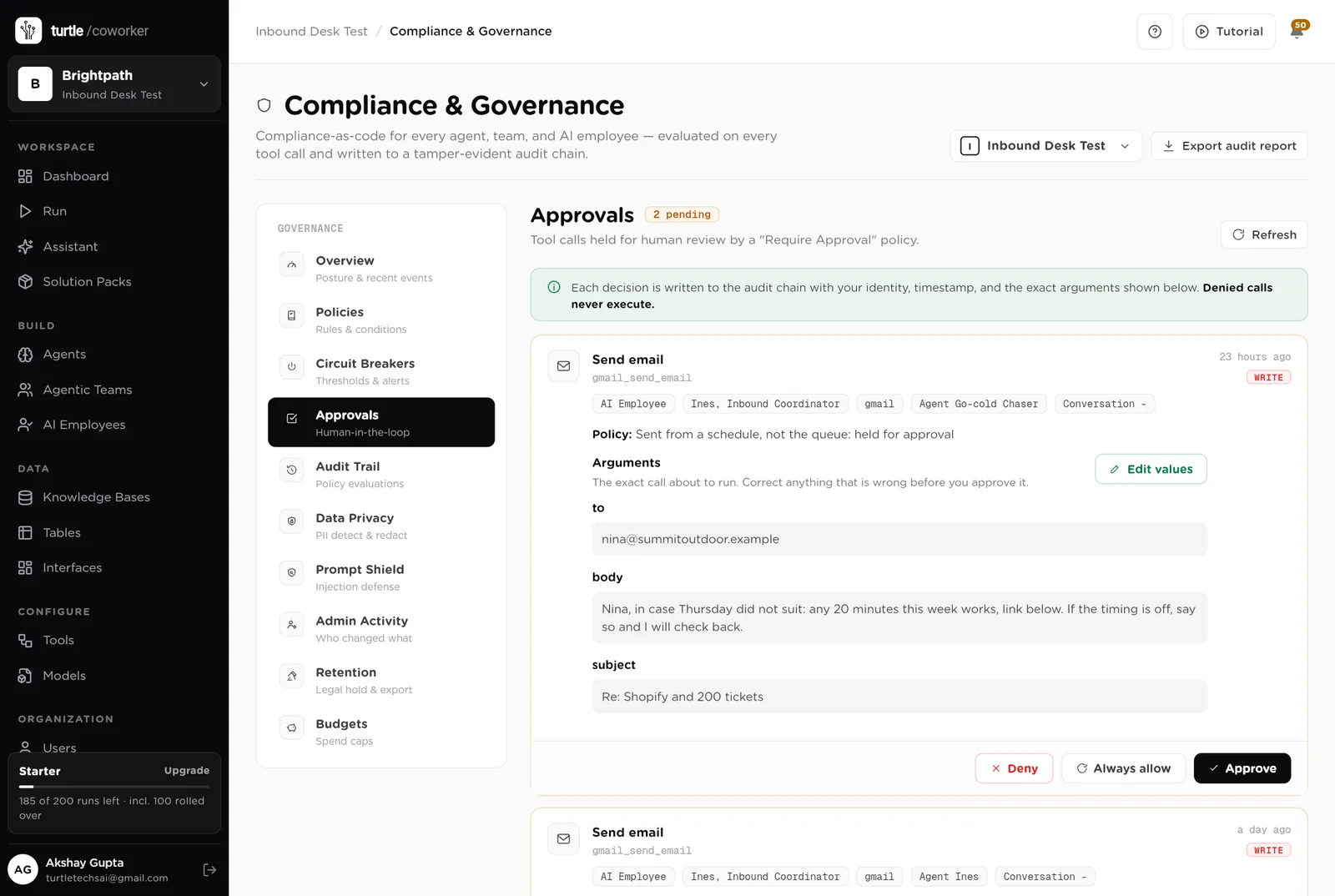
If an agent or Ines tries to send from a chat, a schedule or the API, or to create a calendar invite, it stops. The message appears in Approvals. You read it and click Approve or Deny.
When you give Ines a task, Ines writes a plan and shows it first. Approve and run, change it, or cancel.
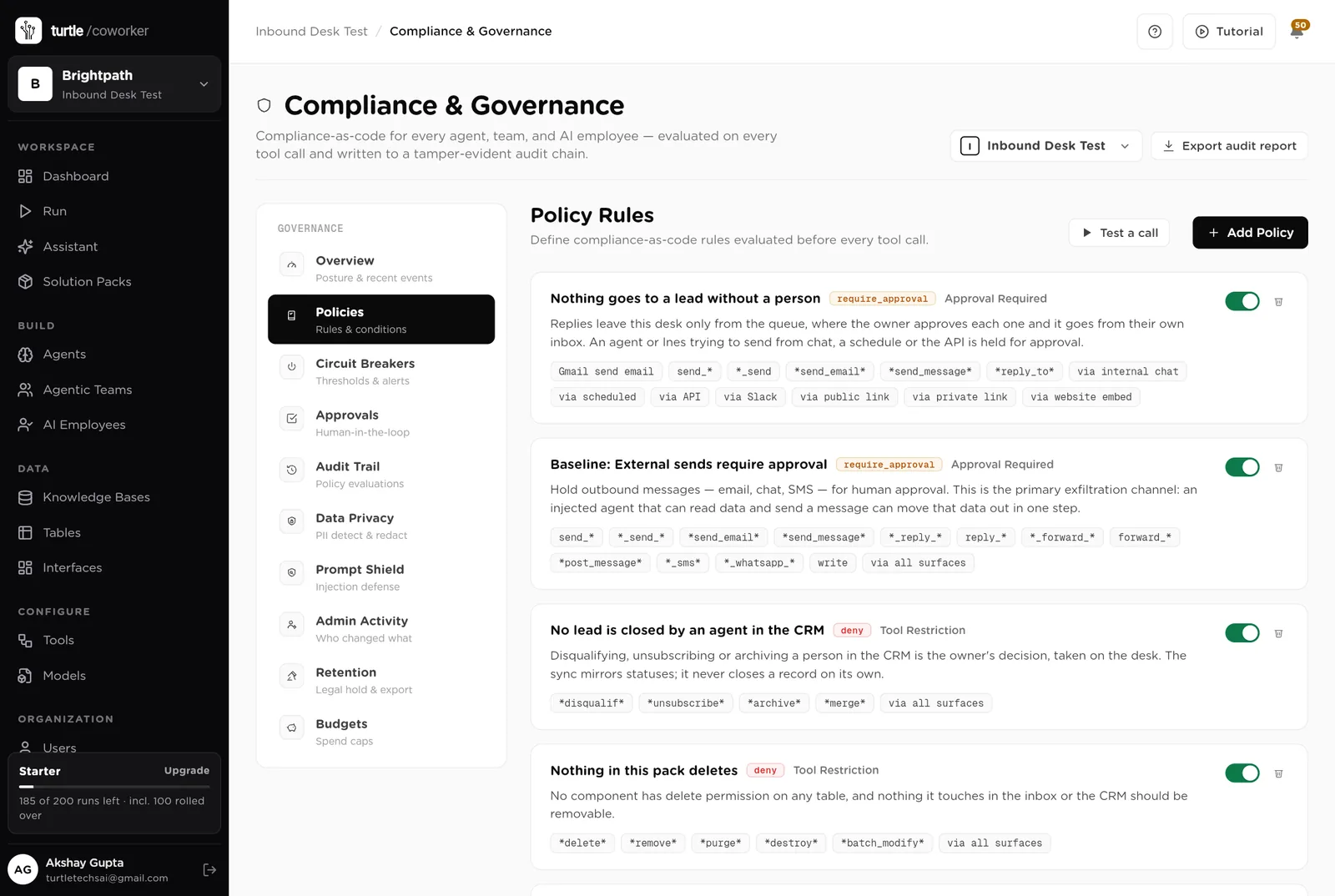
A rule is checked before every single thing the software tries to do. The pack installs five rules of its own on top of the standard ones every workspace starts with.
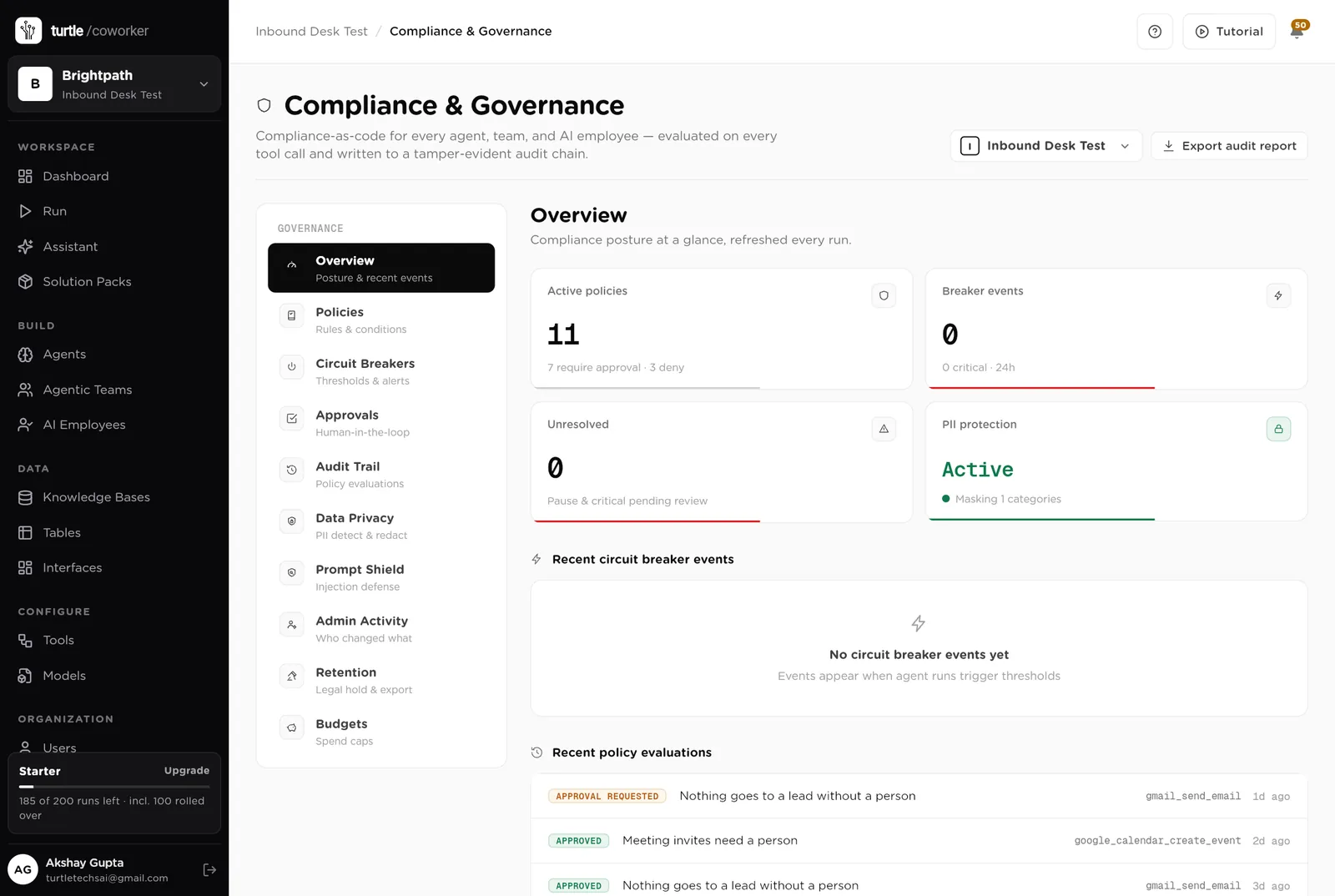
For every run you can see which agent ran, why it ran, every step it took, and every rule that checked it. Passwords and card numbers are blanked out before anything is stored.
A monthly budget with a warning level and a hard stop.
Lead details are masked in what the software reads and writes. Every key is encrypted.
Every reply is sent by a person from their own inbox to a verified address.
The desk is shared with the team. The public page shows nothing but the form. Only owners and admins change the layout.
These estimates assume 30 inbound leads a week, one owner per lead, and 4 demos a week. "Before" is the time by hand; "after" is the reading, approving and replying that is left. Your numbers will differ. These are estimates, not measurements; after a month the audit trail gives you real figures.
| Job | Assumption | Hours before | Hours after | What changes |
|---|---|---|---|---|
| Looking up and qualifying a lead | 10 min each, 30 a week | 5.0 | 1.0 | Company, size, fit and owner set within a minute. |
| Writing the first reply | 10 min each, 30 a week | 5.0 | 1.5 | Drafted with two slots; you read and send. |
| Chasing leads that went quiet | 2 h a week | 2.0 | 0.5 | Nudges drafted every morning. |
| Demo prep | 30 min each, 4 a week | 2.0 | 0.5 | The brief is written when the demo is booked. |
| CRM updates | 2 h a week | 2.0 | 0.0 | Synced on every status change. |
| Working out which sources work | 2 h a month | 0.5 | 0.0 | On the Sources page and in the Monday digest. |
| Total per week | 16.5 | 3.5 | About 13 hours a week back, and every lead answered within the hour instead of within the week. |
The lead that gets a reply in 40 minutes books. The one that waits three days does not.
Two quiet days and a nudge is drafted. Nurture leads get their check-in.
Cost, leads and bookings per source on one screen.
Estimates, not measurements. After a month the audit trail gives you real figures.
Installing takes one click. The real work is the playbook and pointing your forms at the desk.
Install the pack from the Solution Packs page. Connect Gmail, Google Calendar and your CRM when asked.
Replace the starter text: who is a fit, how you reply, the slots you offer.
Put the public "Talk to us" page on your website, or send your existing form's submissions into the Leads table.
Work from the Queue page each morning. Approve the replies you like, edit the rest. Switch on the chaser.
Read the Monday digest and spend on the sources that book.
You pay for the platform, not per desk. The plan sets how many agents, employees and workspaces you can run; every desk is included, and runs are billed on your own model key at cost. 6 agents in this desk count against the plan's agent limit.
See plansFor marketing teams of 1 to 10 people running email, forms, search and a little paid media
Sales and marketingFor founders and small marketing teams publishing in the founder's name
Sales and marketingFor founders and small sales teams selling to businesses
We use analytics cookies to see which pages help and which don’t. Nothing loads until you choose. Cookie Policy

Hello there.
AI agent. It can make mistakes, and a human reviews anything that matters.