Your company’s specialist teams.
Available to everyone.
Zero context lost.
Agentic Teams give every employee instant access to your company’s HR, Finance, IT, Legal, and Operations expertise — through Slack, Microsoft Teams, a web widget, or a shareable link. Each team controls its own knowledge. Every handoff preserves the full conversation. Nobody ever repeats themselves.
Your company’s expertise is locked inside people’s heads, inboxes, and documents nobody reads.
THE KNOWLEDGE ACCESS PROBLEM
The answer exists. Finding it takes half a day.
“An employee asks: ‘What’s our parental leave policy for employees who joined mid-year through an acquisition?’ The answer exists across three internal documents, an HR runbook, and a legal memo. But nobody knows where all of them are.”
Employee question
Email to HR
Day 1
HR redirects to Legal
Day 2
Legal redirects to Ops
Day 3
Answer
Total: 72 hours for a question that had a documented answer
2.5 hrs
Average time enterprise employees spend daily searching for information
McKinsey Global Institute
With an Agentic Team: instant, routed to the right specialist
THE CONTEXT LOSS PROBLEM
Every handoff, the conversation starts from zero.
“A customer contacts support about a billing discrepancy. They explain the issue to Agent 1 who escalates to Agent 2. Agent 2 asks them to repeat everything. Then they get transferred to Agent 3 who asks them to repeat it again. 47 minutes later, zero resolution.”
Today:
Agent 1
Context: 0%
Agent 2
Context: 0%
Agent 3
Context: 0%
With Agentic Teams:
Agent 1
Context: 100%
Agent 2
Context: 100%
Agent 3
Context: 100%
Every agent sees the full conversation history. Nobody ever asks “can you repeat that?”
THE ACCESS CONTROL PROBLEM
Your most sensitive knowledge needs the right guardrails.
“Finance has runbooks with vendor payment terms and budget allocations. HR has executive compensation data and performance reviews. Legal has pending litigation details and contract terms. IT has security protocols and infrastructure access credentials. All of this knowledge needs to be accessible to the right people — and only the right people.”
Too Open
Everyone sees everything
Too Closed
Only 2 people have access
Agentic Teams
Each team has its own permissioned knowledge base. The right people access the right team.
Agentic Teams solve all three — by making company knowledge conversational, contextual, and permissioned at the team level.
Not a chatbot. A coordinated team of specialists with a shared memory.
SUPERVISOR AGENT
Routes · Decides · Tracks · Escalates
Billing Support Agent
Tools: HubSpot
Technical Support Agent
Tools: Asana, Google Docs
Account Management Agent
Tools: HubSpot, Google Sheets
SHARED CONVERSATION HISTORY
INTELLIGENT ROUTING — NOT KEYWORD MATCHING
The Supervisor understands context and intent. “I need help with my account” routes to Account Management. “The API is returning a 403” routes to Technical Support. Right specialist, every time, automatically.
SHARED CONTEXT — ZERO REPETITION
Every agent on the team sees the full conversation history from the start. When Technical Support picks up from Billing, it already knows everything. No summaries. No repetition. Full continuity across every handoff.
DECISION AUDIT TRAIL — FULL TRANSPARENCY
The Supervisor logs every routing decision and why it was made. Which agent handled what. What tools were called. What was returned. Full traceability for every conversation.
PERMISSIONED KNOWLEDGE — BY TEAM, BY GROUP
Each team accesses only its own knowledge bases. Your HR Team has HR policies. Your Finance Team has financial procedures. Share teams with specific user groups — employees only see the teams they’re authorised to access.
PRODUCTION ERROR HANDLING — NOT FRAGILE DEMOS
Tool fails? Tries an alternate. No confident answer? Escalates to human. Conflicting responses? Supervisor decides. Timeout? Notifies user and offers escalation path. Built for production — not just demonstrations.
An intelligence layer you configure and control.
Every Agentic Team has a Supervisor Agent at its center. This is not fixed system logic — it’s a fully configurable orchestration layer. You write the routing instructions in plain language. You decide how specialists are used. You control what the team knows and what it can do.
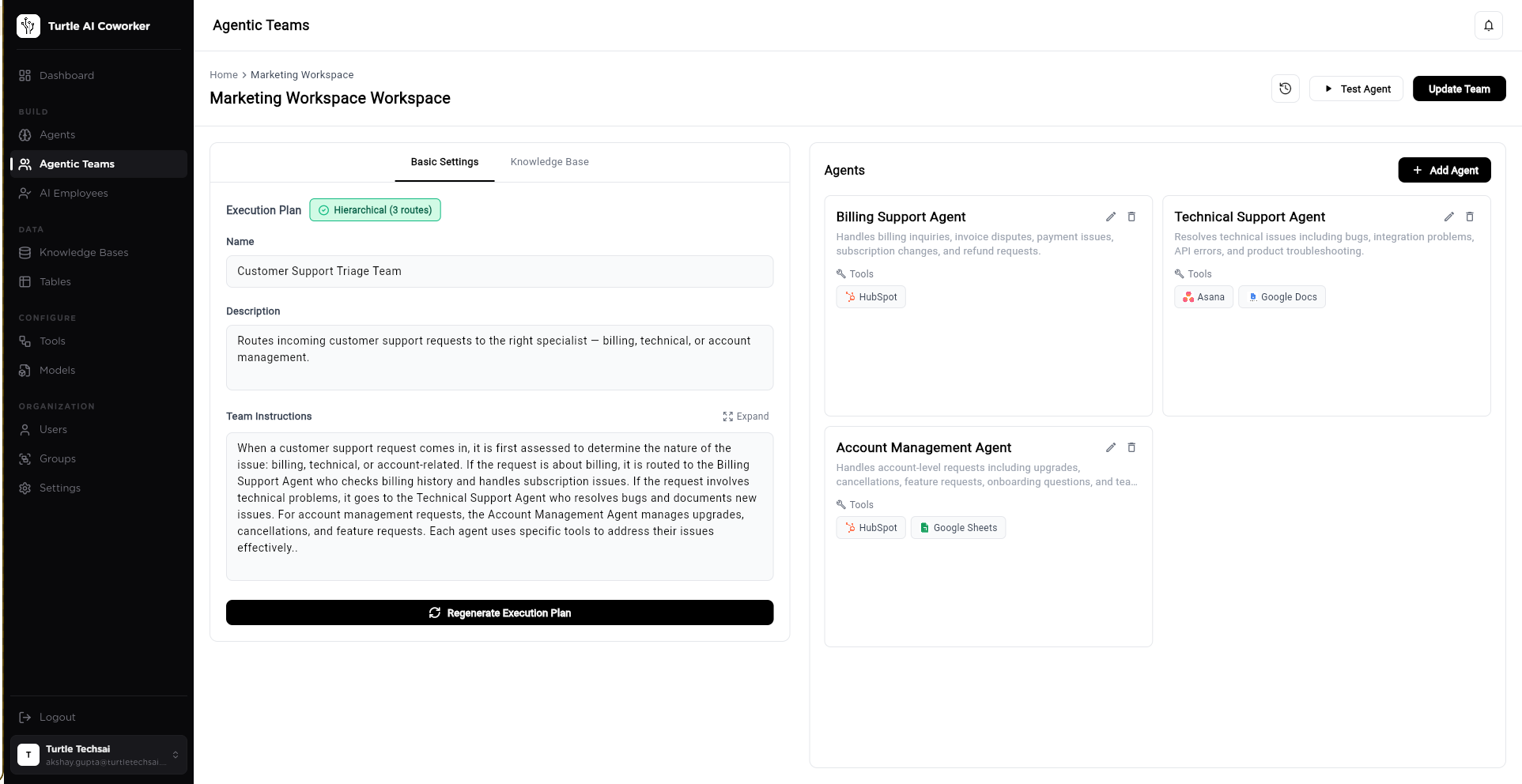
→ Execution plan auto-generated from your team configuration. Regenerate any time as your team evolves.
→ You write routing logic in plain language — exactly how you’d brief a team coordinator. The Supervisor uses this to make every routing decision.
→ Each specialist is a fully independent agent — its own role, its own tools, its own knowledge base, its own table access. The team is the coordination layer above them.
SMART ROUTING
For real-time support and Q&A
Supervisor analyzes each message, picks the best-qualified specialist, and routes directly. The right expert answers. Other agents remain context-aware and can contribute. Ideal for customer support, internal helpdesks, HR queries.
PIPELINE ROUTING
For complex analysis that builds layer by layer
Message flows through Agent 1 → Agent 2 → Agent 3 in defined order. Each agent builds on the previous one’s output. Ideal for research pipelines, due diligence workflows, multi-stage analysis tasks.
Each specialist is a true domain expert. Configured in four steps.
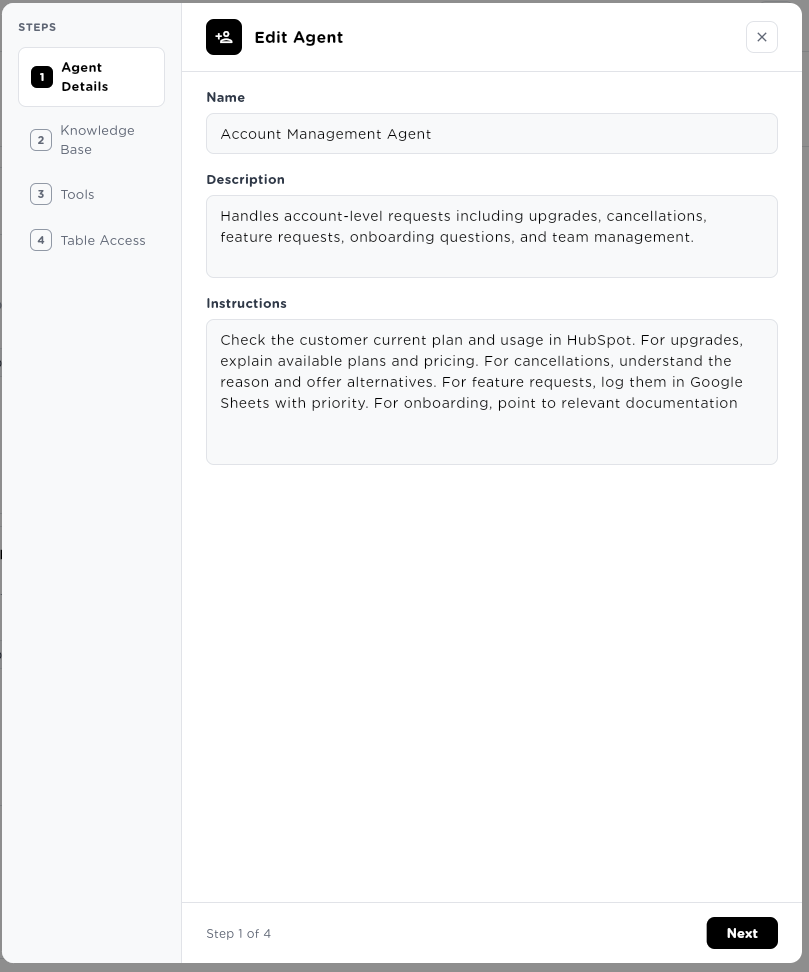
Every agent inside a team has its own identity, its own knowledge, its own tools, and its own data access. This is what makes each specialist genuinely capable — not just a different name on the same chatbot.
Write the agent’s role and instructions in plain language — exactly how you’d brief a domain expert joining your team. “You handle billing inquiries, invoice disputes, payment issues, and subscription changes. For upgrades, explain available plans. For cancellations, understand the reason and offer alternatives. Log all feature requests to Google Sheets with priority level.” The more specific the instructions, the more expert the output.
Connect any knowledge bases this specialist should reference. The Billing Agent gets access to pricing documents and invoice procedures. The Legal Agent gets SA-LEGAL-001 through SA-LEGAL-004. The Technical Agent gets product documentation and API references. Each specialist operates from its own curated knowledge — not a shared pool that anyone can query.
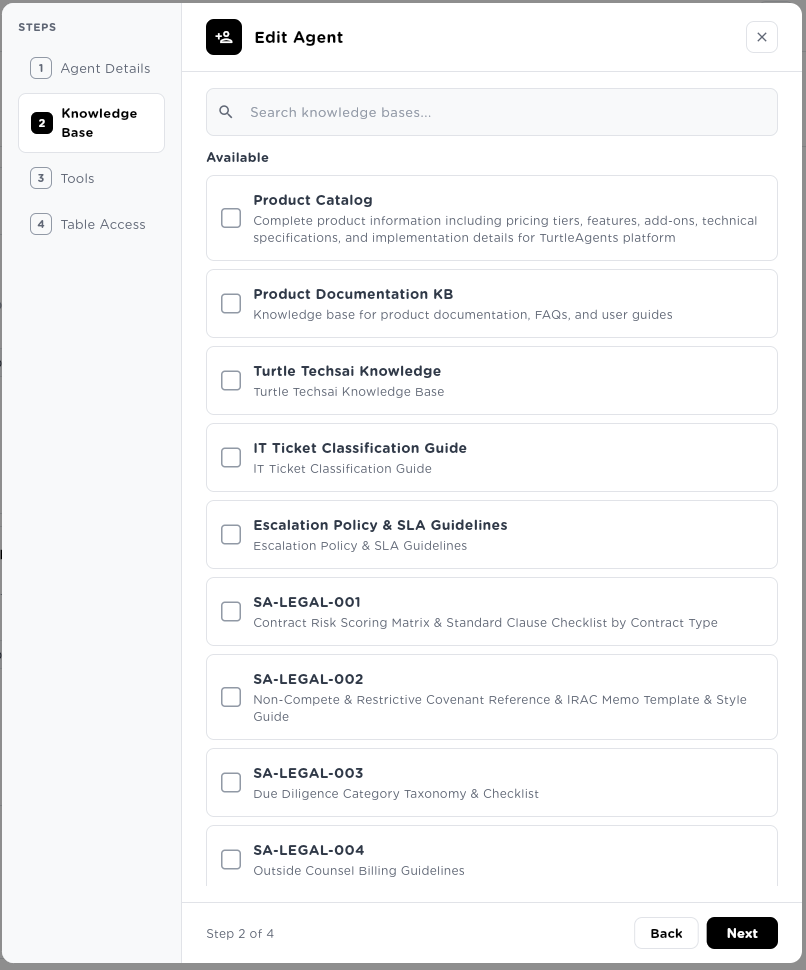
Notice: Legal knowledge bases (SA-LEGAL-001, SA-LEGAL-002, SA-LEGAL-003…) are available to connect — but only to the agents you authorise. Your legal team’s knowledge stays within the Legal Team. Permissioned by design.
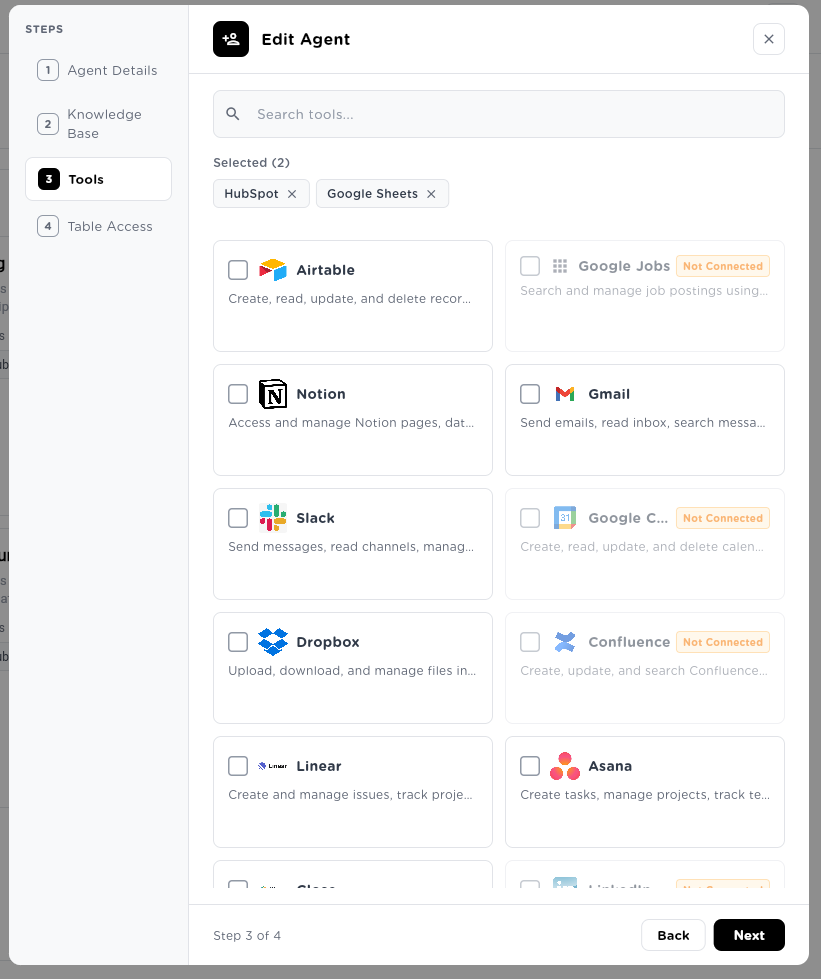
Each agent connects to the tools relevant to its function. The Account Management Agent uses HubSpot to look up customer records and Google Sheets to log feature requests. The Technical Support Agent uses Asana for ticket tracking and Google Docs for documentation. Tools are agent-specific — not shared across the whole team.
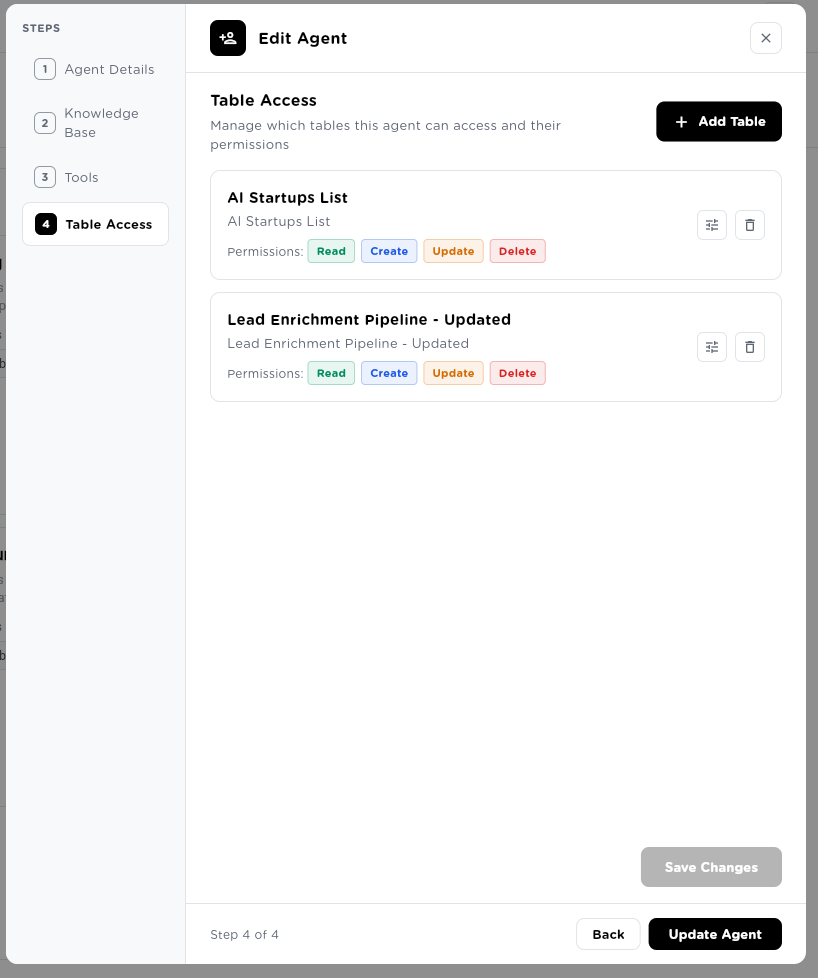
Grant granular table permissions per agent. The Account Management Agent can Read and Create records in the AI Startups List — but cannot delete them. Full Create/Update/Delete access to the Lead Enrichment Pipeline. Each permission is explicit, intentional, and auditable. Your agents only touch data they’re authorised to touch.
Deploy a specialist team for every department. Access controlled by group.
Different departments have different knowledge, different needs, and different access requirements. Agentic Teams lets you build a dedicated specialist team for each — and control exactly who in your organization can access which team.
INTERNAL TEAMS DIRECTORY
Access controlled by user groups
Team & Agents
Access Group
Knowledge
Channels
HR & People Team
HR Specialist · Payroll · Benefits · Policy Expert
Employee handbook, leave policies, benefits guide
Slack #hr-help · Web Chat
HR & People Team
HR Specialist · Payroll · Benefits · Policy Expert
Knowledge
Employee handbook, leave policies, benefits guide
Channels
Slack #hr-help · Web Chat
IT Helpdesk Team
Tier 1 Support · Software · Hardware · Security Advisor
IT runbooks, SLA guidelines, ticket classification
Slack #it-helpdesk · MS Teams
IT Helpdesk Team
Tier 1 Support · Software · Hardware · Security Advisor
Knowledge
IT runbooks, SLA guidelines, ticket classification
Channels
Slack #it-helpdesk · MS Teams
Finance & Operations
Invoice Specialist · Expense Analyst · Compliance Expert
Finance procedures, approval workflows, tax guides
Slack #finance-ops · API
Finance & Operations
Invoice Specialist · Expense Analyst · Compliance Expert
Knowledge
Finance procedures, approval workflows, tax guides
Channels
Slack #finance-ops · API
Legal & Compliance
Contract Reviewer · IP Specialist · Employment Law Expert
SA-LEGAL-001 through SA-LEGAL-004, outside counsel
Private link · MS Teams
Legal & Compliance
Contract Reviewer · IP Specialist · Employment Law Expert
Knowledge
SA-LEGAL-001 through SA-LEGAL-004, outside counsel
Channels
Private link · MS Teams
Sales Intelligence
Lead Research · Account Intel · Competitive Analysis
Sales playbook, ICP criteria, competitor docs
Slack #sales-team · API
Sales Intelligence
Lead Research · Account Intel · Competitive Analysis
Knowledge
Sales playbook, ICP criteria, competitor docs
Channels
Slack #sales-team · API
QUERY ENTERPRISE DATA CONVERSATIONALLY
Your employees don’t need to open 6 systems to get an answer. They ask the team. The team queries the right knowledge bases, looks up the right tables, calls the right tools — and returns a single, accurate, cited answer.
ACCESS CONTROLLED BY GROUP
Create user groups: Finance-Group, Legal-Group, All-Employees. Assign teams to groups. Users only see the teams they’re authorised to access. The HR Team is available to all employees. The Legal Team is restricted to Legal and Executive groups. Built-in access governance — no IT tickets required.
SHARED VIA LINK OR CHANNEL
Share a team internally via a private link that only authenticated users can access. Or deploy directly to Slack and MS Teams channels. Employees interact from where they already work — no new app to download or learn.
The same team. Now facing your customers.
Every Agentic Team can be deployed externally — embedded on your website, shared via a public or private link, or connected to WhatsApp. Same specialist quality. Same zero-context-loss. Now for your customers.
Embeddable Web Widget
Drop a single script tag on your website or product. Your Customer Support Team appears as a chat widget — fully branded, always available, routing to the right specialist automatically.
<script src="turtle.ai/embed/team-abc123"></script>Public Shareable Link
Generate a public link to your team. Share it anywhere — email signature, help center, QR code on packaging. Anyone with the link can start a conversation immediately.
turtle.ai/t/customer-support-team
Private / Password-Protected Link
Generate a private link for partners, contractors, or premium customers. Optionally add password protection or set a link expiry date. Control who accesses the team without requiring platform accounts.
API / Webhooks
Integrate the team programmatically into your product, your CRM, or your support platform. Full REST API. Webhook notifications on conversation events. Build custom interfaces on top of your team.
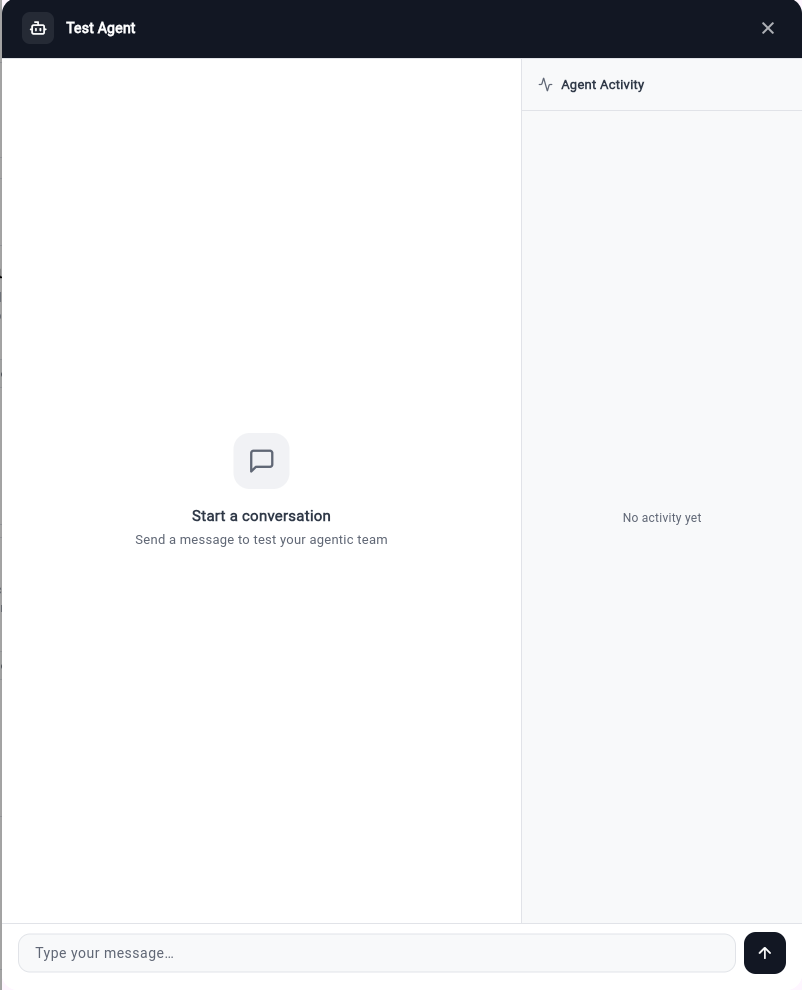
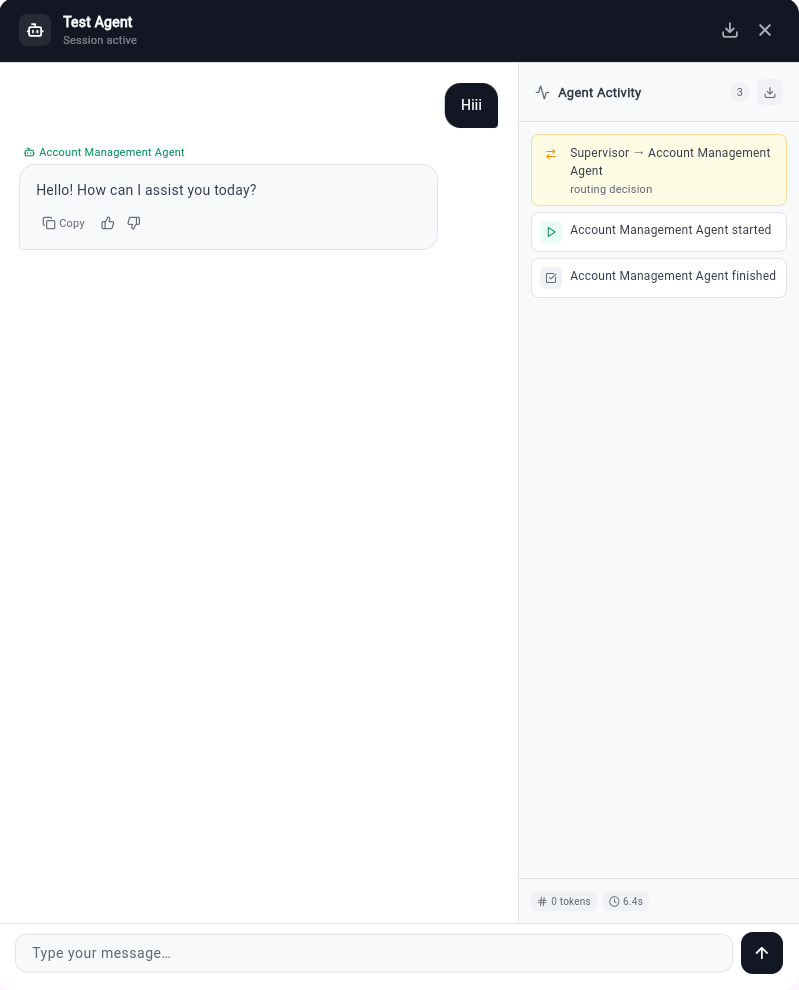
The test interface shows exactly what your customers will see — a clean chat, with the right specialist responding, and full agent activity logged on the right.
Build a specialist team for any function.
Every team has the same structure — a Supervisor, specialists, shared knowledge, and channel deployment. The configuration makes each one unique.
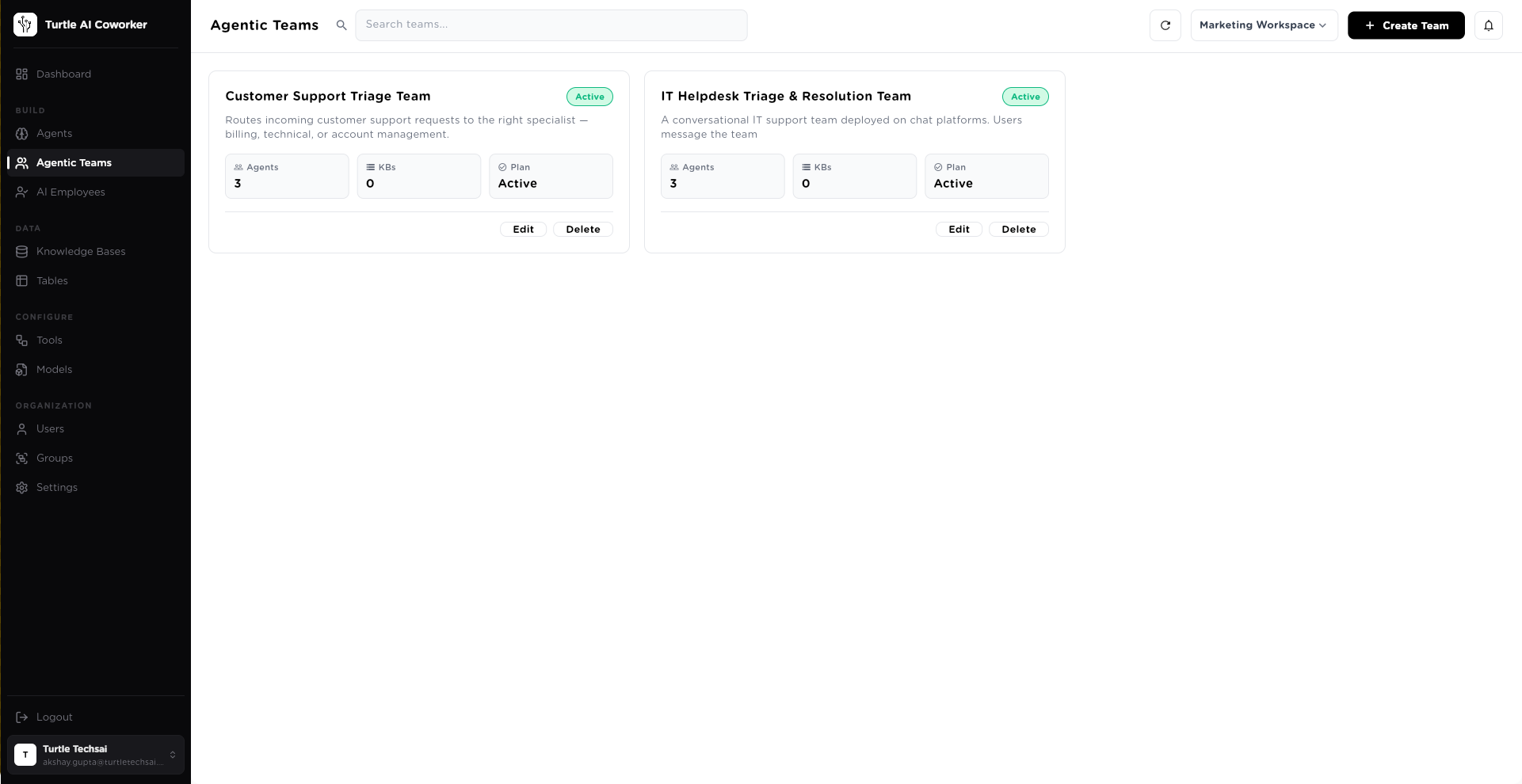
Customer Support Triage Team
External · Customer-FacingBilling Support · Technical Support · Account Management
Product Catalog · Product Docs · Escalation Policy
Web Widget · Slack · MS Teams
65% of Tier-1 tickets resolved without human escalation
IT Helpdesk Team
Internal · All EmployeesTier 1 Support · Software Specialist · Hardware Support · Security Advisor
IT Runbooks · SLA Guidelines · Ticket Classification Guide
Slack #it-helpdesk · MS Teams · Private Link
Password resets and access requests handled automatically
HR & People Team
Internal · All EmployeesHR Policy Expert · Benefits Advisor · Payroll Specialist · Onboarding Guide
Employee Handbook · Benefits Guide · Leave Policies · Onboarding Checklist
Slack #hr-help · Web Chat · Private Link
80% of HR queries answered instantly, without waiting for a team member
Legal & Compliance Team
Internal · Legal + Exec OnlyContract Reviewer · Employment Law Expert · IP Specialist · Outside Counsel Liaison
SA-LEGAL-001 · SA-LEGAL-002 · SA-LEGAL-003 · SA-LEGAL-004 · Outside Counsel Billing Guidelines
Private Link (auth required) · MS Teams
First-pass contract review in under 10 minutes
Sales Intelligence Team
Internal · Sales GroupLead Research Agent · Account Intel Specialist · Competitive Analyst · Proposal Writer
Sales Playbook · ICP Criteria · Competitor KB
Slack #sales-team · API
Pre-meeting research brief delivered in 3 minutes
Customer Onboarding Team
External · New CustomersOnboarding Guide · Technical Setup Agent · Integration Specialist · Success Advisor
Product Docs · Integration Guides · FAQs
Web Widget · Email · WhatsApp
Time-to-first-value reduced by 60% for new customers
Every conversation. Every routing decision. Every agent action. Fully logged.
Sessions List
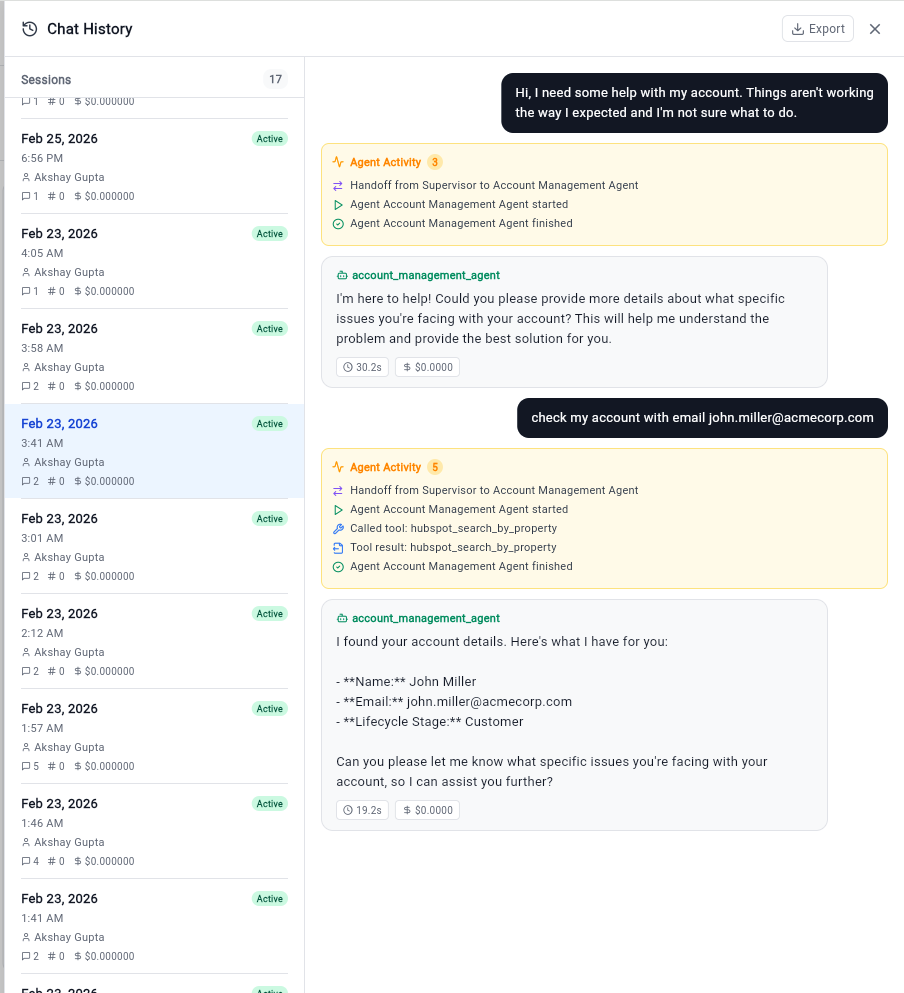
17 sessions logged. Every conversation stored with timestamp, user, message count, and cost. Searchable, exportable, reviewable.
Agent Activity Trail
Every routing decision logged in real time: Handoff from Supervisor → which agent · Agent started · Tool called · Tool result · Agent finished. Full decision transparency.
Live Tool Call Results
The agent found John Miller’s account in HubSpot — Name, Email, Lifecycle Stage — and returned it contextually. This is the tool call result, visible in the activity log.
ROUTING DECISIONS LOGGED
Every time the Supervisor routes a message — which agent it chose and why — is logged and reviewable. No black box routing.
TOOL CALLS TRACKED
Every external tool call (HubSpot lookup, Asana task creation, Google Sheets write) is logged with the tool name, input, and result. Full data access audit trail.
COST PER SESSION
Every conversation session tracks token usage and cost. Understand which teams are most active, which specialists are called most, and what each department’s AI support actually costs.
Deploy once. Available everywhere your employees and customers already are.
Web Chat Widget
Embeddable on any website or product. Script tag deployment. Fully customizable appearance.
Slack
Deploy to any Slack channel. Mention-based routing. Works across workspaces.
Microsoft Teams
Native Teams app integration. Rich adaptive card responses. Works inside existing org channels.
Shareable Link
Public, private, or password-protected. Time-limited access. Share anywhere — email, QR code, help center.
API / Webhooks
Full REST API access. Webhook notifications. Build custom interfaces on top.
Deploy customer-facing teams to WhatsApp. Especially powerful for B2C support scenarios.
Email / Voice / Google Meet
Additional deployment surfaces for enterprise scenarios. Contact for availability.
Which team should your employees never have to wait for?
HR answers. IT support. Finance guidance. Legal queries. Build the first team in under an hour. Deploy to Slack the same day.
Access controlled by group · Full conversation history · Deployed to Slack and MS Teams same day