Your business data.
Your AI agents.
Finally in the same place.
Tables is the structured data layer built into Turtle AI Coworker. Store your leads, deals, tickets, candidates, and operations data natively — then have AI agents enrich every row automatically, trigger on any data event, and write results back in real time. No Airtable. No Zapier. No sync issues.
Your data is in 5 places. Your AI is in a 6th.
Nothing talks to anything.
THE FRAGMENTATION PROBLEM
You’re already paying for tools that don’t connect.
Google Sheets
Zapier
Airtable
HubSpot
CSV Export
Manual Paste
AI Tool (isolated)
The average enterprise ops team manages 4.3 data tools that don’t natively talk to each other.
3.2 hrs/week
per person spent on manual data syncing
~$840/month
average cost of Airtable + Zapier + enrichment tools
48 hrs
average delay between data arriving and AI acting on it
THE AI-DATA GAP
Your AI tools can’t see your data. Your data tools can’t run AI.
“A new lead fills out a form. You export it from HubSpot, paste it into a Google Sheet, run an enrichment API in a separate tab, copy the result into another spreadsheet, ask ChatGPT to qualify it, then manually paste the answer back into the CRM. Six steps. Four manual. Four hours before anyone responds.”
Current State:
Form
CRM
Export
Enrichment
Import
AI
Response
Steps: 6 | Time: 4+ hours | Manual: 4
With Tables:
Form
Table (row created)
Agent fires
Done
Steps: 2 | Time: 2 minutes | Manual: 0
THE PERMISSIONS PROBLEM
Your data has no guardrails.
“Your Lead Research Agent only needs to read company data — it should never modify or delete records. Your external form should create rows but never see existing ones. Your Finance AI shouldn’t touch the sales pipeline at all. But your current setup? Every tool with the API key gets full access to everything.”
| Role | Read | Create | Update | Delete |
|---|---|---|---|---|
| Lead Research Agent | ||||
| Sales AI Employee | ||||
| Finance AI Employee | ||||
| External Form User |
Tables lets you assign granular read/create/update/delete permissions per agent, per employee, per external user.
Tables solves all three by making your data, your AI, and your automation the same thing — natively.
A spreadsheet with a brain.
Your data layer with AI built in.
| Imported Columns | AI-Enriched Columns | ||||||
|---|---|---|---|---|---|---|---|
| Company Name | Contact Email | Website | Notes | Industry ✦ | Company Size ✦ | Lead Score ✦ | AI Summary ✦ |
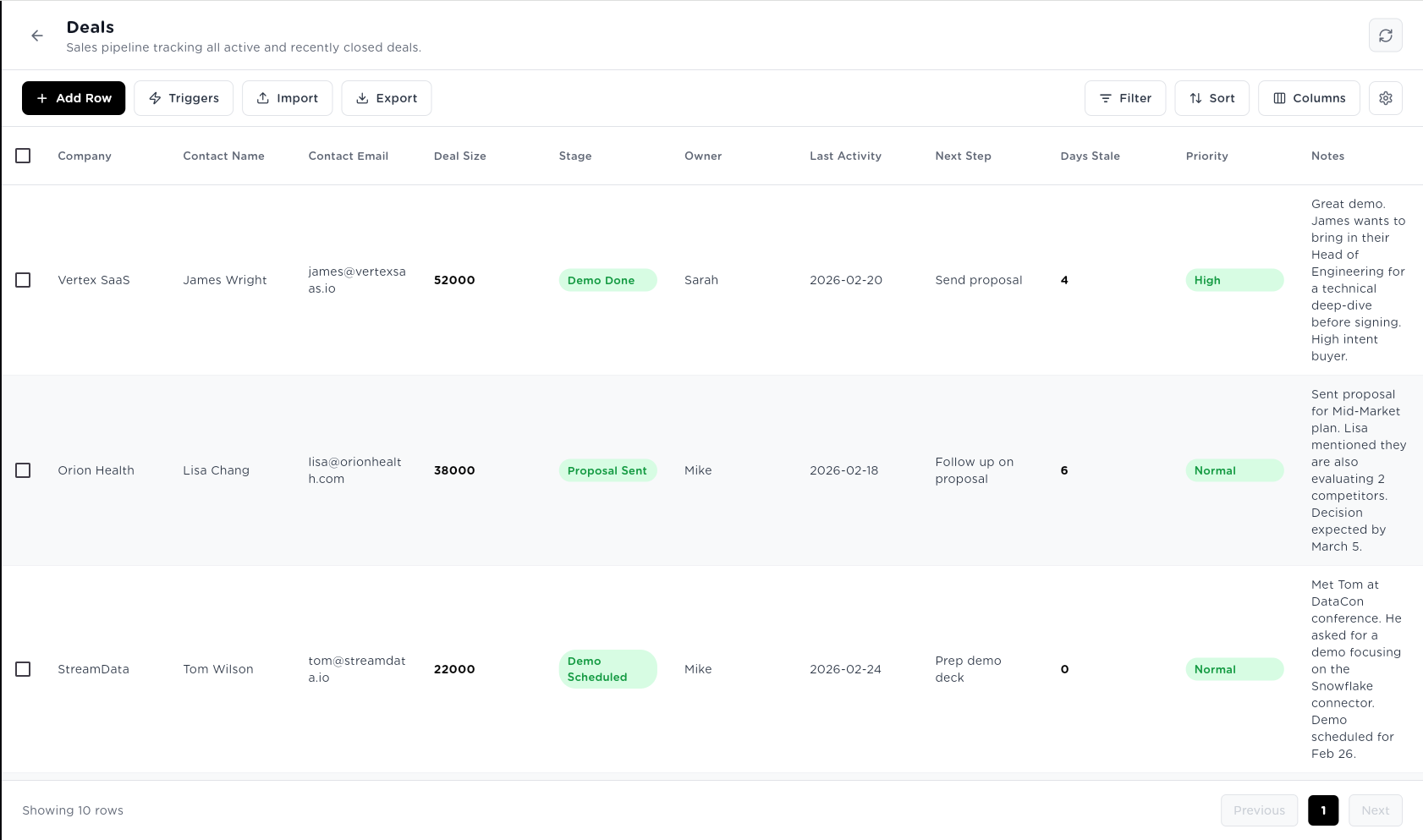
| Vertex SaaS | james@vertexsaas.io | vertexsaas.io | Met at DataCon... | SaaS | 280 employees | 87 | Series B company, hiring aggressively in sales... |
You bring the data. AI fills in the intelligence. Every row. Automatically. In real time.
YOUR DATA LAYER
Store everything natively — leads, deals, tickets, candidates, invoices, inventory, content. Import from CSV, Google Sheets, databases, REST APIs, or webhooks. Or capture it directly with the built-in form builder. Your data stays inside the platform — no exports, no external databases, no sync jobs.
YOUR AI ENRICHMENT LAYER
Add AI-enriched columns to any table. Classify rows automatically. Score records against criteria you define. Extract structured data from messy text fields. Generate summaries, recommendations, and analysis for every row. The columns fill themselves — powered by whichever LLM you configure.
YOUR AUTOMATION TRIGGER LAYER
Connect tables to agents. When a new row is created, an agent fires automatically. When a field changes, an agent recalculates. On a schedule, an agent runs across all rows. On a condition, an agent triggers. Tables are the event source for your entire AI workforce.
Columns that fill themselves.
Powered by your agents.
This is what makes Tables different from every other spreadsheet tool. Add an AI-enriched column — define what you want it to do in plain language — and it populates automatically for every existing row and every new row that comes in.
TEXT GENERATION
Summaries, descriptions, recommendations, personalised messages based on row data
Hi James, saw Vertex SaaS just closed Series B — congrats on the growth. With 40 new sales reps joining, qualifying inbound leads becomes the critical bottleneck...
CLASSIFICATION
Automatically categorise rows — industry, sentiment, intent, topic, status, priority
SaaS / HIGH — pricing page visited 3x, demo requested
SCORING
Numeric scores based on defined criteria — ICP fit, lead quality, risk level, engagement
87 / 100
Scored against: company size, funding stage, tech stack, engagement signals
EXTRACTION
Pull structured data from unstructured text — names, numbers, dates, entities
$52,000
Extracted from notes: 'James mentioned budget is around $50-55k for the annual contract'
TRANSLATION
Multilingual conversion for any text column — for global teams
Gran demo. James quiere traer a su Director de Ingeniería para una revisión técnica...
ANALYSIS
Insights, patterns, risk flags, recommendations based on the full row context
⚠ MEDIUM RISK — Orion Health evaluating 2 competitors, decision deadline March 5. Recommend accelerating proposal timeline.
These columns don’t exist in your CRM. They’re AI analysis that runs automatically on every deal — informed by everything in the row.
Your table is not a static spreadsheet.
It’s a live event source.
Connect any agent to any trigger on any table. When your data changes, your agents act — automatically, immediately, without manual intervention.
ROW CREATED
New data arrives → Agent fires instantly
The moment a new row enters your table — from a form submission, webhook, import, or manual entry — a connected agent runs automatically. Zero delay between data arriving and AI acting on it.
FIELD CHANGED
A value changes → Agent recalculates
Watch a specific column for changes. When Company Size updates, recalculate Lead Score. When a deal moves to ‘Proposal Sent’, trigger the follow-up sequence agent.
SCHEDULED (CRON)
Every morning at 9 AM → Agent runs
Run agents across all rows on a recurring basis. Every morning, generate deal summaries. Every Sunday, update competitive intelligence. Configured with a simple cron expression.
CONDITION MET
When your data hits a threshold → Agent acts
Define a rule. When a row meets the condition, the agent fires. Lead Score drops below 40? Trigger re-nurture. Deal stale for 7 days? Alert account executive.
All 4 triggers working together on a single lead pipeline
NEW LEAD FORM SUBMITTED
Row Created trigger
Lead Qualifier Agent runs in 32 seconds
AI columns populate: Industry, Score, Summary
Score: 87 — HIGH PRIORITY
Field Changed trigger — Score column
Sales Sequence Agent fires
Personalised email drafted
Scheduled trigger — 9AM daily
Deal Assistant reviews all active deals
Condition trigger — deal stale >7 days
Revival Agent fires
One table. Four trigger types. A fully automated lead pipeline — from first touch to closed deal.
Every agent you build reads from tables.
Every agent you run writes back to them.
Tables aren’t just data storage. They’re the shared memory layer for your entire AI workforce — readable by any agent, writable by any agent, with granular permissions controlling exactly who can do what.
SEQUENTIAL AGENTS + TABLES
Sequential Agents
Any Sequential Agent can be granted read or write access to any table — with per-table permissions (Read, Create, Update, Delete). The Lead Research Agent reads your Prospects table. The Lead Qualifier Agent writes scores back.
AGENTIC TEAMS + TABLES
Agentic Teams
Each specialist agent within a team can have different table permissions. The Account Management Agent can read and update customer records. The Billing Specialist can read invoice data but cannot delete records. Per-agent, per-table, per-permission.
| Customers | Invoices | Deals | |
|---|---|---|---|
| Billing | Read | Read | — |
| Account | Read | — | Update |
| Technical | Read | — | — |
AI EMPLOYEES + TABLES
AI Employees
An AI Employee uses tables as its persistent operational memory. Sarah (Sales AI Employee) has access to Leads, Deals, and Prospects tables. She reads from them to plan tasks, writes results back when she completes work.
Sarah — Sales AI Employee
Active tables
Today: Updated 12 deal stages, enriched 8 new leads
THIS IS WHAT MAKES TABLES DIFFERENT FROM AIRTABLE OR GOOGLE SHEETS.
When your data lives inside the same platform as your agents, there’s no sync job, no API call, no webhook to maintain. The agent just acts on the data — in real time, with full permission control, and a complete audit trail of everything it touched.
Every table is also a form.
Embed it. Share it. Capture data anywhere.
Turn any table into a data collection form with one toggle. Generate a shareable link — public, private, or password-protected. Embed it on your website. Share it with partners. Every submission becomes a row. Every row can trigger an agent.
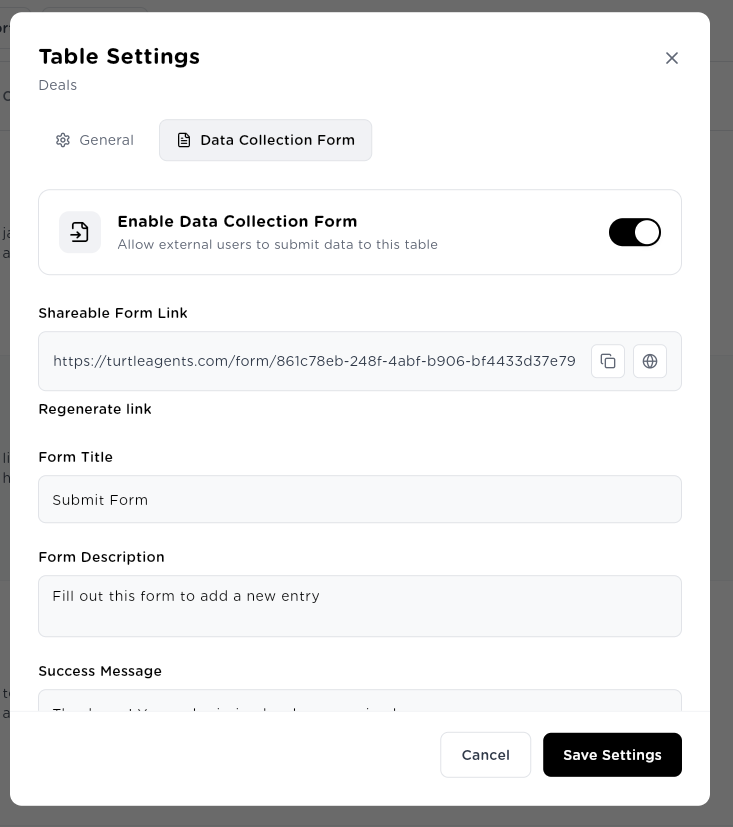
→ One toggle. Any table becomes a public-facing form.
→ Generate a unique link. Share publicly, privately, or with password protection.
→ Customise the form title, description, and success message.
USE CASE FLOW
You enable the form on your Customer Leads table
Share the link at your conference / website / email
Lead fills in Company Name, Contact, Website, Industry
New row created in Customer Leads table
ON ROW CREATED trigger fires Lead Qualifier Agent
Agent enriches: scores lead, generates outreach, updates HubSpot
Total time: 90 seconds from form submission to qualified pipeline entry
EXTERNAL LEAD CAPTURE
Embed the form on your marketing website. Every visitor who fills it in becomes a row — and triggers your Lead Qualifier Agent within 90 seconds.
Website embed
PARTNER DATA COLLECTION
Share a private link with distribution partners. They submit monthly pipeline data. It lands in your Deals table. Your Finance Agent processes it overnight.
Private link, password-protected
INTERNAL DATA COLLECTION
Share the link with your sales team. They fill in deal notes from phones after meetings. Your Deal Assistant generates next-step recommendations by morning.
Internal link, authenticated users only
Full data management.
Native to the platform.
Tables isn’t a stripped-down data tool. It’s a complete data management layer — with everything your operations team needs to work with business data at scale.
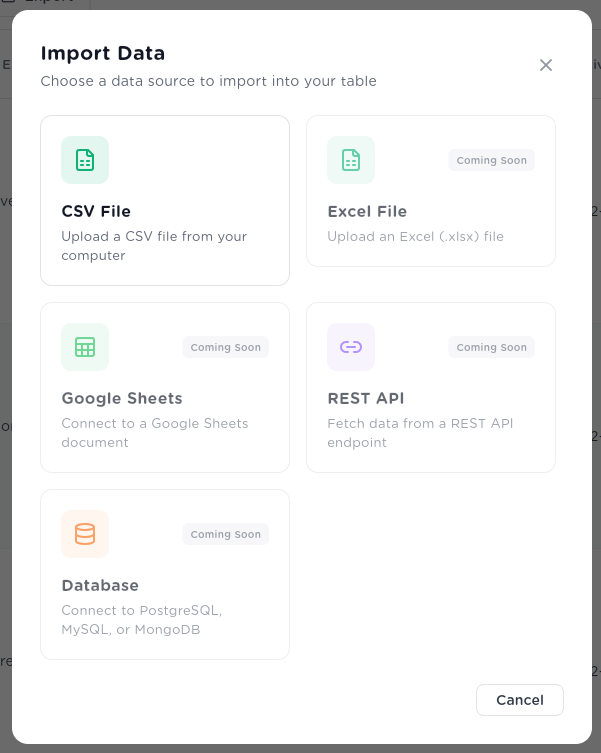
IMPORT FROM ANYWHERE
Import from 7 sources
CSV upload today. Google Sheets sync, REST API, PostgreSQL/MySQL/MongoDB, and webhook ingestion coming soon. Import once or sync continuously.
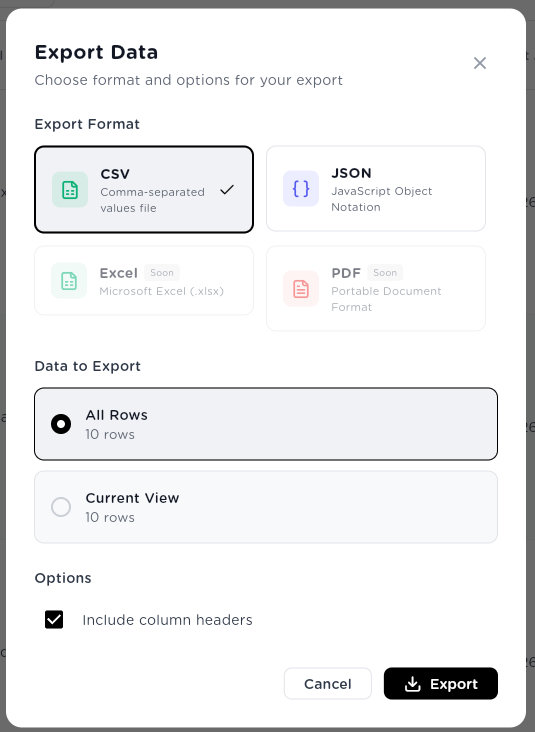
EXPORT IN ANY FORMAT
Export in any format
Export your full table or filtered view — in CSV, JSON, Excel, or PDF. Board report? Export as PDF. Data handoff? Export as JSON. Full data portability — always.
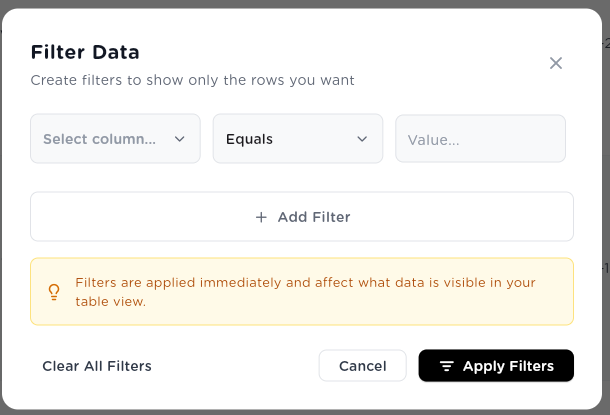
FILTER AND SORT
Filter, sort, and search
Create multi-condition filters on any column combination. Sort by any field. Search across all rows instantly. Filters affect only your view — not the underlying data.
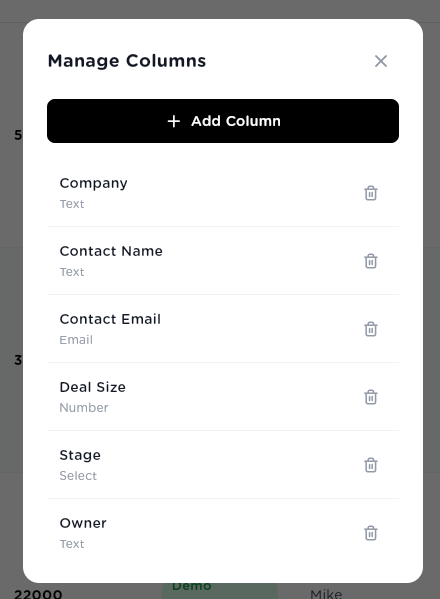
MANAGE COLUMNS
Full column control
Add, rename, reorder, or delete columns at any time. Column types: Text, Number, Date, Select, Email, URL, Boolean, and Agent Output (AI-enriched). Your table schema evolves with your process.
One data layer. Every department.
Tables replaces the fragmented collection of spreadsheets, Airtable bases, and CRM exports that every department currently uses to manage their operations data.
Lead Enrichment Pipeline
SalesCompany Name, Email, Industry✦, Size✦, Score✦, Summary✦
From form submission to qualified lead: 90 seconds
Deals
SalesCompany, Stage, Deal Size, Owner, Next Step, Days Stale
Zero stale deals go undetected for more than a day
Prospects
SalesCompany Research, ICP Score✦, Outreach Draft✦
Pre-call research generated automatically for every prospect
Customer Support Tickets
SupportTicket text, Category✦, Priority✦, Resolution✦, SLA Status
60% of Tier-1 tickets auto-resolved without human handling
Customer Health Scores
SupportCustomer, Usage data, Support history, Health Score✦
At-risk accounts identified before they churn
Candidate Pipeline
HRCandidate, CV text, Role, Score✦, Recommendation✦
First-pass screening in 20 minutes per candidate
Onboarding Tracker
HREmployee, Start Date, Provisioning Status, Checklist✦
Day-1 onboarding initiated automatically on hire
Invoice Processing
FinanceInvoice text, Vendor, Amount✦, PO Match✦, Approval Status
Invoice processing: 20 min manual → 2 min automated
Inventory Monitoring
OperationsItem, Current Stock, Reorder Level, Status✦
Out-of-stock incidents reduced by 85%
Your data. Your rules. Full visibility.
Granular Permissions
Control exactly what each agent, AI Employee, user, and group can do with each table — Read, Create, Update, Delete. Per-table. Per-entity. Full CRUD permission control at every level.
Per-table permissions: Read · Create · Update · Delete
Full Audit Trail
Every row change is logged — who changed what, when, what the previous value was, and whether it was a human or agent. Full version history. Exportable. SOC 2 compliant.
Every change tracked · Human or agent identified
API Access
Every table has a REST API endpoint. External systems can read and write programmatically at 1,000 requests/minute. Build custom integrations or trigger agents from outside the platform.
REST API · 1,000 req/min · Full CRUD
Scalable Storage
100,000 rows per table (Enterprise: Unlimited). Unlimited columns. 25MB file attachments. Real-time to 24-hour sync frequency. Tables scales from a 50-person team to a global enterprise.
100K rows · Unlimited columns · 25MB attachments
Replace your spreadsheets with a data layer that thinks.
Create your first table in 2 minutes. Import your data. Add AI-enriched columns. Wire it to an agent. Watch your pipeline run itself.
Granular permissions from day one · Full audit trail on every change · API access included on all plans