Your best analyst.
Your best SDR.
Your best researcher.
Running on every case. Simultaneously.
A Sequential Agent encodes how your top performers work — the exact steps, the reasoning, the tools, the knowledge — and runs that expertise automatically on every input, every time, without variation, without fatigue, without forgetting.
Expertise lives in people’s heads.
It dies when they leave.
The reality
“Your best SDR qualifies leads with a 6-step mental process built over 3 years. Your other reps skip 4 of those steps. You don’t know until the deal falls through.”
“Your top analyst researches a company in 45 minutes — funding stage, tech stack, decision makers, recent news, competitive positioning. Everyone else spends 15 minutes and misses half of it.”
“Your best HR coordinator screens candidates against 12 criteria, cross-references the job spec, and writes structured feedback. When she’s out, it doesn’t happen at all.”
The cost
87%
of AI projects stay as prototypes, never reaching production
40%
revenue lost to inconsistent sales processes annually
Day 1
when institutional expertise starts walking out the door
Sequential Agents solve this by making your best person’s process the only process — for everyone, every time, at any scale.
Three steps. Thirty-two seconds.
Senior analyst quality output.
This is a real run of the Lead Qualification Agent — Run #74, completed in 32 seconds, costing $0.0321. This is what Sequential Agents actually produce.
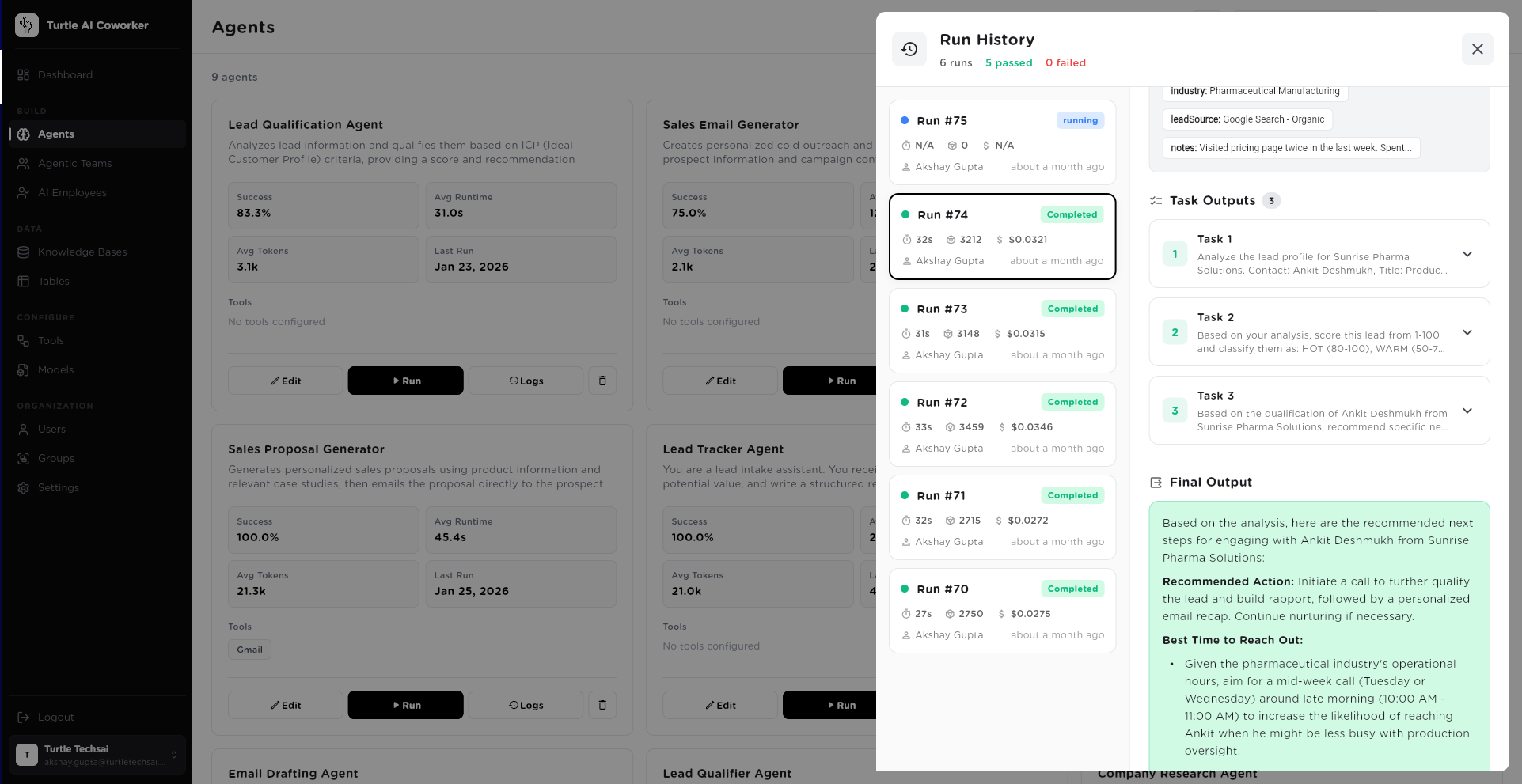
Three tasks executed in sequence. Each one reads the output of the previous before executing.
Full run tracked: duration, token cost, and success status. Every run logged for analytics and audit.
The actual output — specific, reasoned, actionable. Not a template. Not a generic summary. Expert-level analysis on this specific lead.
The output you just read came from an agent configured in plain language — no code, no ML engineering. The intelligence comes from how the tasks were written, what knowledge was provided, and how the steps chain together.
Six layers. Each one adds intelligence.
Configuring a Sequential Agent is not programming. It’s defining how an expert thinks — what they know, what they do, what tools they use, and who they report to.
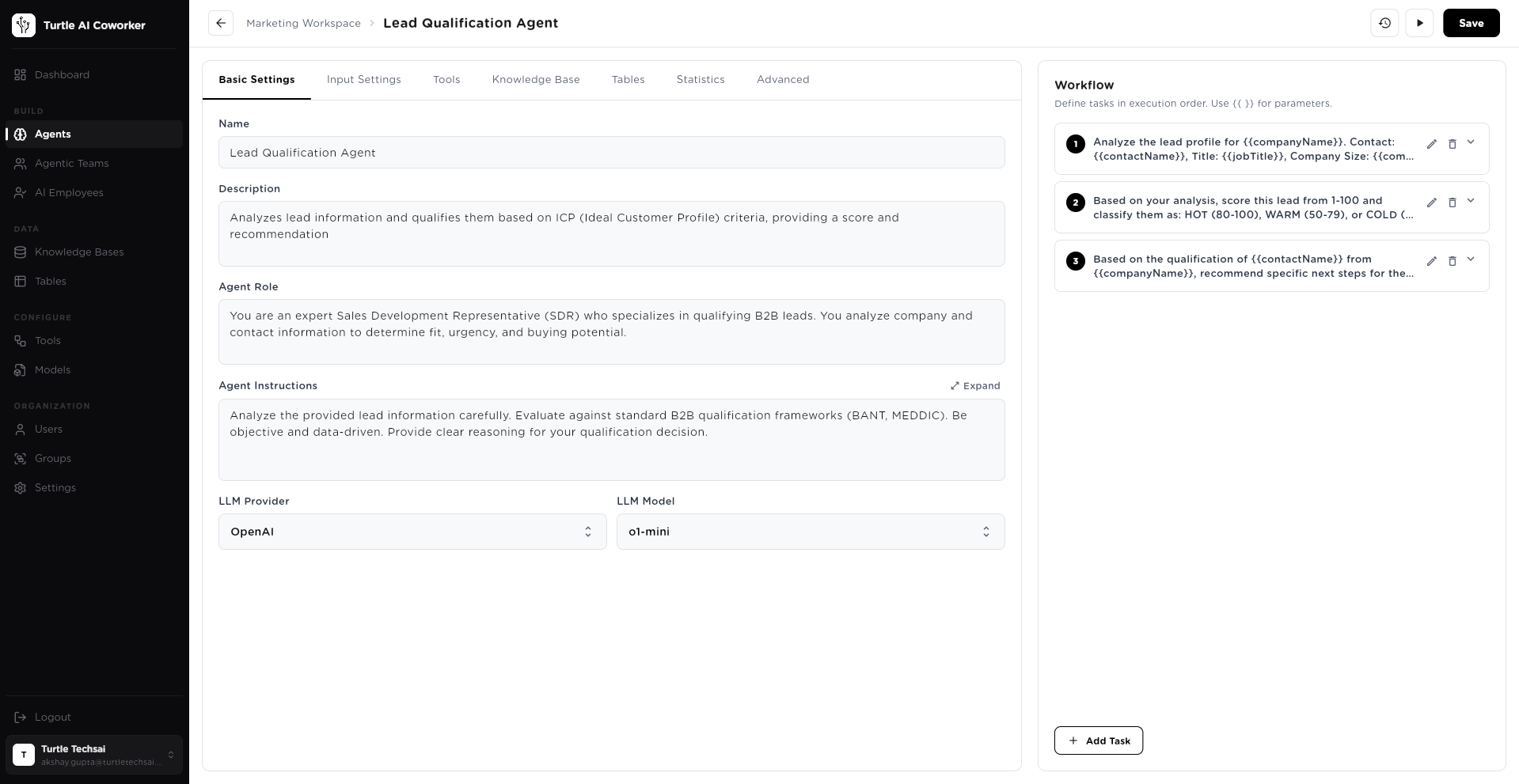
You define the agent’s role in plain language — exactly how you’d brief a new hire. “You are an expert Sales Development Representative who specialises in qualifying B2B leads. You analyse company and contact information to determine fit, urgency, and buying potential.” The LLM uses this as its operating persona for every run.
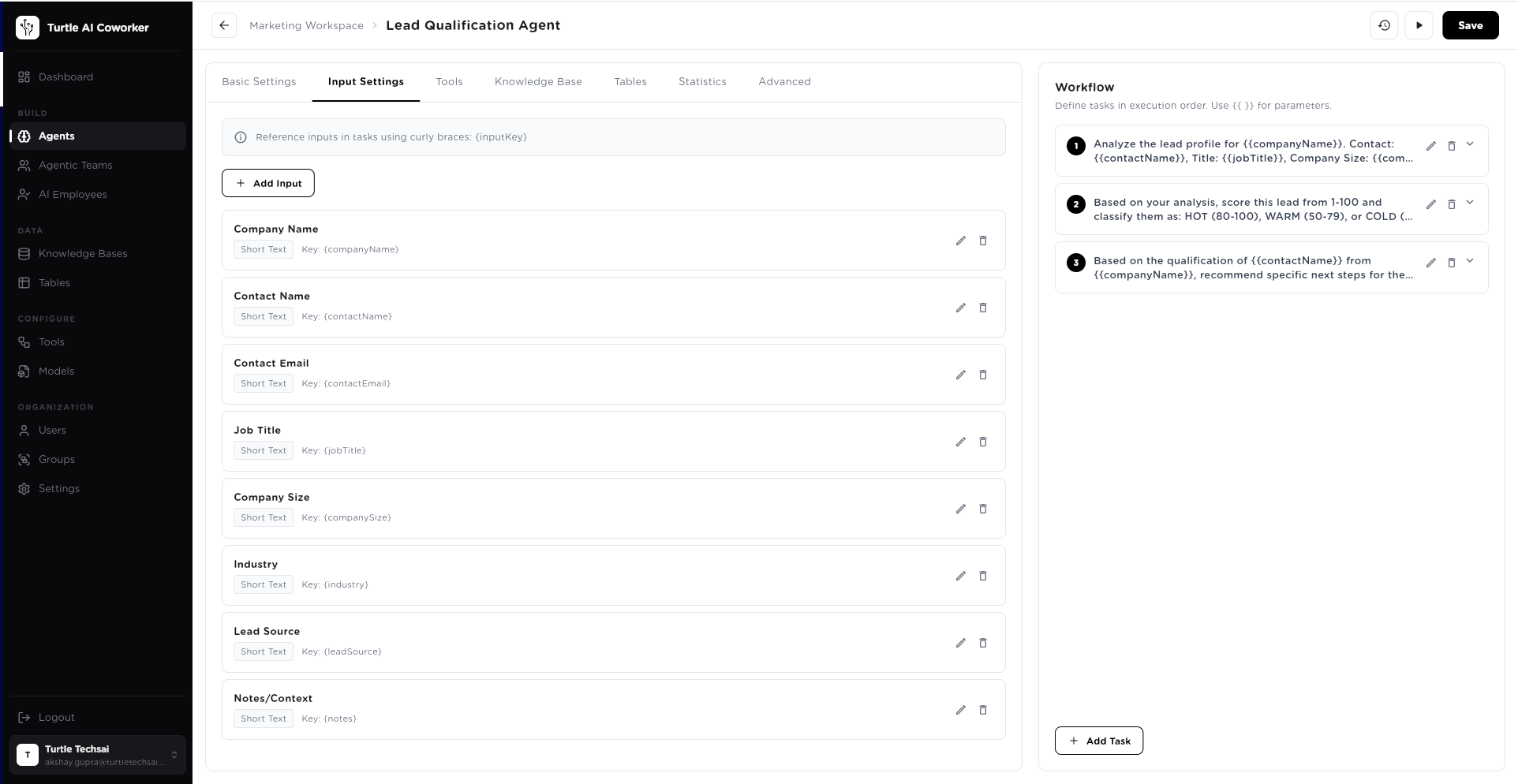
Input parameters are the variables that change each run — company name, contact name, job title, industry, lead source. Define them once. Reference them in tasks using {{companyName}}, {{contactName}}, {{jobTitle}}. The agent uses these to personalise every output to the specific case it’s working on.
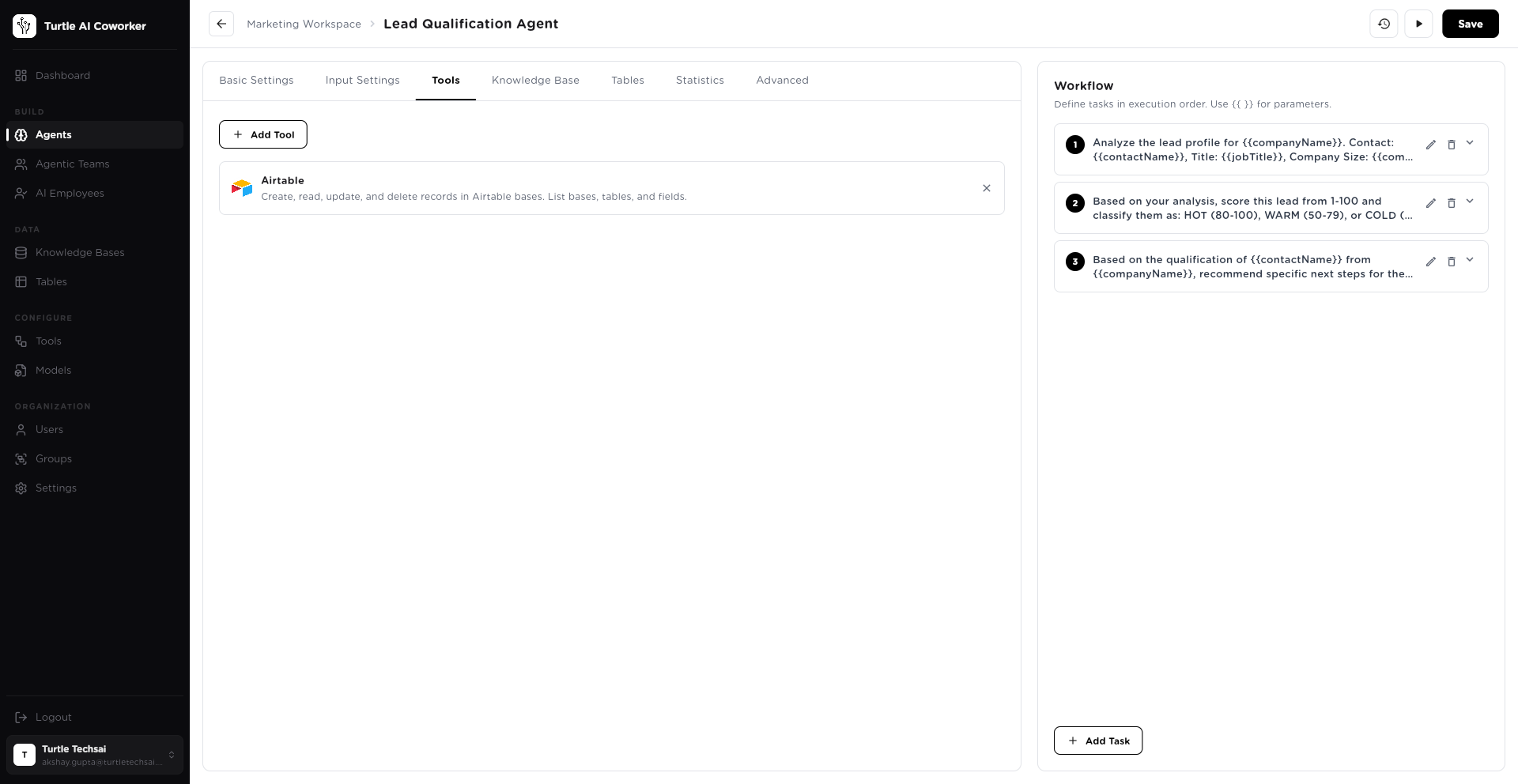
Connect the tools your agent needs to do its work. HubSpot to read and write CRM data. Gmail to send outputs. Slack to notify your team. Google Search to research companies. Tools are shared across all tasks — the agent decides when and how to use each one based on the task at hand.
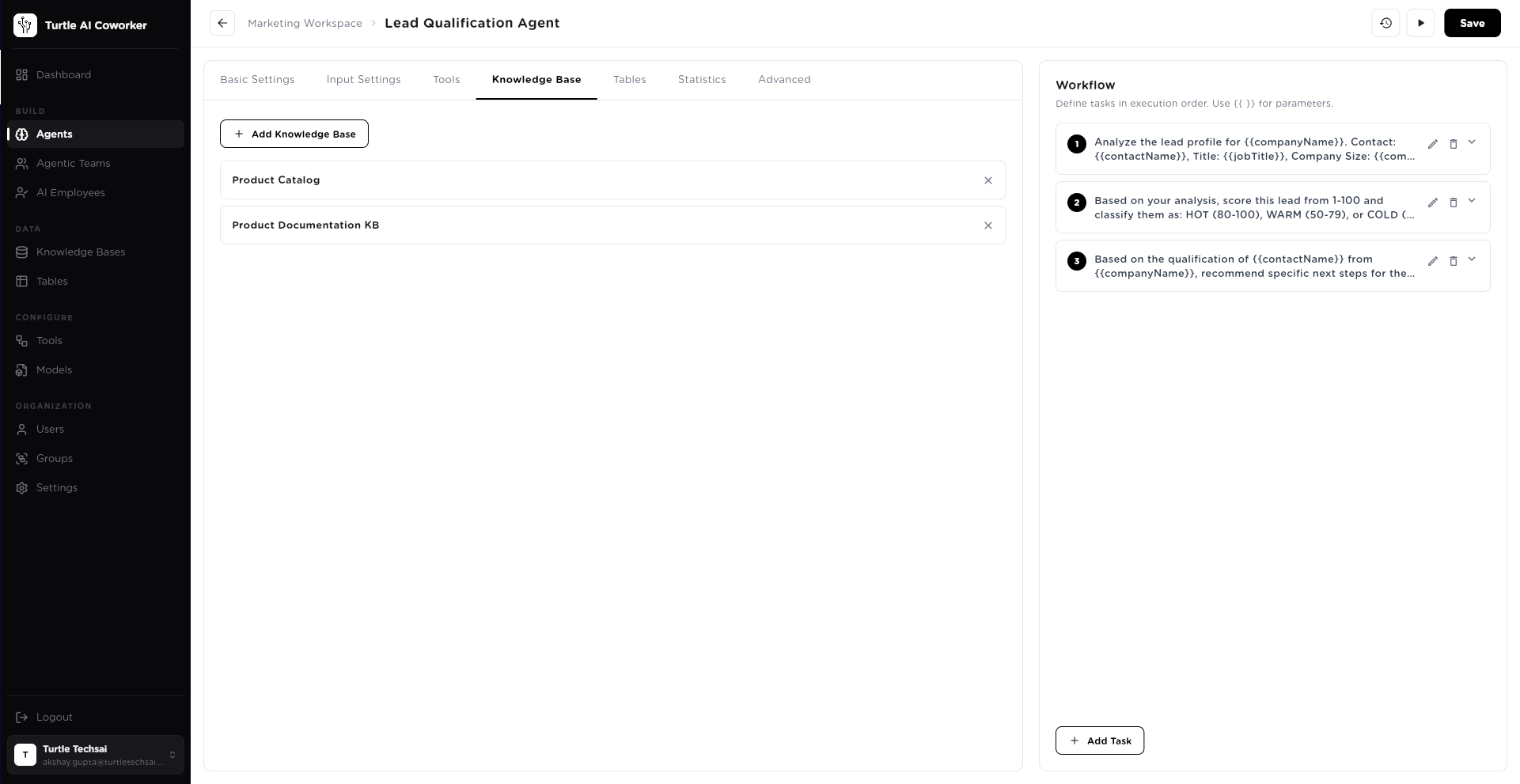
This is where institutional expertise lives. Upload your ICP criteria, your sales playbook, your qualification frameworks, your product documentation. The agent performs semantic search across everything you’ve provided — finding the exact relevant context for each specific situation. This is what makes the output expert-level rather than generic.
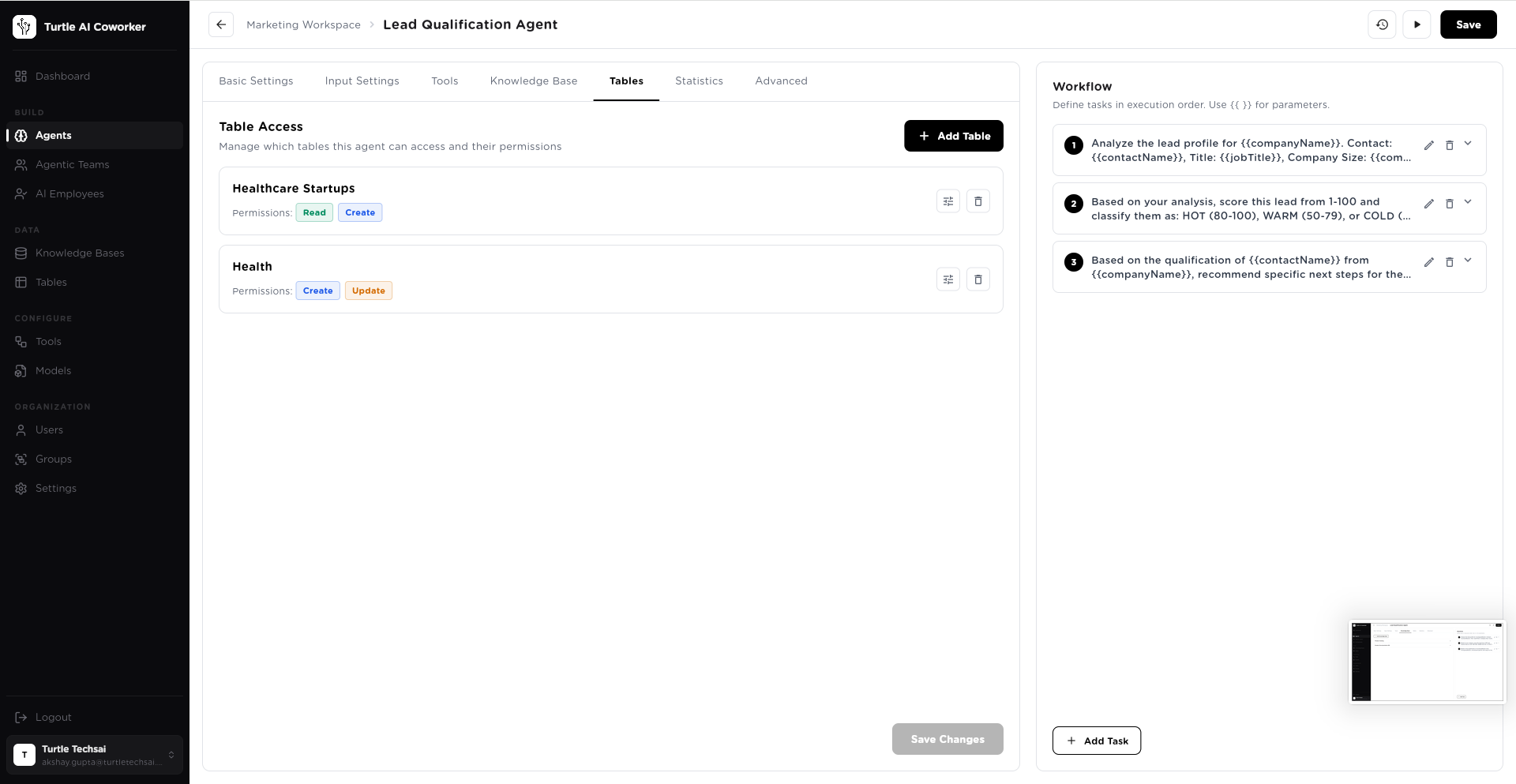
Give the agent access to your structured data tables — with granular permissions. Read-only access to your leads table. Create access to your qualified pipeline table. Update access to your healthcare records. The agent reads from tables as context and writes results back — creating a data pipeline that updates automatically with every run.
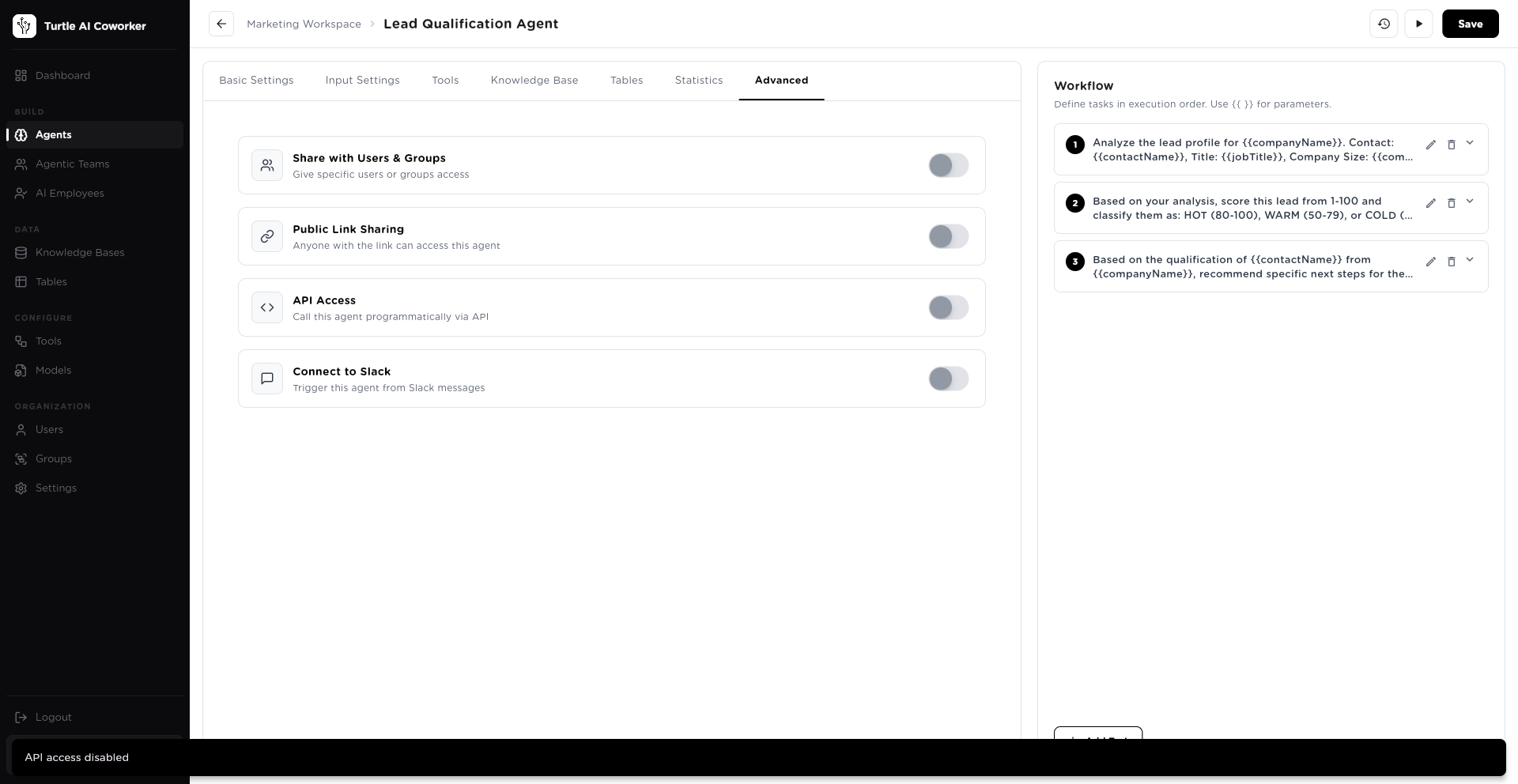
Deploy to your team via user and group sharing. Enable public link access for external users. Expose via API for programmatic triggering from your systems. Connect to Slack so any team member can run the agent directly from a message. One agent. Multiple access points. Full control over who can trigger it and how.
These six layers configure once. Then the agent runs itself — on demand, on a schedule, triggered by a table event, called via API, or assigned by an AI Employee.
It’s not rule execution.
It’s chained reasoning.
The critical difference between a Sequential Agent and a basic automation: every step reads and reasons about everything that came before it.
Analyze the lead profile
Analyze the lead profile for {{companyName}}. Contact: {{contactName}}, Title: {{jobTitle}}, Company Size: {{companySize}}...
Output: Company profile + contact analysis
Score and classify
Based on your analysis, score this lead from 1-100 and classify as HOT (80-100), WARM (50-79), or COLD...
Reads: Task 1 output (full company profile)
Output: Score + classification + reasoning
Recommend next steps
Based on the qualification of {{contactName}} from {{companyName}}, recommend specific next steps...
Reads: Task 1 output + Task 2 output
Recommended Action: Initiate a call to further qualify the lead and build rapport, followed by a personalized email recap. Best Time: Mid-week (Tues/Wed) 10–11 AM given pharmaceutical industry operational hours.
Analyze the lead profile
Analyze the lead profile for {{companyName}}. Contact: {{contactName}}, Title: {{jobTitle}}, Company Size: {{companySize}}...
Output: Company profile + contact analysis
Score and classify
Based on your analysis, score this lead from 1-100 and classify as HOT (80-100), WARM (50-79), or COLD...
Reads: Task 1 output (full company profile)
Output: Score + classification + reasoning
Recommend next steps
Based on the qualification of {{contactName}} from {{companyName}}, recommend specific next steps...
Reads: Task 1 output + Task 2 output
Recommended Action: Initiate a call to further qualify the lead and build rapport, followed by a personalized email recap. Best Time: Mid-week (Tues/Wed) 10–11 AM given pharmaceutical industry operational hours.
TOTAL: 32s · $0.0321 · Expert-level output
Task 3 knows that Ankit is a Production Manager at a pharma company who visited the pricing page twice — because Task 1 surfaced it. Task 3 knows the lead scored 87/100 — because Task 2 calculated it. Every step builds on every step before. This is why the output reads like a senior analyst wrote it, not a template engine.
Every expert process.
Now running automatically.
Any repeatable process that your best people follow can be encoded as a Sequential Agent. Here are 15 examples across every major enterprise function.
Lead Qualification Agent
Sales- 1. Research company profile
- 2. Score lead against ICP
- 3. Recommend next steps
Sales Proposal Generator
Sales- 1. Understand requirements
- 2. Pull case studies
- 3. Draft proposal
- 4. Send via email
Company Research Agent
Sales- 1. Scrape website
- 2. Research news & funding
- 3. Map stakeholders
- 4. Generate brief
Candidate Screening Agent
HR- 1. Parse CV
- 2. Score vs JD
- 3. Background check
- 4. Schedule interview
Employee Onboarding Agent
HR- 1. Send welcome
- 2. Provision access
- 3. Share materials
- 4. Set check-in schedule
- 5. Update HRIS
Policy Q&A Agent
HR- 1. Receive question
- 2. Search policy KB
- 3. Generate cited answer
- 4. Send response
Invoice Processing Agent
Finance- 1. Extract invoice data
- 2. Match PO
- 3. Route for approval
- 4. Log to accounting
Expense Anomaly Agent
Finance- 1. Pull transactions
- 2. Detect anomalies
- 3. Generate flagging report
- 4. Alert CFO
Ticket Triage Agent
Support- 1. Classify ticket
- 2. Search KB
- 3. Generate answer
- 4. Send or escalate
Customer Health Score Agent
Success- 1. Pull usage data
- 2. Check support history
- 3. Score health
- 4. Alert CSM if at-risk
Vendor Due Diligence Agent
Operations- 1. Research vendor
- 2. Check reviews & news
- 3. Score risk
- 4. Generate report
Weekly Ops Briefing Agent
Operations- 1. Pull KPIs
- 2. Identify anomalies
- 3. Generate briefing
- 4. Distribute
Preventive Maintenance Planner
Manufacturing- 1. Identify equipment
- 2. Check history
- 3. Pull manufacturer specs
- 4. Generate PM plan
- 5. Schedule
Quality Shift Report Agent
Manufacturing- 1. Pull shift data
- 2. Compare vs targets
- 3. Identify defects
- 4. Generate report
- 5. Alert QC team
Contract Review Checklist Agent
Legal- 1. Parse contract
- 2. Check against policy KB
- 3. Flag non-standard clauses
- 4. Generate review checklist
Don’t see your use case? Every repeatable process with defined steps can become a Sequential Agent.
Book a demo and we’ll show you exactly how.Production-grade from day one.
Full Run History & Cost Tracking
Every run is logged with inputs, step-by-step outputs, duration, token count, and exact cost per run. Searchable, filterable, exportable. Know exactly what every agent produced and what it cost — down to the cent.
See it: Run #74 · 32s · 3,212 tokens · $0.0321
Granular Table Permissions
Control exactly what data each agent can read, create, update, or delete. Per-table, per-agent permissions. Your Lead Qualification Agent can read your prospects table and create records in your qualified pipeline — but cannot modify or delete existing data.
Per-table permissions: Read · Create · Update · Delete
Multi-Channel Deployment
Deploy via API for programmatic triggering. Share with specific users or groups. Enable Slack integration so team members trigger agents from messages. Enable public links for external access. One agent. Multiple deployment channels. Full control.
4 channels: API · Users & Groups · Public Link · Slack
Scheduling & Trigger Automation
Run agents on a schedule — daily at 7 AM, weekly on Friday at 5 PM, hourly. Or connect to a Table trigger — new row added automatically fires the agent. Your pipeline updates the moment a new lead comes in.
Triggers: Schedule · Table Events · API · Manual
Which expert process should run automatically first?
Pick any repeatable workflow your best people follow. We’ll show you how to encode it as a Sequential Agent — configured in plain language, running in production before the end of the week.
No engineering required·Full run history from day one·Scales from 1 run to 10,000 runs without changes
- No engineering required
- Full run history from day one
- Scales from 1 run to 10,000 runs without changes