Stop automating tasks.
Start hiring AI.
AI Employees are autonomous digital workers — with a name, a role, a memory, and access to every tool and data source they need. You assign tasks in plain language. They execute in the background, report results, and escalate only when they need you.
Every other AI tool gives you assistance.
Turtle gives you a workforce.
What everyone else gives you
CHATBOTS
Answer questions when you ask them. Forget everything the moment the conversation ends. Zero background execution.
COPILOTS
(Microsoft, Salesforce)Help you while you’re working. Still require you to initiate, guide, and execute. You do the work. They assist.
AUTOMATION TOOLS
(Zapier, Make)Execute predefined workflows when a trigger fires. Break when something unexpected happens. Can’t reason, adapt, or handle ambiguity.
All of these require you to be present and involved for work to happen.
What AI Employees give you
AI EMPLOYEES
Execute tasks autonomously in the background — even tasks they’ve never seen before.
Work 24/7 across every tool and data source.
Plan, reason, and adapt without your involvement.
Report back when done. Escalate only when they need you.
You assign the work.
They deliver the results.
This isn’t AI helping your team.
This is AI joining your team.
AI Employees sit at the top of the entire platform stack.
Agents, Tables, Knowledge Bases, and Tools are all powerful standalone modules. But an AI Employee is what happens when one entity knows how to use all of them together — autonomously — to get a real job done.
Orchestration Layer
AI EMPLOYEES
Your autonomous digital workforce
The orchestrators who use everything below them
Capability Layer
Sequential Agents + Agentic Teams
Specialized skills — Lead Qualifier, Email Drafter, Company Research Agent
Data Layer
Tables + Knowledge Bases
Working data + institutional memory
Foundation Layer
Tools — 50+ Integrations
Gmail · Slack · HubSpot · Notion · Airtable · and more
| Module | Real-World Analogy | Role in the Stack |
|---|---|---|
Agents | A specific skill | The specialized capabilities |
Tables | Spreadsheets & databases | The live working data |
Knowledge Bases | Training & playbooks | The institutional memory |
Tools | Software on their desk | The action execution layer |
AI Employees | The actual person | The orchestrator — the workforce |
The key insight: Agents, Tables, KBs, and Tools can all be used standalone. But when you deploy an AI Employee, you’re not automating a workflow — you’re hiring someone who knows how to use all of these together, autonomously, to get a job done.
This isn’t a metaphor.
This is the actual architecture.
When we say AI Employees work like real employees, we mean it structurally — not just as a marketing claim.
What a real employee has
What Maya (AI Employee) has
A name and a defined role
Name: Maya | Role: Sales Operations Assistant for the B2B sales team
A set of instructions and SOPs
Custom instruction set written in plain language with @tagged resources
Access to specific tools (CRM, email, calendar)
Assigned tools: Airtable, Notion, Gmail — configured per employee
Access to company data
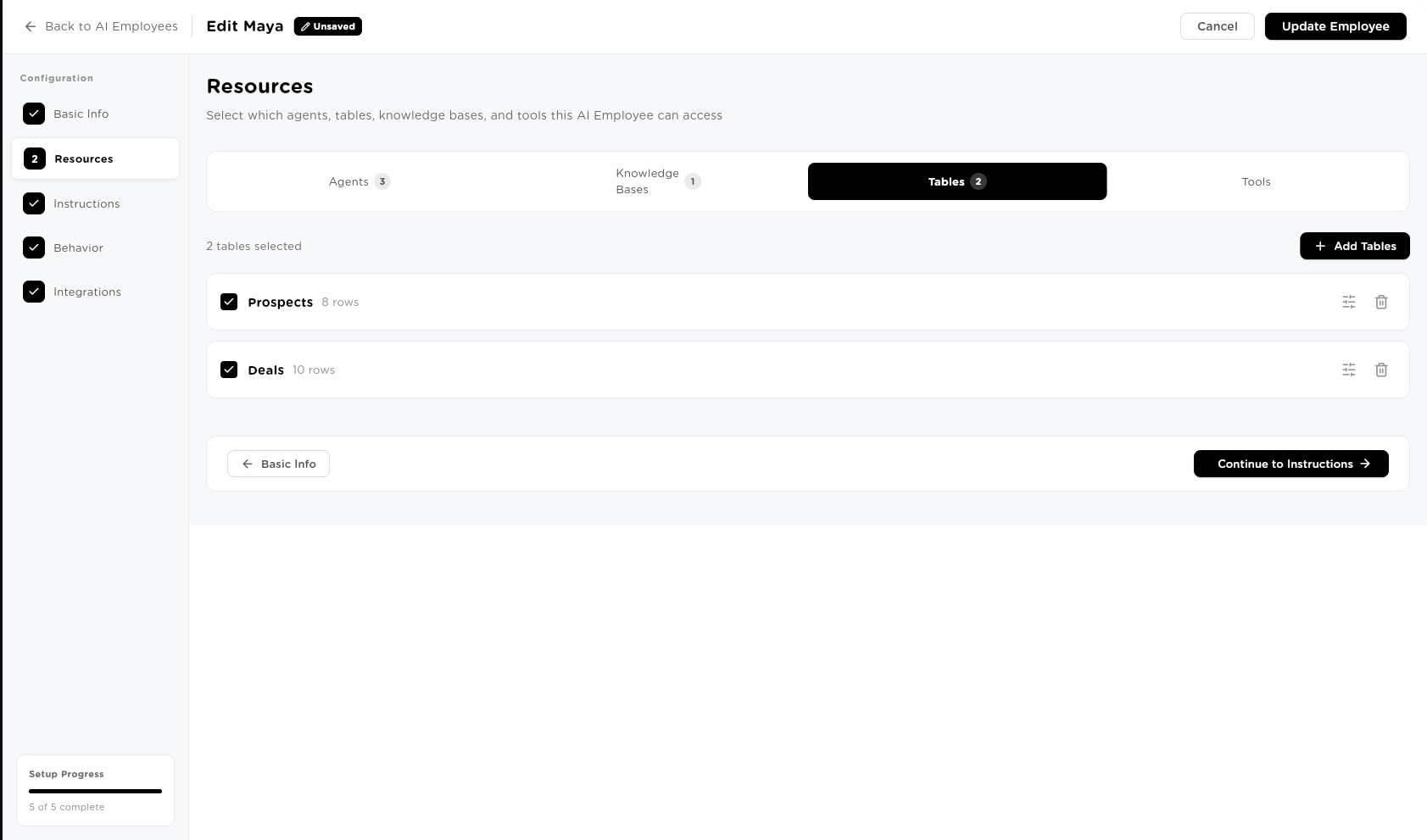
Assigned Tables: Prospects (8 rows), Deals (10 rows) — with granular read/write permissions
Domain training and playbooks
Knowledge Bases: Sales Playbook (4 docs, 11 chunks) — company messaging, objection scripts, email templates
Specialized colleagues they delegate to
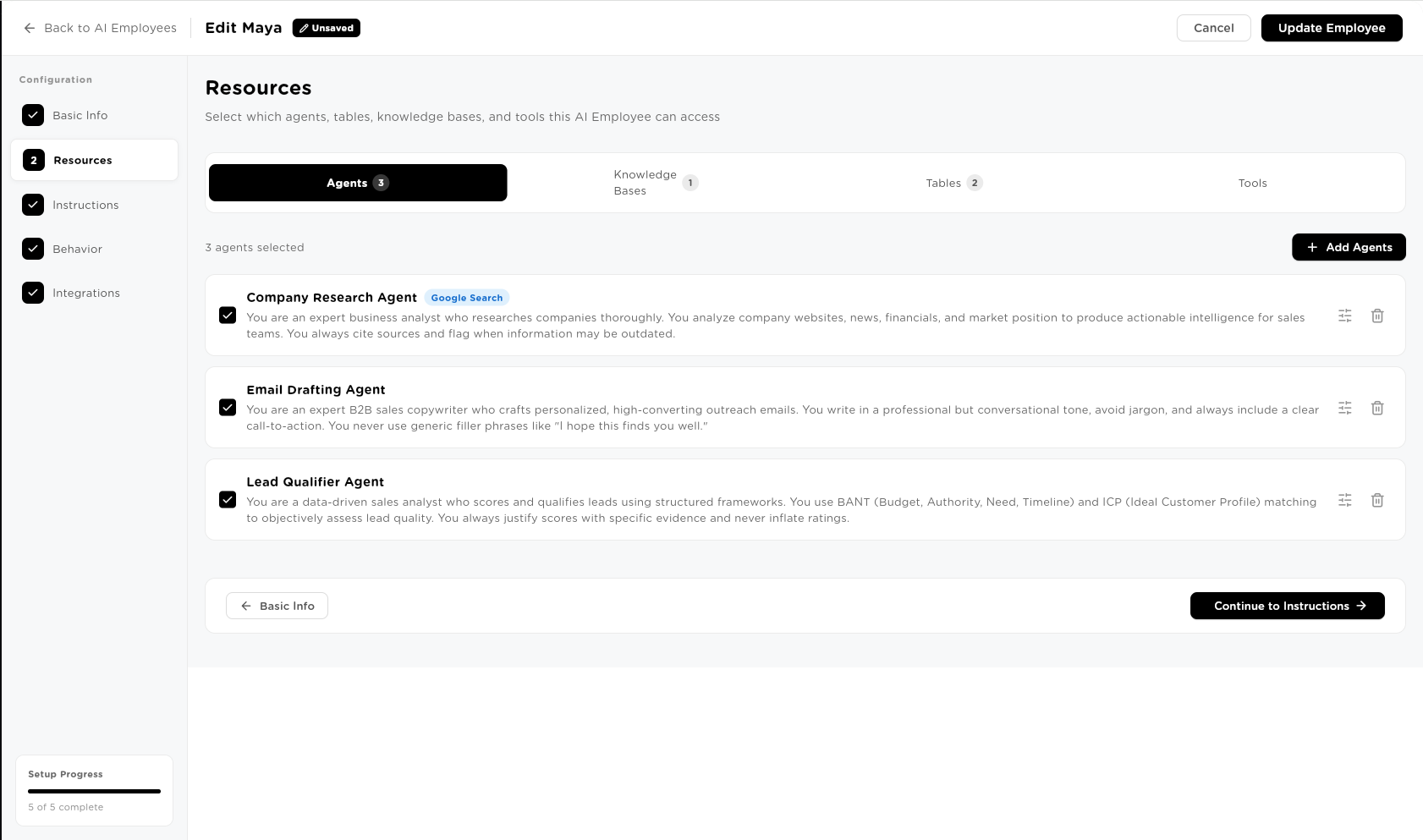
Assigned Agents: Company Research Agent, Email Drafting Agent, Lead Qualifier Agent
Memory of past conversations
Session memory (20 messages) + long-term memory across all interactions
A manager who assigns tasks
Chat interface — give instructions in plain English, from any channel
Approval chains for sensitive decisions
Configurable approval workflows — agent pauses and notifies before executing
Accountability and a paper trail
Full audit trail — every task, every action, every resource accessed, every decision made
Resources › Agents
Resources › Tables
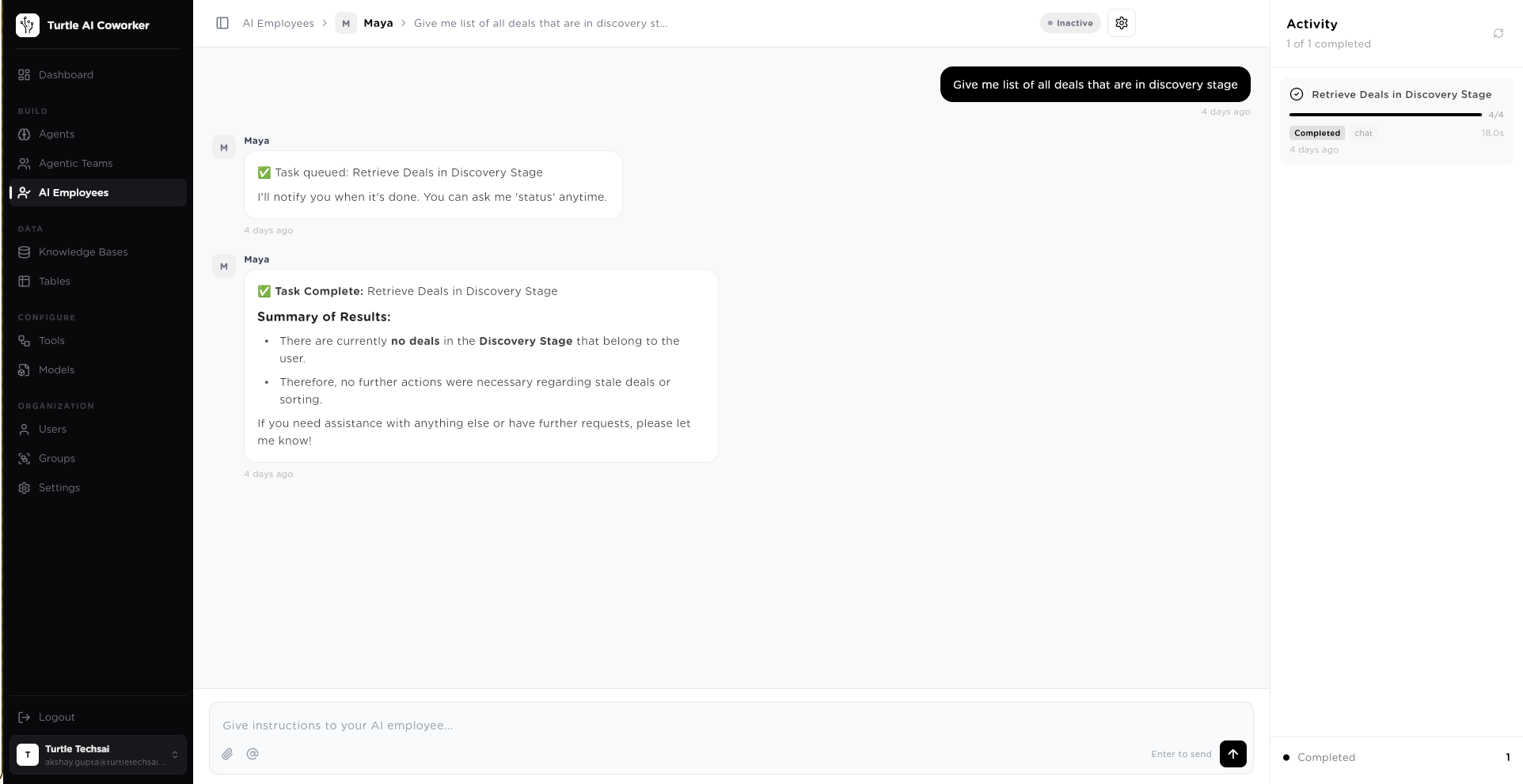
Maya received: “Research TechCorp and draft outreach.” Without any more prompting, she ran the Company Research Agent, ran the Lead Qualifier Agent, saved results to Prospects table, retrieved the Enterprise playbook from Sales Playbook KB, and drafted a personalised email. 45 seconds. Zero human involvement until results were ready.
The math is not subtle.
One AI Employee delivering 30% of what a human knowledge worker does — at 5% of the cost — is already a 6x ROI before accounting for 24/7 availability and infinite scale.
HUMAN KNOWLEDGE WORKER
US, 2025
Availability
8 hrs/day, 5 days/week, 1 timezone
Concurrent tasks
1
Consistency
Variable
Audit trail
Limited
AI EMPLOYEE
Turtle AI Coworker
Availability
24/7/365
Concurrent tasks
Unlimited
Consistency
100%
Audit trail
Complete
171%
Average ROI from agentic AI deployments
Source: McKinsey / Landbase 2026
74%
Enterprises achieving ROI within year one
Source: Google Cloud ROI Report 2025
70%
Cost reduction through workflow automation
Source: Multiple enterprise studies
6 months
Average payback period
Source: Forrester Research 2025
Scenario: Replace one SDR function with Maya
A human SDR costs ~$138,000/year fully loaded. Maya handles prospect research, ICP scoring, outreach drafting, pipeline tracking, and deal summaries.
Works every day. Costs a fraction. Gets smarter over time.
The question isn’t whether you can afford AI Employees. It’s whether you can afford to wait while competitors deploy them.
Onboard an AI Employee in 30 minutes.
Configure once. Runs forever.
The setup flow mirrors real employee onboarding — intuitive for any operations manager, no technical skills required.
Setup Progress: 5 of 5 complete
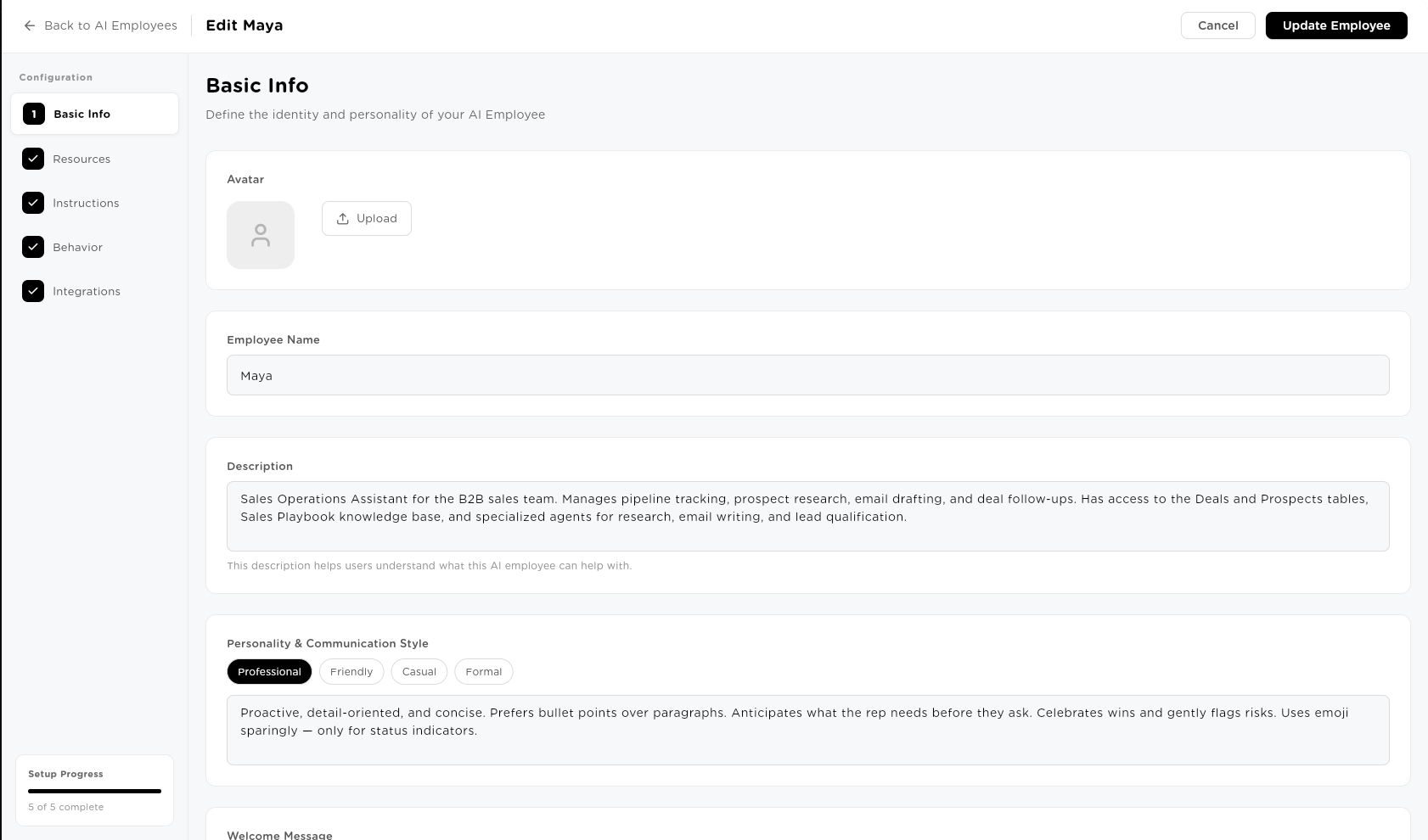
Give them a name, a role, and a personality.
Define who this employee is — exactly like writing a job description and offer letter. Name: Maya. Role: Sales Operations Assistant. Personality: Professional, proactive, detail-oriented, concise.
Maya's personality: “Proactive, detail-oriented, and concise. Prefers bullet points over paragraphs. Anticipates what the rep needs before they ask. Celebrates wins and gently flags risks.”
30 minutes from zero to a fully configured AI Employee with agents, knowledge, data, tools, instructions, and deployment channels. Operational from day one.
Background work. Foreground results.
When you assign a task to an AI Employee, the interaction feels like a conversation. The execution is fully autonomous.
YOU
“Research TechCorp and draft an outreach email”
MAYA
Task queued: TechCorp Research & Outreach
I’ll notify you when it’s done. You can ask me ‘status’ anytime.
BACKGROUND — happening automatically
Step 1: Company Research Agent → pulls website, news, financials
Step 2: Lead Qualifier Agent → ICP score = 87, Segment = Enterprise
Step 3: Saves to @Prospects table — new row created
Step 4: Retrieves Enterprise playbook from @Sales Playbook KB
Step 5: Email Drafting Agent → personalized outreach email
Total: 45 seconds
MAYA
Task Complete: TechCorp Research & Outreach
- ICP Score: 87 — Strong fit (Series B SaaS, 250 employees)
- Segment: Enterprise — Applied the Enterprise Expansion playbook
- Prospect row saved to @Prospects table
- Draft email attached — personalised to their recent funding round
Ready to review, or should I send?
YOU TALK. MAYA WORKS.
Assign tasks in plain English. Maya plans, executes, and reports back. You never touch the workflow unless you want to.
STATUS ON DEMAND.
Ask ‘status’ at any time. Maya reports back with exactly where she is in the task — steps completed, steps remaining, any blockers.
RESULTS, NOT PROCESS.
Maya doesn’t narrate every step. She delivers a structured result with everything you need to act — summary, data saved, next step recommended.
Autonomous. Not reckless.
The #1 concern blocking enterprise AI adoption is control. AI Employees solve this with six enterprise-grade guardrails — built in, not bolted on.
76% of enterprises now include human-in-the-loop processes in their AI deployments.
APPROVAL WORKFLOWS
High-risk or irreversible actions — sending emails, updating records, processing payments — can require human sign-off before execution. Maya pauses, notifies the approver, and waits. Nothing happens without the right person saying yes.
ACTION LIMITS
Cap the maximum number of emails sent, API calls made, and records updated per day. Prevents runaway loops and accidental bulk operations. Set once, enforced automatically.
FULL AUDIT TRAIL
Every task, every agent run, every tool call, every data access is logged with timestamps, reasoning, and outcomes. Complete traceability for compliance, security reviews, and operational analysis.
ESCALATION PATHS
When confidence is low, when a task is ambiguous, or when a situation falls outside defined instructions — Maya escalates to a human automatically. She never guesses on high-stakes decisions.
CONFIGURABLE MEMORY
Control exactly how much context Maya retains — memory window, auto-summarization, long-term memory toggle. Configure what she remembers and for how long.
SHADOW MODE
Coming SoonMaya plans and logs every action she would take — without actually executing any of them. Use shadow mode to validate behavior, test new instructions, and build confidence before going live. A probation period for your AI.
Gets smarter the longer it works with you.
Unlike chatbots that forget everything after a session, AI Employees have a three-tier memory architecture that compounds over time — exactly like a real employee who’s been with the company for a year.
SHORT-TERM MEMORY
Current session context. Maya remembers everything said in the active conversation — the last 20 messages by default. Ask a follow-up and she knows the full context. No re-explaining needed.
WORKING MEMORY
Active task state. While a task is running, Maya holds all intermediate results in working memory — Step 1 output informs Step 2, all previous agent results inform the final synthesis. The whole task stays coherent.
LONG-TERM MEMORY
Persistent across sessions. Key facts, preferences, past task patterns, user context — retained across every conversation. Maya after 6 months knows your pipeline patterns, your ICP criteria, which playbooks apply to which accounts.
DAY 1
Maya knows her assigned agents, tables, and KB. Executes tasks accurately.
30 DAYS
Maya has pattern-matched 200+ tasks. Knows which accounts are highest priority, which reps prefer which formats.
6 MONTHS
Maya knows your entire sales operation. Proactively flags risks. Suggests next steps before asked. Knows which playbook applies to every account type.
DAY 1
Maya knows her assigned agents, tables, and KB. Executes tasks accurately.
30 DAYS
Maya has pattern-matched 200+ tasks. Knows which accounts are highest priority, which reps prefer which formats.
6 MONTHS
Maya knows your entire sales operation. Proactively flags risks. Suggests next steps before asked. Knows which playbook applies to every account type.
This compound advantage is why enterprises that deploy AI Employees now will be ahead by 12–18 months when competitors start.
One AI Employee per department.
Your entire operation on autonomous.
Each department gets a dedicated AI Employee — wired into the right agents, data, and knowledge — running their function’s most repetitive high-value work.
MAYA — SALES OPERATIONS
Sales Operations Assistant, B2B Sales Team
Proactive, detail-oriented, concise.
- •“Research TechCorp and qualify against ICP”
- •“Give me all stale deals this week”
- •“Draft follow-up emails for Proposal Sent accounts”
- •“Generate pipeline summary for Monday standup”
3 Agents · 1 KB · 2 Tables · 3 Tools
ALEX — CUSTOMER SUPPORT
Customer Support Specialist
Calm, empathetic, resolution-focused.
- •“Triage all open tickets and flag SLA risks”
- •“What’s the status of ticket #4821?”
- •“Draft responses for all Tier-1 tickets today”
- •“Generate daily support summary”
2 Agents · 2 KBs · 1 Table · 2 Tools
EMMA — HR COORDINATOR
HR & People Operations Coordinator
Warm, thorough, policy-precise.
- •“Screen the 12 CVs for the Senior Engineer role”
- •“What’s our parental leave policy for contractors?”
- •“Start onboarding checklist for Marcus — starting Monday”
- •“Pull all open reqs and hiring status”
3 Agents · 3 KBs · 2 Tables · 2 Tools
MARCUS — FINANCE ANALYST
Finance Operations Analyst
Precise, numbers-first, flags anomalies proactively.
- •“Process all invoices received today”
- •“Flag any expenses outside policy this month”
- •“Generate weekly finance summary for CFO”
- •“Which accounts are 30+ days overdue?”
2 Agents · 2 KBs · 3 Tables · 2 Tools
JORDAN — MARKETING OPS
Marketing Operations Manager
Creative but data-driven. Brand voice enforcer.
- •“Draft 5 LinkedIn posts for this week’s campaign”
- •“What are competitors announcing this week?”
- •“Update the content calendar with Q2 campaigns”
- •“Pull last month’s content performance”
3 Agents · 2 KBs · 2 Tables · 4 Tools
RILEY — IT HELPDESK
IT Helpdesk & Operations Specialist
Technical, efficient, escalates proactively.
- •“Classify and prioritize all open IT tickets”
- •“What’s the resolution for ‘VPN not connecting on Mac’?”
- •“Process the 5 access requests from this morning”
- •“Flag any incidents open more than 24 hours”
2 Agents · 3 KBs · 1 Table · 3 Tools
Compared to every alternative.
| Capability | Turtle AI Employees | Zapier / Make | Chatbots | Copilots | Custom Build |
|---|---|---|---|---|---|
| Background autonomous execution | Native | Trigger-only | DIY | ||
| Natural language task assignment | DIY | ||||
| Multi-agent orchestration | Native | Limited | DIY | ||
| Long-term memory | Limited | DIY | |||
| Enterprise guardrails (built-in) | Basic | Basic | DIY | ||
| Works 24/7 autonomously | Triggers only | DIY | |||
| Full audit trail | Basic | Basic | Basic | DIY | |
| Time to deploy | 30 min | Hours | Days | Days | 6–18 months |
| No-code setup |
VS ZAPIER / MAKE
Zapier triggers workflows. AI Employees think, plan, adapt, and execute — even for tasks they’ve never seen before. Zapier breaks when something unexpected happens. AI Employees handle it.
VS CHATBOTS
Chatbots answer questions. AI Employees complete tasks. A chatbot tells you the refund policy. An AI Employee processes the refund, updates the table, sends the confirmation, and notifies the account manager.
VS COPILOTS
Copilots assist you while you work. AI Employees work while you’re not there. They execute in the background, notify you when done, and only pull you in when they need a decision.
The companies deploying now will be 12–18 months ahead by 2026.
79%
Organizations already with some form of AI agent adoption
Source: PwC 2025
88%
C-suite executives increasing AI agent budgets next 12 months
Source: PwC 2025
73%
Executives saying AI agents give competitive advantage in next 12 months
Source: PwC 2025
33x
Projected increase in enterprise software with agentic AI by 2028
Source: Gartner
6 months
Average payback period for enterprise AI agent deployments
Source: Forrester
“The question isn’t whether AI Employees will reshape your operations. It’s whether you’ll lead that change or follow it.”
— Google Cloud ROI of AI Report, 2025
Meet your team where they already work.
AI Employees don’t require a new interface. They deploy to every channel your team uses.
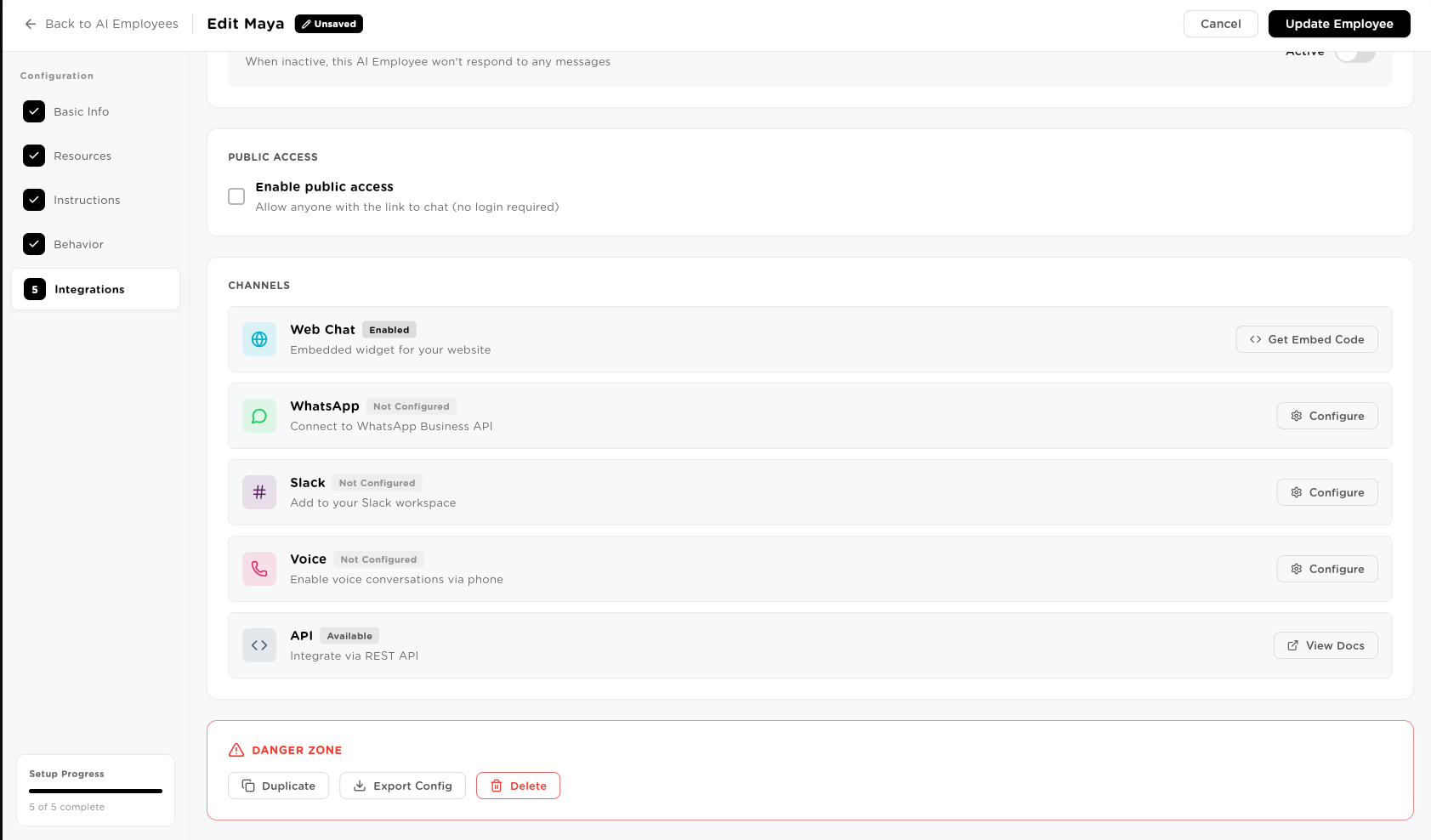
Web Chat
Primary interface. Embedded widget with one script tag. Enable public access for external-facing deployments.
Mobile-first access. Assign tasks to Maya from your phone while commuting. Results delivered in the thread.
Slack
@mention Maya in any channel. She executes and responds in the thread. Full task history stays in Slack.
Voice
Coming SoonSpoken instructions, voice-first workflows. Assign a task by speaking. Results delivered via voice or message.
API
Integrate programmatically into any system. Full REST API. Trigger Maya from your CRM, your operations system, or any custom integration.
Which role in your company
should an AI be doing?
Pick a department. Define the job. Deploy Maya, Alex, Emma, or whoever your operation needs. Running in 30 minutes. Working 24/7 from day one.
Full audit trail from day one·Approval workflows built in·No engineering required
- Full audit trail from day one
- Approval workflows built in
- No engineering required