Solutions · Operations

Your whole operation,
run by one AI-native workforce.

Operational load lives in inboxes and in people's heads: requests land everywhere, the real procedure is tribal knowledge, and SLA breaches surface as complaints. An AI-native operations function puts the whole desk on a workforce that intakes every request, runs your written SOP, and holds every payment and commitment for the ops lead.

Installed in about 35 min. Governed and audited from the first run.

OVERNIGHTThis morning's desk
34 requests intaken & matched to SOP
SLA held across the queue
1 vendor payment holding for the lead
1 exception routed to a person
one workforce · governed · audited · cfg v6
The whole function, on one workforce

Not a bot bolted onto intake.
The operations motion, end to end.

Every stage of the motion is worked by the right kind of worker (an unattended play, a room of specialists for the hard cases), all reading and writing one shared record, with your ops lead at the gates that matter.

You delegate to one coworker. It runs intake and brings you the exceptions that need a person.
runs on its own
Intake
  • Capture from every channel
  • Categorize the request
  • Stamp the SLA clock
runs on its own
Match the SOP
  • Find the runbook
  • Cite the steps
  • Escalate the gaps
a room of specialists
Run the steps
  • Execute the routine steps
  • Pull in the right systems
  • Hand off the judgment calls
runs on its own
Commit & pay
  • Vendor commitments hold
  • Show the SOP as evidence
  • Release only on approval
holds for a person
runs on its own
Watch & report
  • Watch every SLA clock
  • Compile the briefing
  • Price the run
One shared record underneath. Every stage reads and writes the same requests, SOPs and SLA clocks, under one rulebook of gates, budgets and audit.
Every step lands in the audit trail, pinned to the config that ran, so the SOP becomes executable and auditable, provable afterwards.
One workforce, several kinds of worker

One team. The right shape of worker for each job.

You don't wire this together or choose an architecture. You describe the outcome; the workforce brings the right kind of worker to each part of the motion, and they all work from one shared record, under one set of rules.

Workers that run a play to the end

The repeatable requests (intake, categorize, match the SOP, run the routine steps) go start to finish on their own, unattended, the moment they land, day or night.

A room of specialists for the hard cases

When one request touches several systems at once (verify a contract, update a record, prepare a payment), a room of specialists assembles the work together, each owning its part.

A coworker you delegate intake to

You don't operate a queue. You talk to one coworker that runs intake, remembers your standing instructions and thresholds, and surfaces only the exceptions that need you.

One shared record, one rulebook

Every worker reads and writes the same requests, SOPs and SLA clocks, and every one obeys the same gates, budgets and audit. No worker is ever off the leash.

Your SOPs, finally executable and auditable

The procedure stops living in people's heads. Your runbooks are retrieved and cited on every run, so the SOP is the thing that executes, and every step it takes lands in the audit trail.

What you never build

There's no integration project and no architecture to pick. You delegate the outcome, the workforce assembles the right workers, and every one of them lands under the same gates and audit.

What this makes possible

Process that runs on paper, not on memory.

Not another intake form: a workforce that owns the repeatable majority of requests end to end, runs your written SOP on every one, and hands your people the exceptions and the judgment. The week shifts like this (a worked scenario, not a benchmark):

01
Every request matched to a written SOP on arrival

Email, chat, form: each request is categorized, matched to the written procedure that governs it, and stamped with an SLA clock the minute it lands. Nothing lives in whichever inbox it happened to hit.

02
The routine steps executed from your runbooks

Routine steps run from your own knowledge base, retrieved and cited on every run. Where the procedure doesn't cover it, the request escalates to a person instead of being improvised.

03
Exceptions and money held at the gate

Vendor payments, external commitments, anything the SOP marks as judgment, all hold at the approval gate with the relevant SOP section attached as evidence, waiting for the ops lead.

04
SLA drift flagged with time to act

Every open request is checked against its clock continuously, so drift surfaces as an escalation with runway, not as a customer complaint, and cost per closed request is priced from real run spend.

Ops todayWith the workforce
New requestsscattered across inboxesone queue, categorized, clocked
The SOPin someone's headexecuted and cited, every run
SLA breachesfound in the complaintflagged while there's runway
Vendor paymentsburied in a threadone approval queue, evidence attached
Ops lead's daychasing status by handthe exceptions and the calls
What running it feels like

You run the queue from one conversation.

Otto isn't a dashboard you operate, it's the coworker you delegate intake to. The night's requests, what's still waiting on a vendor, the payment that's ready: it arrives summarized, the pieces that need you are already held with the SOP section as evidence, and each approval releases exactly one thing.

Every message, tool call and approval in this exchange lands in the audit trail. How the gates work →

LIVEQueue check-in with Ottooperations workspace
Otto, where does the queue stand?
OT
Otto · Operations coordinator34 requests intaken since yesterday. 32 matched to an SOP and worked through, 1 waiting on a vendor, 1 needs you: a vendor payment above the threshold. SLA is green across the queue.32 executedSLA green1 held
search_kb(vendor-renewals-sop) → §4.2: renewals under $5k, ops-lead approval
create_payment · $3,150 · Meridian Logistics · money always waits for a person
Approved. Are we still inside the SLA?
OT
Otto · Operations coordinatorYes. The clock started at intake, 7:48 AM. Your approval releases the payment step with about three hours of runway, and the grant covers exactly this one payment.cited: SOP §4.2single-use grant
payment released · request closed inside SLA · logged to audit trail, cfg v6
Proof, not promises

One vendor request, across the whole motion.

A scenario: a shared-services ops team with SLA targets on every request type. These are real screens, not mockups.
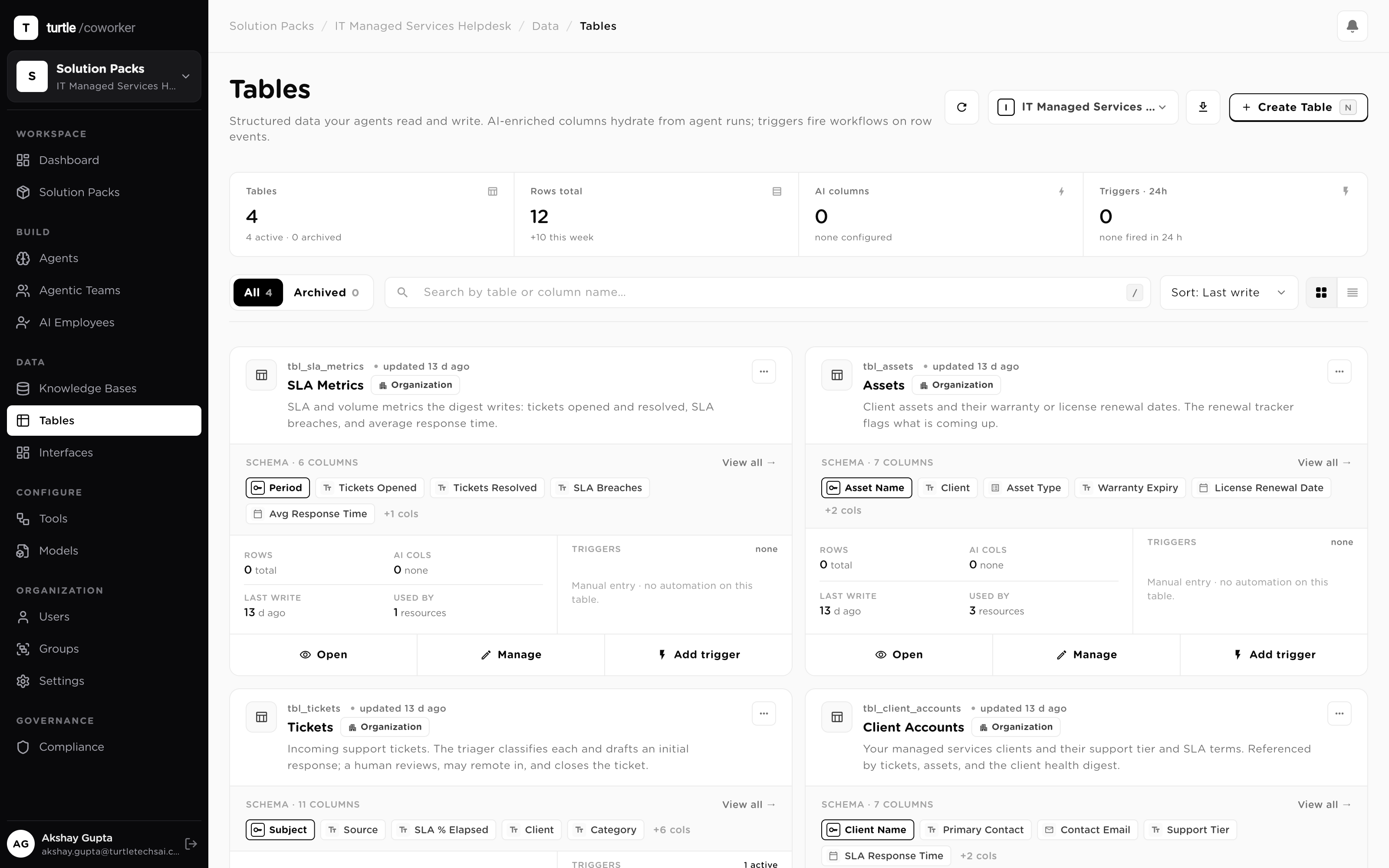
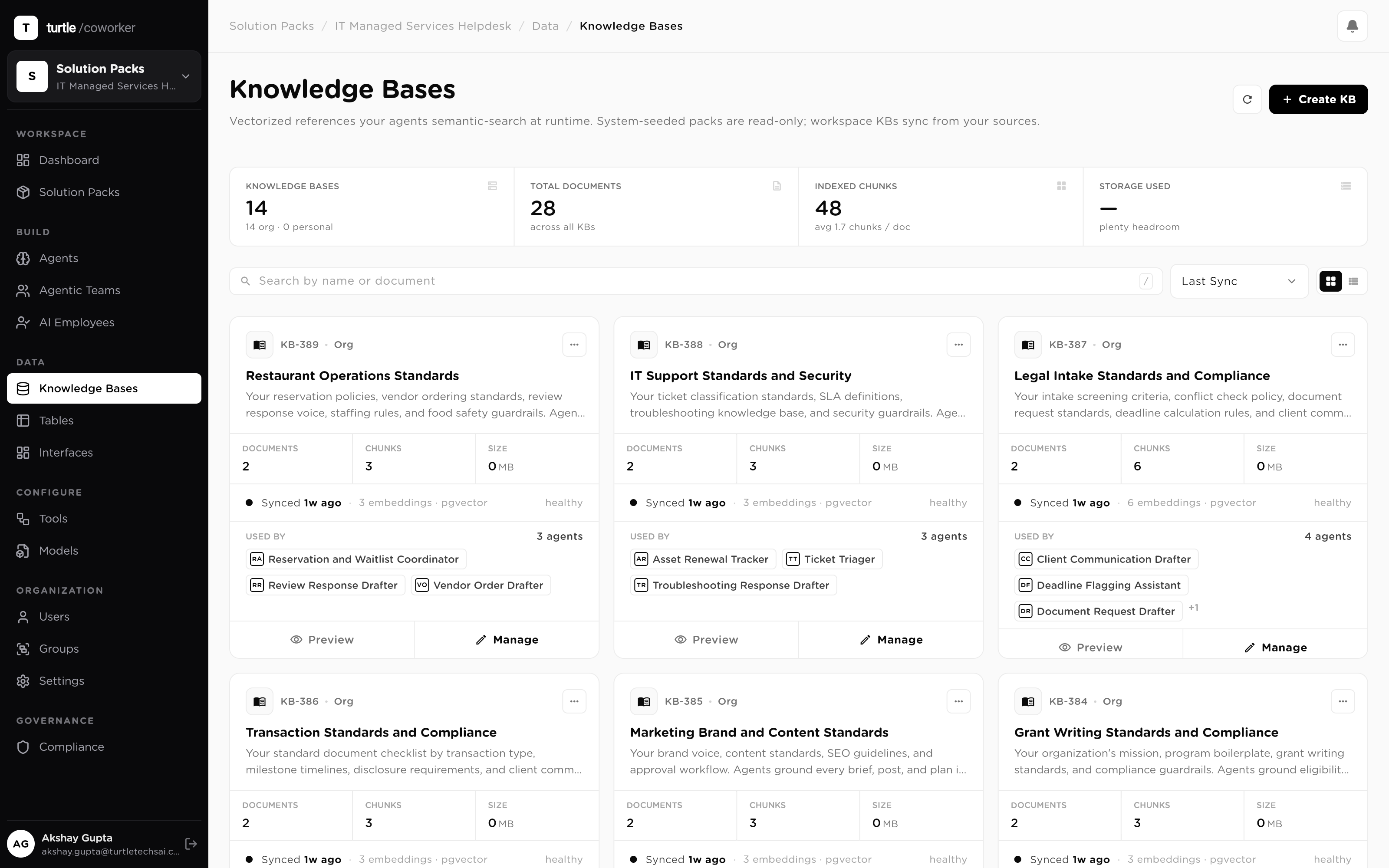
LIVEOne vendor request, intake to closerun #5217 · operations workspace
7:48 AM
arrivedA vendor request landsA renewal request arrives by email. The SLA clock is stamped at intake, and the inbound text is screened by the injection shield before it can steer anything.
7:49 AM
workforceMatched to SOP §4.2, categorized, clockedCategorized as a vendor renewal, priority set, matched to the written procedure that governs it. The request is a queue row now, not an email.
7:52 AM
workforceRoutine steps executed from the runbookContract terms verified, renewal record updated, each step run from the runbook knowledge base and cited. A gap in the SOP would escalate, not improvise.
7:58 AM
heldOne step needs a payment, so it holdscreate_payment · $3,150 to Meridian Logistics. Money never moves on its own; it waits in the queue with SOP §4.2 and the executed steps attached as evidence.
10:20 AM
humanThe ops lead approves, with the SOP shownThe lead reviews the SOP section and the steps already run, and approves. Single-use grant: this payment only, expired in 24 hours if unused, the next one asks again.
10:21 AM
doneClosed inside SLA, priced, pinned to cfgPayment released, request closed with hours of runway, run priced, every step in the audit trail and pinned to cfg v6.
The request queue table with rows from multiple channels: category, priority and SLA-due columns filled in on each request, showing the queue categorized and clocked at intake
One queue for every channel, categorized, prioritized, on a clock
The SOP runbook knowledge base with the source procedure documents listed: the runbooks the executing workers ground and cite each step in
The runbook the workers execute from, your documents, cited on every run
Governed by default

The gates ship with the system.

01 · THE SOP IS THE SOURCE

Grounded in your runbooks

Every executed step is retrieved from your SOP knowledge base and cites the passage it followed; what the runbook doesn't cover escalates to a human instead of being improvised. Inbound request text is untrusted, so a prompt-injection shield screens it before it reaches a model. The control plane →

02 · CONSEQUENCE HOLDS

Money moves only on approval

Payments, external commitments and the exceptions your SOP flags all stop at the gate, enforced at the tool call, at runtime. Each approval is single-use: one grant, one action, 24-hour expiry, and delegation covers the days the ops lead is out. How approvals work →

03 · EVERY STEP TRACED

Audited, with SLA evidence

Every intake, executed step, hold and decision lands in the audit trail, pinned to the config version that ran, SLA evidence included. Every run's spend rolls up under budgets with hard caps, so cost per closed request is a number you read, not estimate.

Get the whole motion, pre-wired
Procurement Ops Control Tower Pack Official
Everything on this page (the queue, the workers, Otto, the gates) installs as one system in about 35 min, verified with a smoke test. The full blueprint is readable before you sign up.
Start smaller

Operations templates, ready to clone.

All templates
Incident Command And Change Operations Coordinator Template Template
Operations AI employee for service operations, incident triage, stakeholder updates, postmortem preparation, and change risk review. Includes three relational tables, AI-enriched columns, two operations knowledge bases, and four specialist embedded agents.
Weekly Status Rollup Writer Template
Turns scattered team updates from Slack, docs, and standups into one exec-ready weekly rollup. Organizes the raw dump into wins, progress by workstream, risks with severity, decisions needed, and slippage: flagging contradictions instead of smoothing them over: then writes an audience-calibrated report with a 3-bullet TL;DR, per-workstream sections, a risks table, and explicit asks. Skimmable in under two minutes. Pure standalone, no tools or tables required.
Inbox Triage Assistant Template
Triages a pasted batch of emails into act-now, reply-today, delegate, read-later, and ignore buckets against your stated priorities, then drafts the urgent replies for you. Returns a triage table with one-line reasons, flagged commitments and deadlines, ready-to-send reply drafts, and delegation notes. Pure standalone, no inbox connection required.
Meeting Notes to Action Items Template
Turns raw meeting notes or a transcript into clear decisions, owned action items, and a ready-to-send follow-up email. Paste your notes, get a crisp summary for people who missed it, an action-item table with owners and due dates, and a recap email. Pure standalone, no tools or tables required.
Questions

Before you install.

Is this one AI, or a lot of them?
One workforce, several kinds of worker. Some requests run as unattended plays that go start to finish on their own; a request that touches several systems at once is assembled by a room of specialists; and you talk to one coworker that runs intake. You never wire this together or choose an architecture. You delegate the outcome, and the workforce brings the right shape of worker to each part of the motion. Every one of them reads and writes the same record and obeys the same gates.
Do we have to rewrite our SOPs to use this?
No. Your existing procedures, the docs, wikis and runbooks you already maintain, are ingested into a knowledge base, and the executing workers ground each step in them at run time, citing the passage they used. You keep maintaining one document; execution follows it. Where a procedure is thin, you'll find out precisely: those are the requests that escalate, which tells you exactly which SOP to write next.
What happens when a request isn't covered by an SOP?
It escalates, to a named person, with everything gathered so far attached. The workers answer from your runbooks or not at all; a gap in the procedure is a handoff, never a guess. That failure mode is the point: the alternative is an improvised process step that nobody documented and nobody can defend later.
Who approves the money?
A person you name. Anything touching payments or external commitments holds at the approval gate, enforced at the tool call, at runtime, not by convention, and each approval is a single-use grant: one grant releases exactly one action and expires in 24 hours. When the ops lead is out, approval delegation routes the queue to a named delegate, and every decision is stamped with who made it.
How does the SLA watching actually work?
Every request gets its SLA clock stamped at intake and carried on its row in the queue. A trigger checks the open queue against those clocks continuously and flags requests drifting toward breach while there is still time to act, so a breach surfaces as an escalation with runway, not as a customer complaint. Response and resolution outcomes are recorded, so SLA attainment is a query, not a reconstruction.
How long until it's running?
About 35 min. You answer a few setup questions (your request types, SLA targets and approval thresholds), point the knowledge base at your SOPs, connect the channels requests arrive by, and the installer wires the queue, the workers and Otto together, verified with a smoke test and ready for a first request.
Solutions · Operations

The procedure runs itself by morning. The payments wait for your ops lead.

Book a demo Install Procurement Ops Control Tower Pack