Lock your automation to one model vendor and their price list becomes your cost structure — and you'll pay frontier rates for extraction work a cheap model does fine. Here the model is a layer: six providers plus Azure OpenAI on your own keys, chosen per agent, swapped without rebuilds, and metered to the message under hard budget caps. Enterprise mandates — an existing Azure agreement, data residency, BYOK — are the design, not the exception.
In a pack, model choices arrive made: every agent ships with a working default you can swap, on your own keys.
See Solution Packs →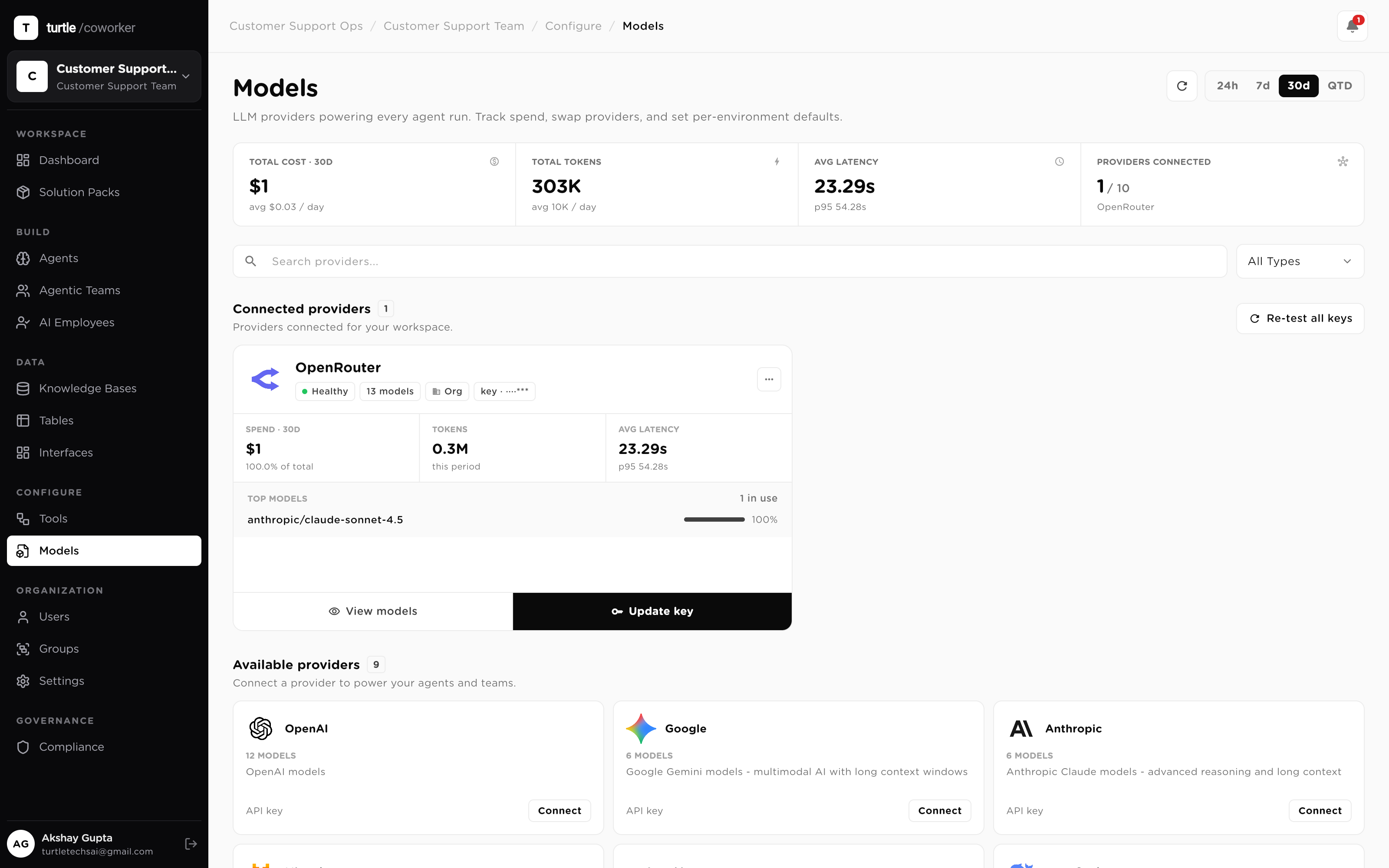
Model lock-in compounds quietly: every workflow you build on a hard-coded model is another workflow that vendor's pricing, outages and roadmap now own. And most enterprises carry mandates — an existing Azure OpenAI agreement, data-residency terms, keys-stay-ours — that most AI products simply can't meet.
So intelligence here is a layer, not a dependency. Providers connect on your keys, each agent picks its own engine, a swap is a setting, and every call is metered to the message with hard caps above it. The model decision stays a decision — revisable, priced, and yours.
Pick a job. Each keeps the choice yours: any provider, per agent, on your own keys, with the meter and the ceiling attached.
A finance department's invoice pipeline has two very different jobs in it: pulling fields off PDFs, and deciding what to do about exceptions. One price should not fit both.
Field extraction is high-volume, low-judgment work. That agent is configured with a fast, low-cost model — its accuracy needs are structural, not creative.
The exception-handling agent — mismatch reasoning, escalation decisions — runs a frontier model, because being wrong there costs more than the tokens do.
Per-message cost accounting shows each agent's spend separately, so the mix is tuned on evidence.
A cheaper model with comparable quality just launched. On most platforms that's a migration ticket. Here it's a setting change on the agents that should move.
If the provider is connected, its new model is available to pick. A new provider is one key away.
The extraction agents switch models; their inputs, tools, tables and permissions are untouched.
Next window's per-model cost roll-up shows the actual saving in dollars — or tells you to switch back.
The company already has an Azure OpenAI agreement with negotiated terms and a residency commitment. The mandate: AI traffic runs on that agreement or it doesn't run.
IT connects the org's Azure OpenAI endpoint, API version and deployments — an org-scoped connection with the org's own key.
Deployments appear in the model menu like any provider's models; workers run on them without special-case plumbing.
Traffic stays on the company's Azure tenancy and region. Nothing was renegotiated to adopt one more product.
A provider is degraded and part of the workforce runs on it. You need those agents on a healthy engine now — not after a re-engineering sprint.
Per-model accounting shows exactly which agents and how much traffic ride on the degraded provider.
The affected agents switch to comparable models on a healthy connected provider — a setting change per agent.
Workflows, tools and permissions never moved. When the provider recovers, moving back is the same one change.
The fear isn't the average month — it's the outlier: a looping agent on a frontier model, discovered on the invoice. The ceiling should exist before the loop does.
Hard daily and monthly caps per workspace, employee or team — governance-enforced, not advisory.
Period-end forecasting projects spend against the cap and surfaces the breach date early.
A cost threshold trips and the circuit breaker pauses the worker mid-loop. The invoice stays boring.
Connect providers with your own keys once; every agent, team and employee runs on the model you choose — swappable, metered, capped.
Six properties that keep the intelligence layer yours — the providers, the keys, the choice, and the bill.
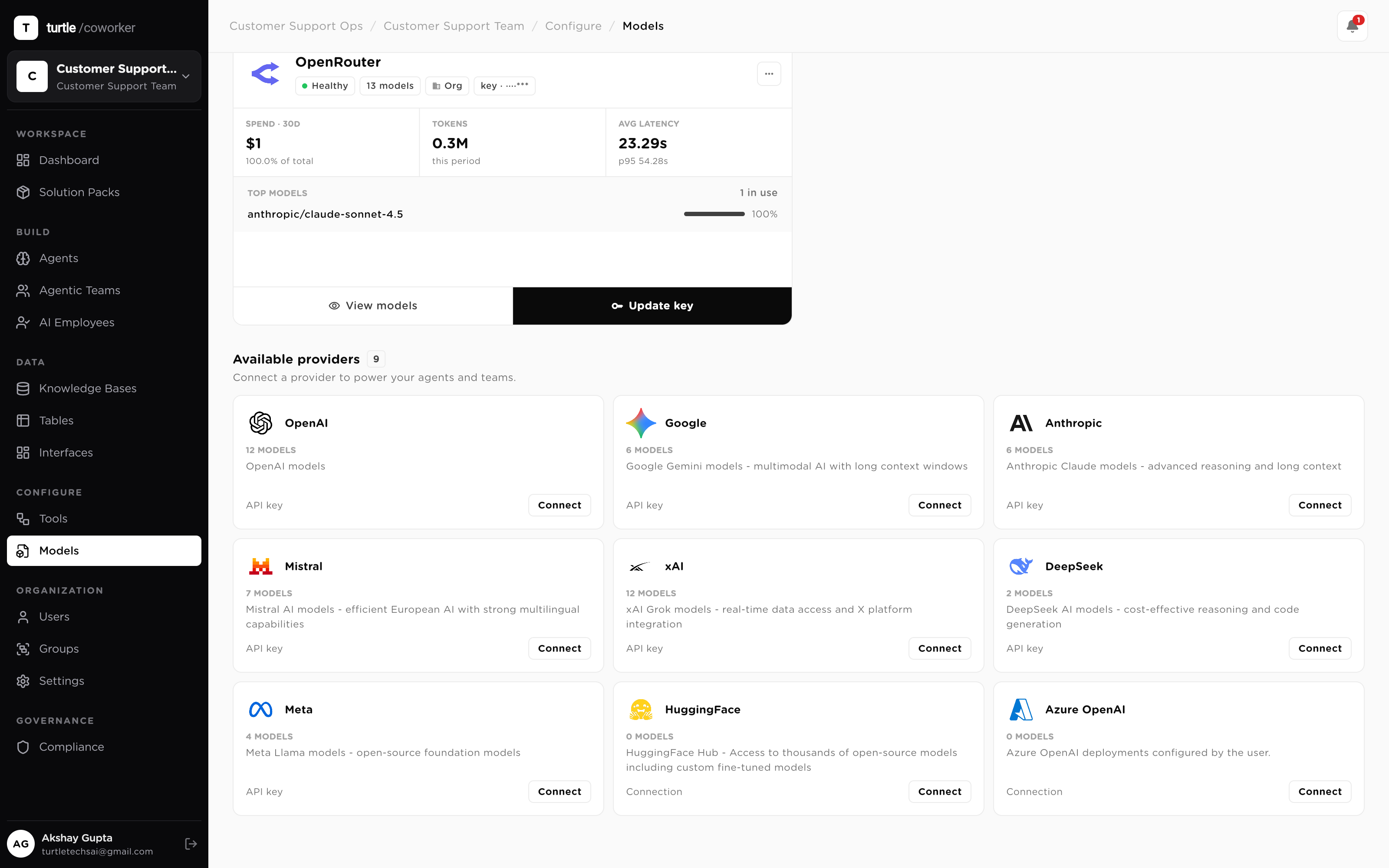
Hard-code one vendor's model into your automation and you've signed up for its pricing, its outages and its roadmap, with no exit. Here the model is a configuration layer: connect OpenAI, Anthropic, Google, Mistral, DeepSeek and xAI — plus Azure OpenAI as its own connection type — and every model becomes pickable across the workspace. No single vendor ever owns your intelligence layer.
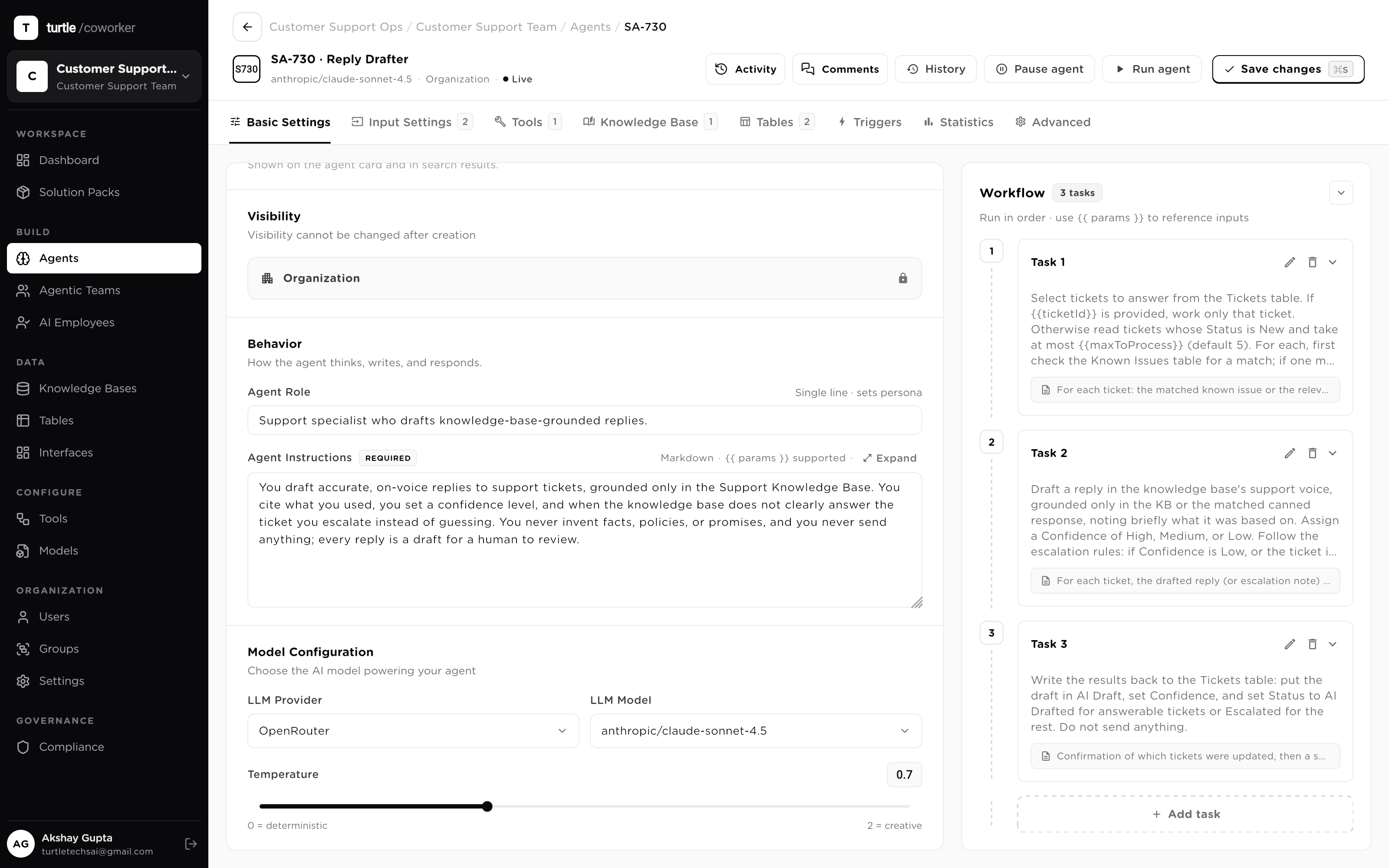
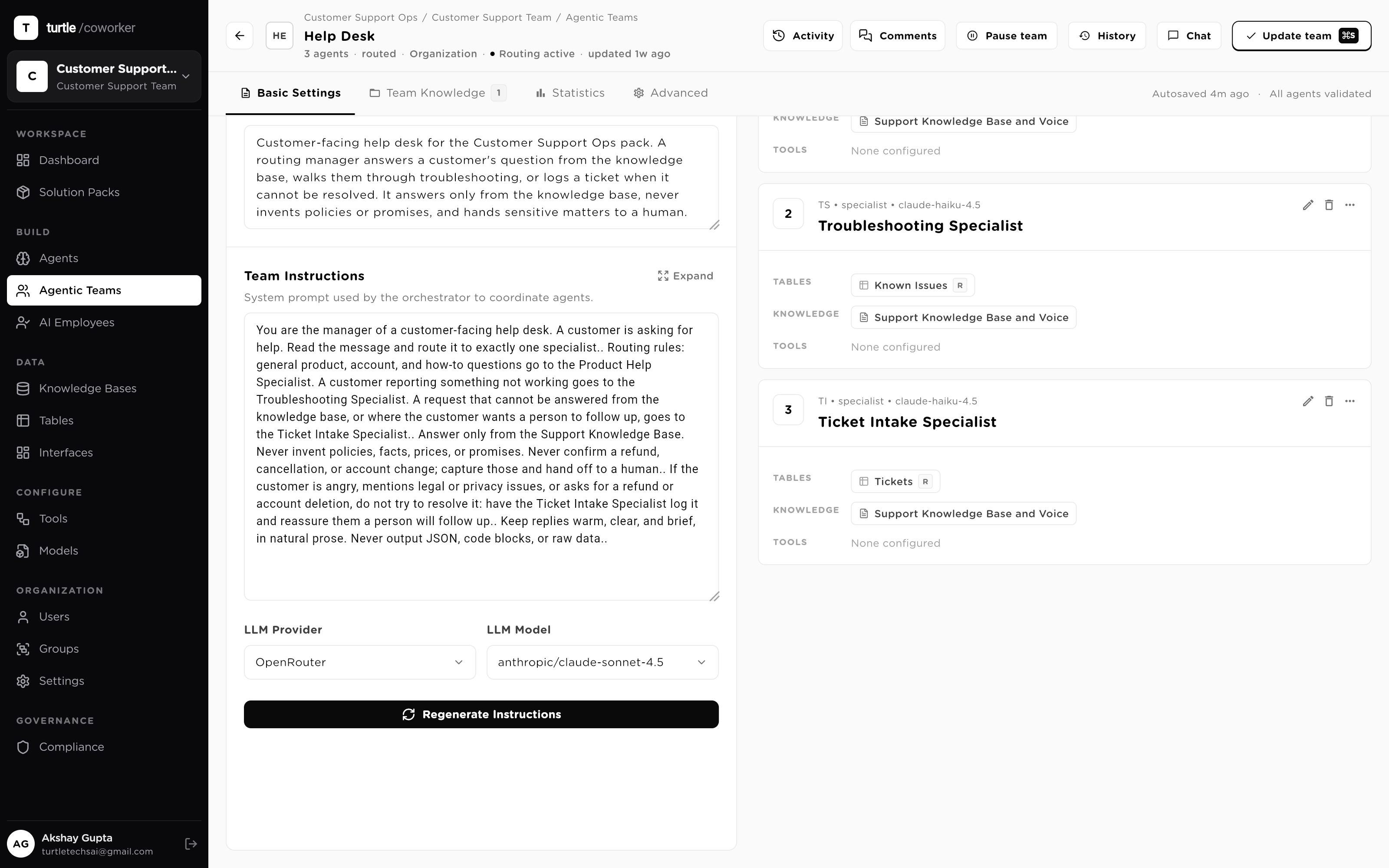
Paying frontier prices for extraction work is the quiet waste in most AI bills. Model choice here is per agent, not a global default: the agent doing document extraction runs a fast, cheap model; the agent making the judgment call runs a frontier one. Both live in the same workflow, and each choice is one setting on that agent — mixing providers freely across a team.
Because the model is configuration, a swap is not a migration. When a cheaper or better model ships, point the agent at it — the workflow, tools, tables and permissions stay exactly as they were. A provider outage works the same way in reverse: move the affected agents to a comparable model on a healthy provider and resume. Model churn stops being your re-engineering problem.
Keys are the organization's own. A connection is scoped to the org or to a person, and at call time the platform resolves the exact configured connection first — then org-level keys, then provider-level, then environment. No reselling, no markup, no pooled tenant key: your spend lands on your vendor agreement, in your region, under your negotiated terms. For enterprises with an existing Azure OpenAI agreement, that agreement — endpoint, deployments and all — is the connection.
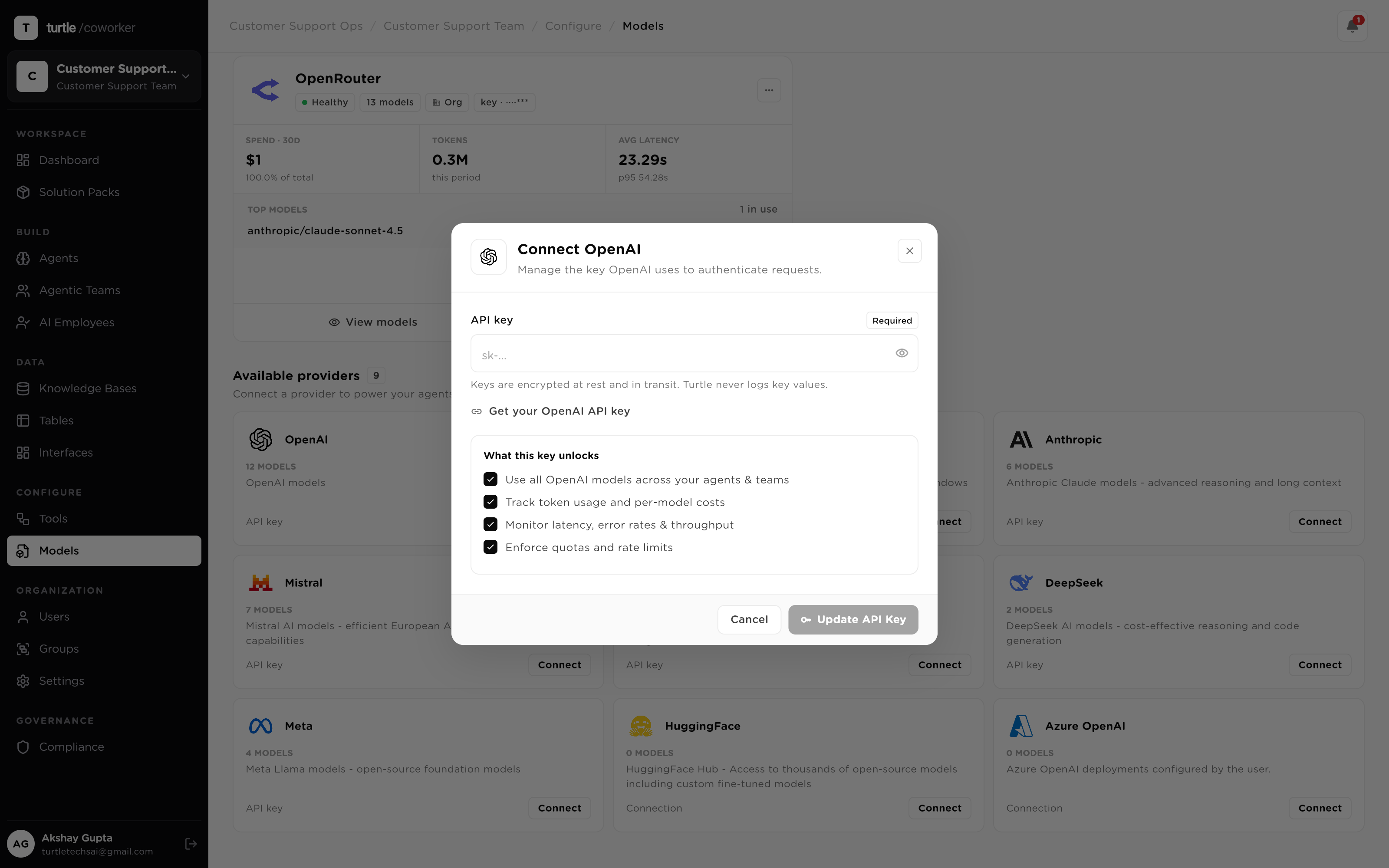
Cost control starts with knowing where the money goes. Every LLM call carries its token counts and USD cost at the message level — not a monthly invoice surprise, a per-message record that rolls up by session, worker and model. "What are we spending on AI" stops being a guess, and "which steps belong on a cheaper model" becomes something you read off, not estimate.
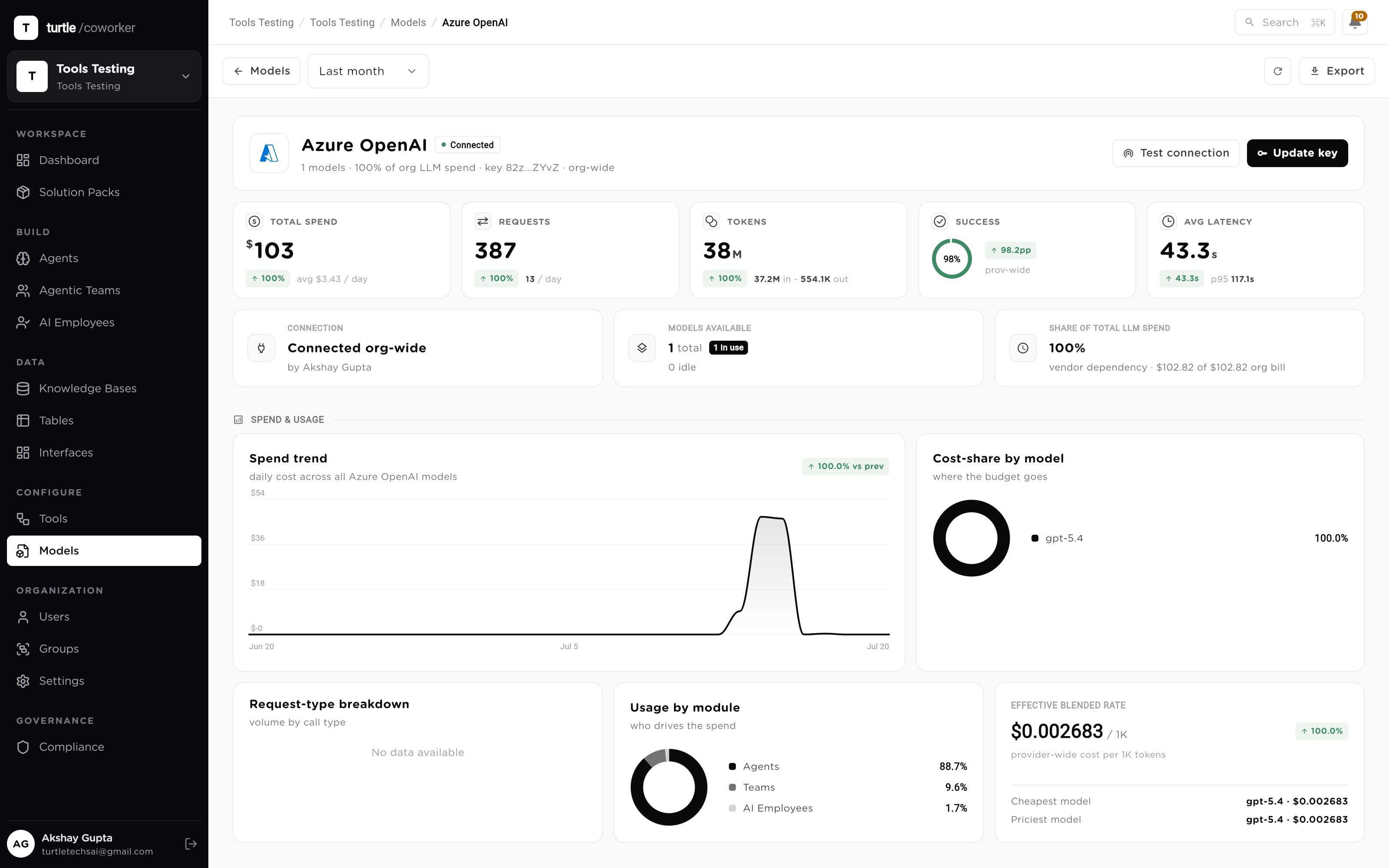
Metering shows the spend; governance caps it. Hard budget limits — daily and monthly, per workspace, employee or team — sit on top of the per-message accounting, with period-end forecasting and circuit breakers that pause a worker when cost or error thresholds trip. A runaway loop on an expensive model burns to a ceiling, not through a quarter. That's the governance layer, applied to the model bill.
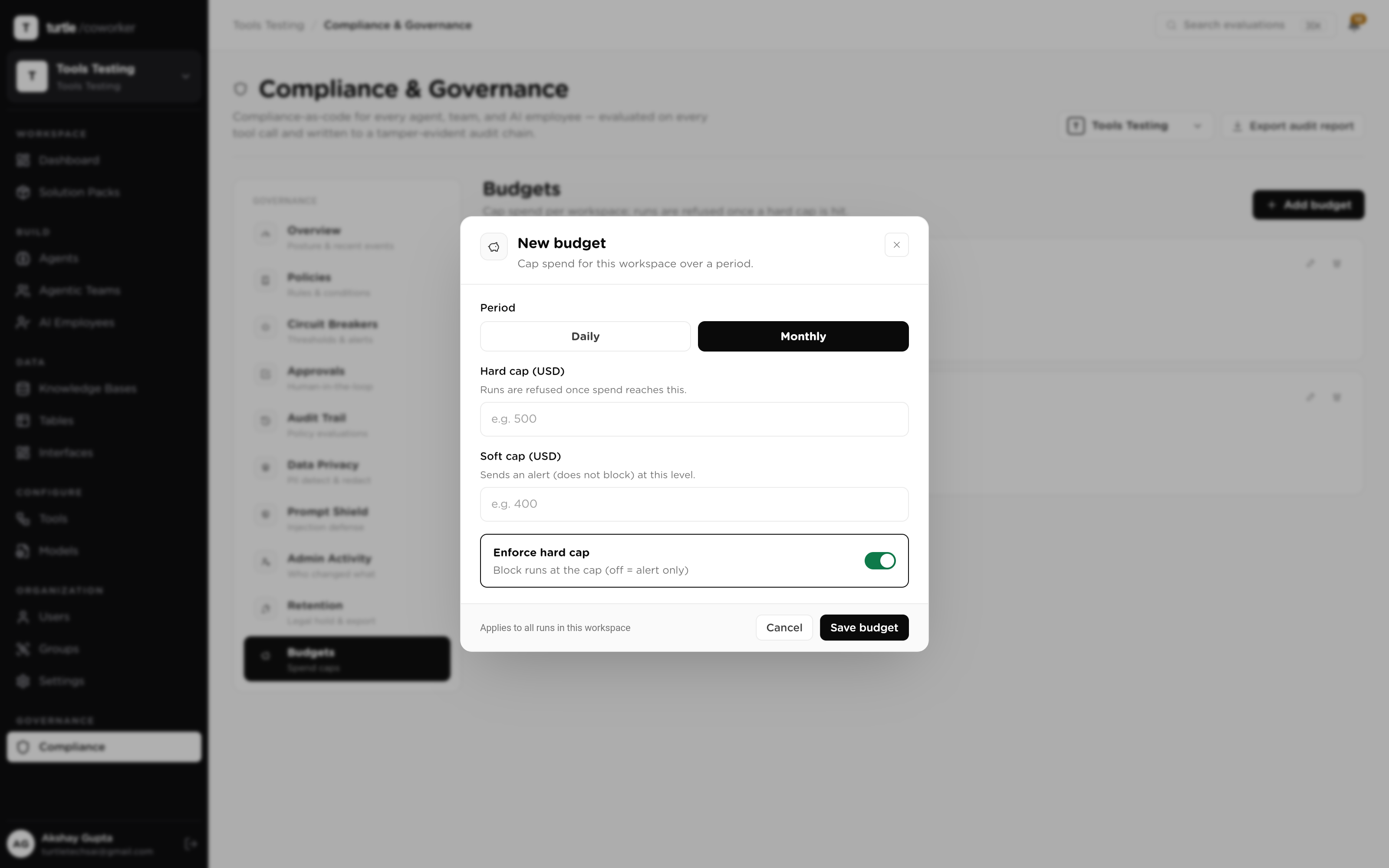
An AP pipeline runs extraction and judgment as separate agents on separate models — chosen per agent, on the org's own keys. Here's how the system behaves across a quarter.
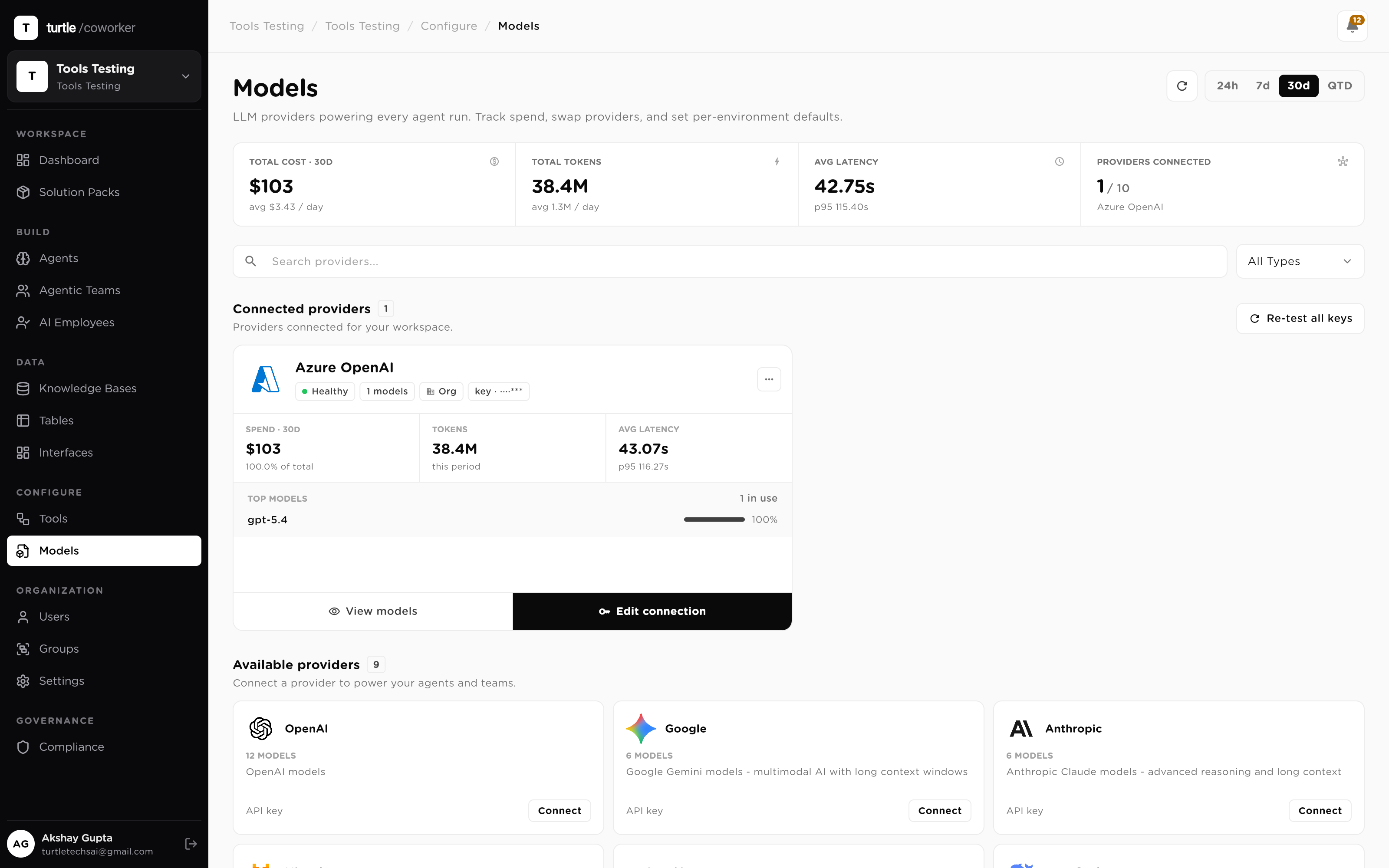
OpenAI, Anthropic, Google, Mistral, DeepSeek and xAI behind one menu — no model hard-coded into any workflow.
A first-class connection type: your endpoint, API version and deployments — your existing enterprise agreement, honored.
Each agent picks its own model. Cheap for extraction, frontier for judgment, mixed freely in one team.
A model change is a setting. Workflow, tools, tables and permissions are untouched by the swap.
Org- or personal-scoped keys, resolved configured-connection-first. No markup, no pooled tenant key.
Token counts and USD cost on every call, rolled up by session, worker and model.
Hard daily and monthly caps with breach forecasting; breakers pause a worker when thresholds trip.
Model calls happen inside runs that are logged, sanitized and pinned to the config version they executed under.
End-to-end procurement operations solution pack with vendor registry, purchase request review, contract path assessment, embedded review team, and AI employee coordination.
Complete operating system for a Chartered Accountant practice. Tracks clients, engagements, statutory deadlines, and IT/GST notices. Includes AI agents for notice triage, GST reconciliation, filing reminders, and client communication. Comes with an AI Employee (Priya) who coordinates compliance work end-to-end.
Move candidates faster without cutting corners on fair hiring. Riley, your AI recruiting coordinator, screens each new candidate against the job's must-haves with must-have-by-must-have reasoning, coordinates interview scheduling by drafting availability requests, drafts honest candidate outreach and status updates, builds submittal packages for hiring managers or clients mapping experience to requirements, and gives the team a daily pipeline read. Screening never considers anything beyond skills and qualifications, and it never rejects a candidate or extends an offer; those stay human decisions. Everything else is draft-and-approve: candidate messages are prepared for a human to send, and interview times are proposed, never confirmed, by the agent. Four tables hold your job orders, candidates, interview scheduling, and pipeline metrics. A knowledge base holds your screening standards, submittal format, communication voice, and compliance guardrails, which every assessment and message follows. Automations included: new candidates are screened on arrival, plus an optional daily pipeline digest. Works out of the box with the roles and candidates you add; connect an ATS or job board later to sync candidates, and Gmail and Calendar to send outreach and confirm interviews from the platform. Best first step: replace the placeholder screening standards and compliance rules with your own and add an open job.
A complete outbound-to-pipeline sales engine for a small team. Define your ideal customer profile once in the ICP Profiles table and paste your product details into the Product Knowledge Base, then Sasha, your AI SDR, discovers and vets target accounts, enriches prospects, researches companies, scores leads, and drafts outreach, all grounded in your data. Inbound leads and your deal pipeline live in tables the founder can watch. Automations included: new prospects are auto-enriched on arrival, and an optional daily discovery run finds fresh accounts from your Active ICP. Requires an LLM provider plus the Apollo, Serper, Exa, and Google Search connectors. Replace the sample knowledge base content and the example ICP row with your own.
Answer more support tickets, faster, without losing the human touch. Sam, your AI support specialist, classifies every incoming ticket by category, sentiment, and priority, drafts an accurate reply grounded only in your knowledge base, and escalates anything it is not confident about instead of guessing. It matches recurring problems to approved canned responses, mines new tickets into known issues so answers stay consistent, tracks the feature requests buried in tickets, and produces a weekly insights digest of volume, deflection, and top drivers. Everything is draft-and-approve: replies are prepared for a human to review and send, and sensitive tickets (anger, churn, refunds, account deletion, legal or privacy) are always escalated. Four tables hold tickets, known issues, feature requests, and daily metrics. A knowledge base holds your help-center content and support voice, which every reply cites. Automations included: a reply is drafted the moment a ticket arrives, plus an optional daily sweep of anything still unanswered. Works out of the box with no external tool; connect Gmail later to send from the platform and Slack for the digest. Best first step: replace the placeholder knowledge base with your real help-center articles or URLs.
A complete, full-lifecycle sales engine for a growing team, spanning outbound prospecting and account management across one shared data layer, with a companion inbound concierge. Outbound: Sasha, your AI SDR, discovers and vets accounts, enriches prospects, scouts buying signals, researches companies, scores leads, and drafts cold email, LinkedIn, and nurture outreach. Account management: Maya, your AI Account Manager, qualifies opportunities, drafts and reviews proposals, flags pipeline risk, forecasts renewals and expansion, and keeps the CRM clean. Seven tables hold ICP profiles, target accounts, prospects, website leads, CRM contacts, opportunities, and customer accounts. Automations included: new prospects are auto-enriched on arrival, and an optional daily discovery run finds fresh accounts from your Active ICP. For the inbound engine, install the companion Website Sales Concierge team template, which routes visitor questions to product, pricing, and objection specialists and captures leads into the Website Leads table. Requires an LLM provider plus the Apollo, Serper, Exa, and Google Search connectors. Replace the sample knowledge base content and the example ICP row with your own. Outreach and proposals are drafted for a human to review and send.
