Platform · Govern · The control plane

Governance

The layer your security review is looking for. A policy engine evaluates every tool call, approvals are enforced at runtime and spent after one use, PII and prompt injection are screened by policy, spend has hard ceilings, and every action lands in an immutable, exportable audit trail — pinned to the exact configuration it ran under.

See the controls Approvals & HITLTrust Center
At a glance
  • Policy engine6 rule types · 5 verdicts
  • Function catalog1,095 fns · 50 integrations
  • Approvalssingle-use, runtime-enforced
  • Autonomy4 scopes, per worker
  • DataPII + injection policies
  • Spendhard caps + breakers
  • Auditevery call, config-pinned
  • Tenancyorg-scoped, role matrix
IN A SOLUTION PACK

In a pack, governance arrives on: permissions, approval gates and the audit ledger active from run one.

See Solution Packs →
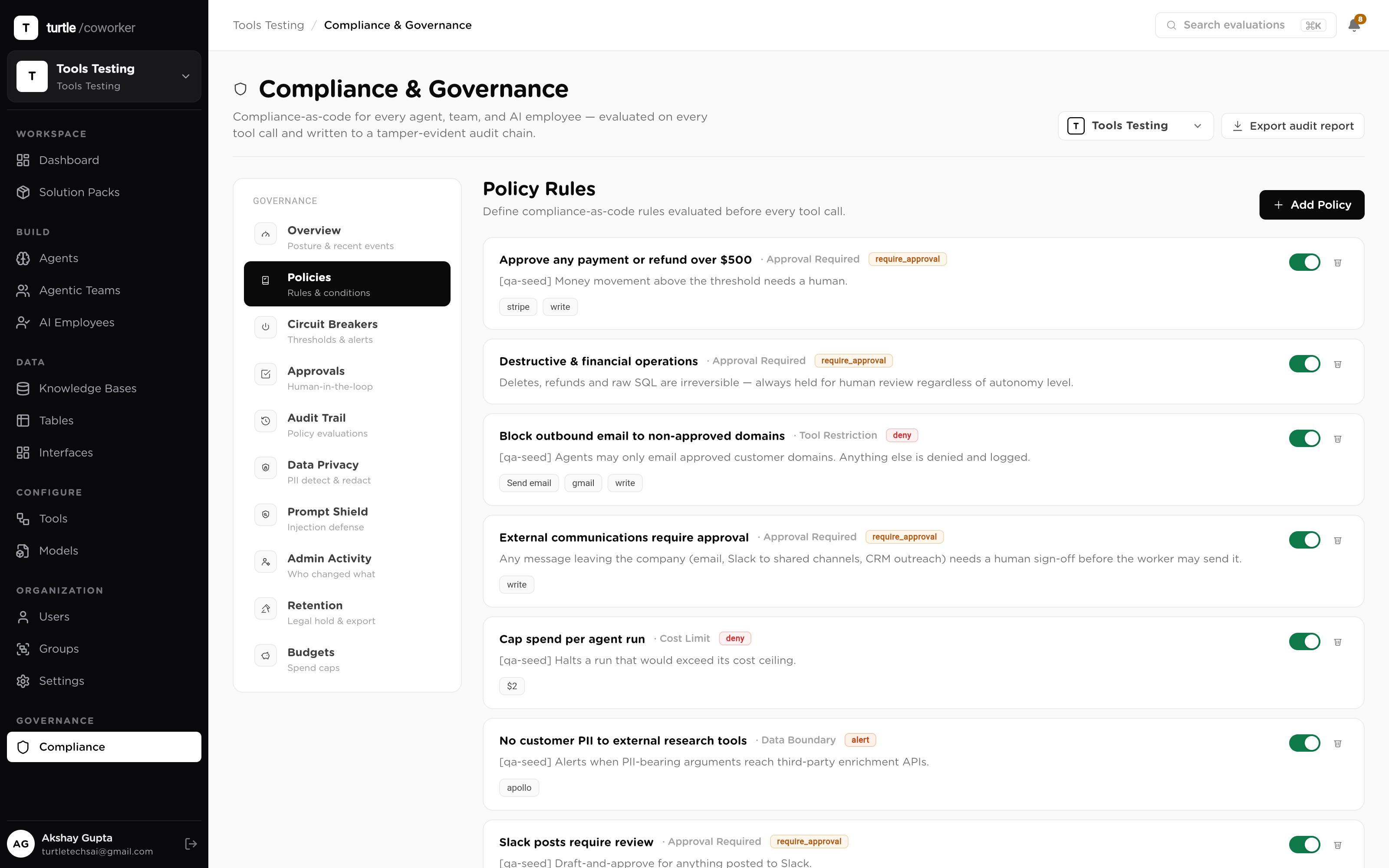
app.turtlecoworker.com/governance/policies
The governance overview: active policy rules with type, conditions, verdict and priority, plus the live evaluation counter
The policy surface: what's allowed, what's held, what's blocked — and the count of evaluations behind each rule.
Why it's built this way

Governance that reads the plan
isn't governance.

A model can be talked out of a plan. It cannot be talked past a gate that sits in the execution path. Every control on this page is enforced where the action happens — on the tool call, at runtime, with the verdict recorded.

That's the difference between a policy document and a policy engine. One asks the AI to behave; the other makes misbehavior a no-op. And because the controls live in the runtime, they cover every entry point the same way: chat, schedule, trigger, API, mobile, MCP client.

The controls

Eight layers between a worker and the world.

Scope what it touches, screen what it reads, gate what it writes, cap what it spends — and keep a record of all of it, forever pinned to the config that produced it.

01 · Policy engine

Compliance as code, evaluated on every call.

Governance here is not a PDF your vendor emails you. It's a policy engine that sits between every worker and every tool: rules with a priority order, conditions on the integration, the exact function and whether it reads or writes, and five possible verdicts — allow, deny, require approval, alert, or log. Every evaluation is recorded, including the ones that allowed.
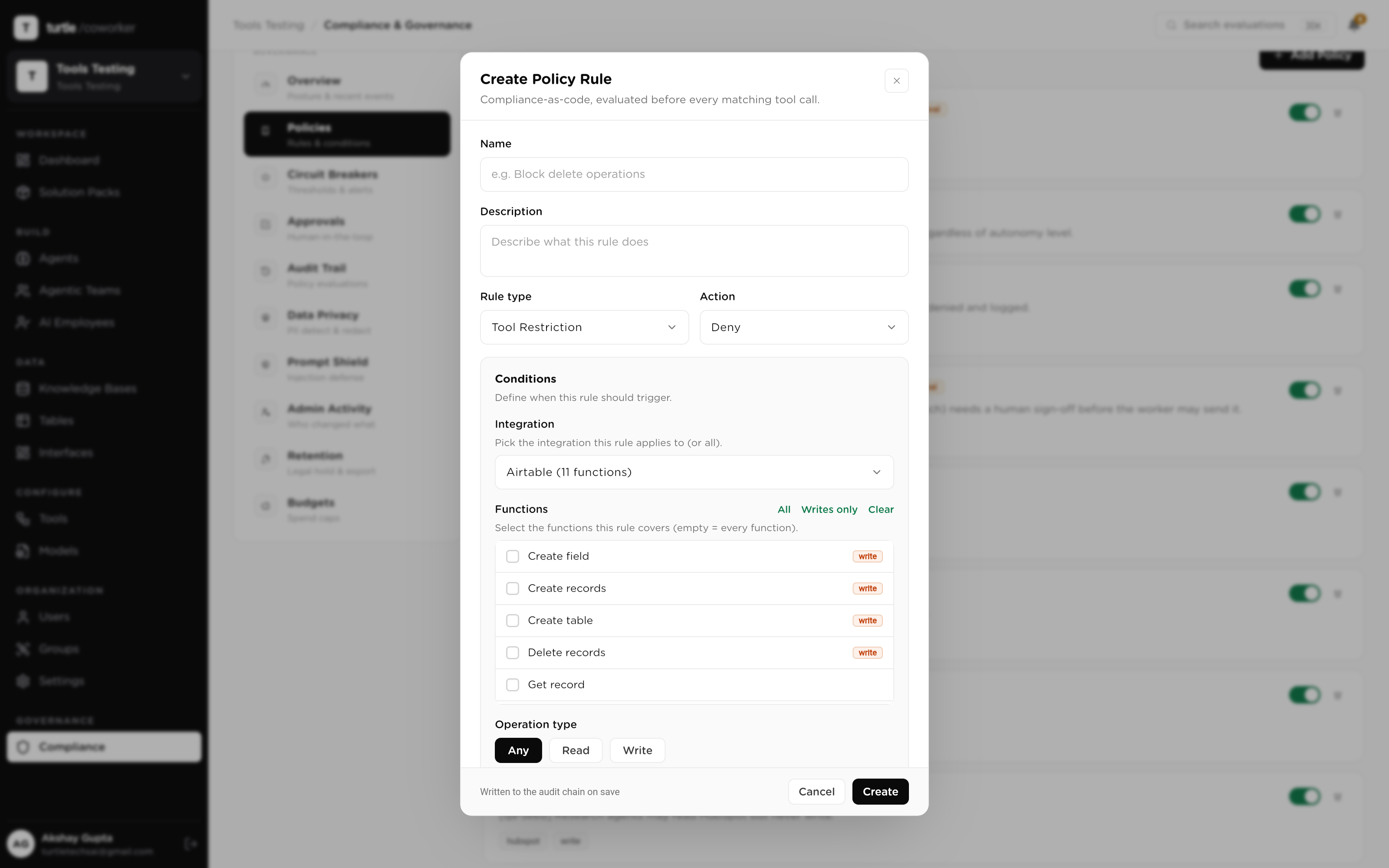
  • Six rule types: tool restriction, data boundary, cost limit, approval required, time restriction, scope limit
  • Five verdicts: allow · deny · require approval · alert · log-only
  • Priority-ordered, versioned, and evaluated at the moment of the call, not after it
The policy builder: a rule with integration, function and operation-type conditions, and its verdict
A policy rule: conditions on one side, a verdict on the other
02 · Function catalog

Policies written against real functions, not wildcards.

The platform ships a catalog of 1,095 integration functions across 50 integrations, each with a human-readable name and a read-or-write classification. When you write a policy, you pick the exact functions it governs — 'Send email', 'Approve merge request', 'Delete row' — instead of guessing at wildcard patterns and hoping they match.
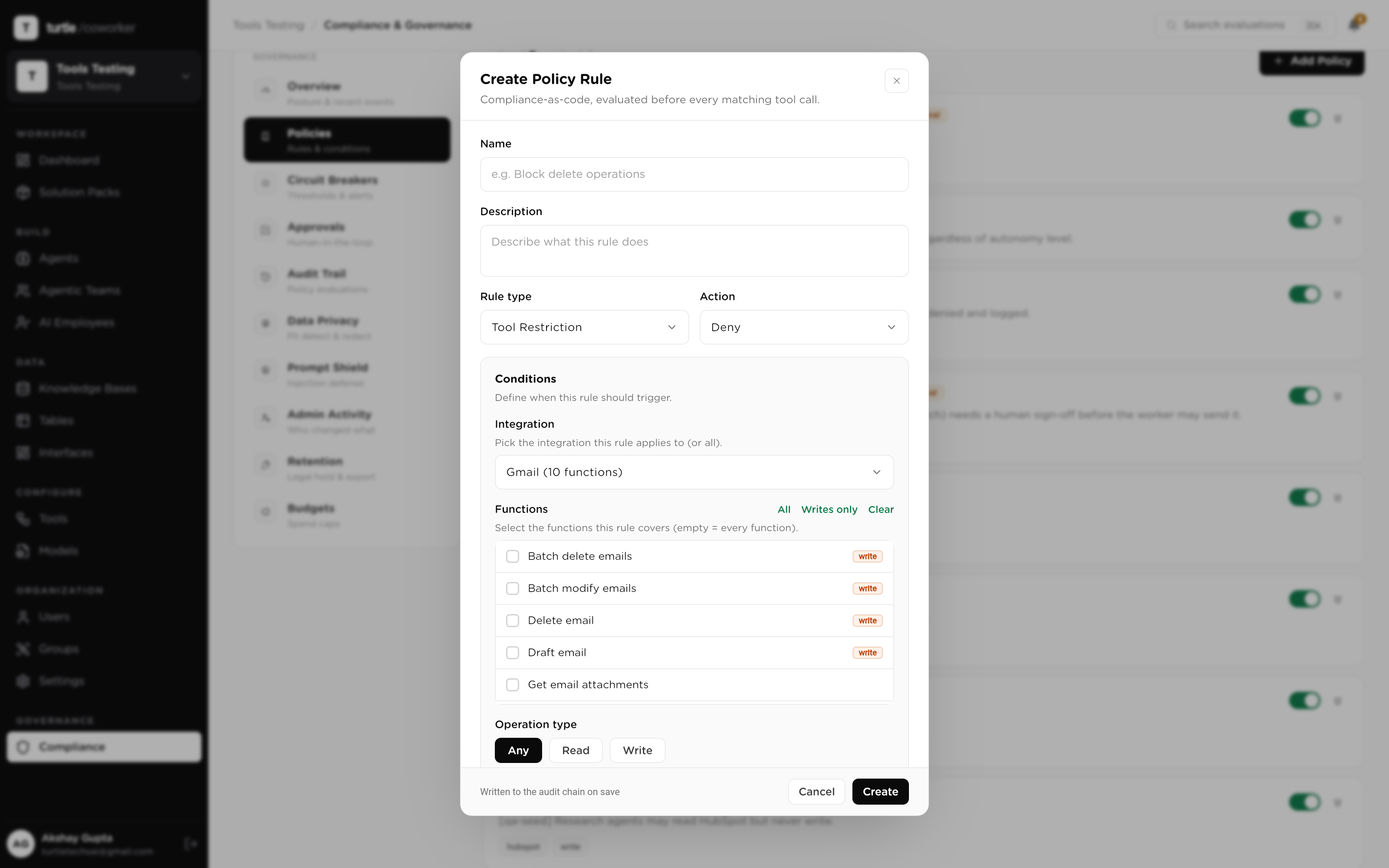
  • 1,095 functions across 50 integrations, catalogued and classified
  • Every function tagged read or write, so 'block all writes to X' is one rule
  • Pick functions by name in the policy builder; the engine matches them exactly
The function catalog picker: integrations on the left, their named functions with read/write tags on the right
The catalog: every governable function, by name
03 · Runtime floor

Approval is enforced where the action happens.

Most platforms check permissions when a plan is written. This one also checks at the moment each tool call executes — a runtime authorization floor underneath everything. A write that was never approved doesn't run, even if a clever prompt, an injected instruction or a misbehaving model put it in the plan. And every approval is single-use: it releases exactly one action, then the next one asks again.
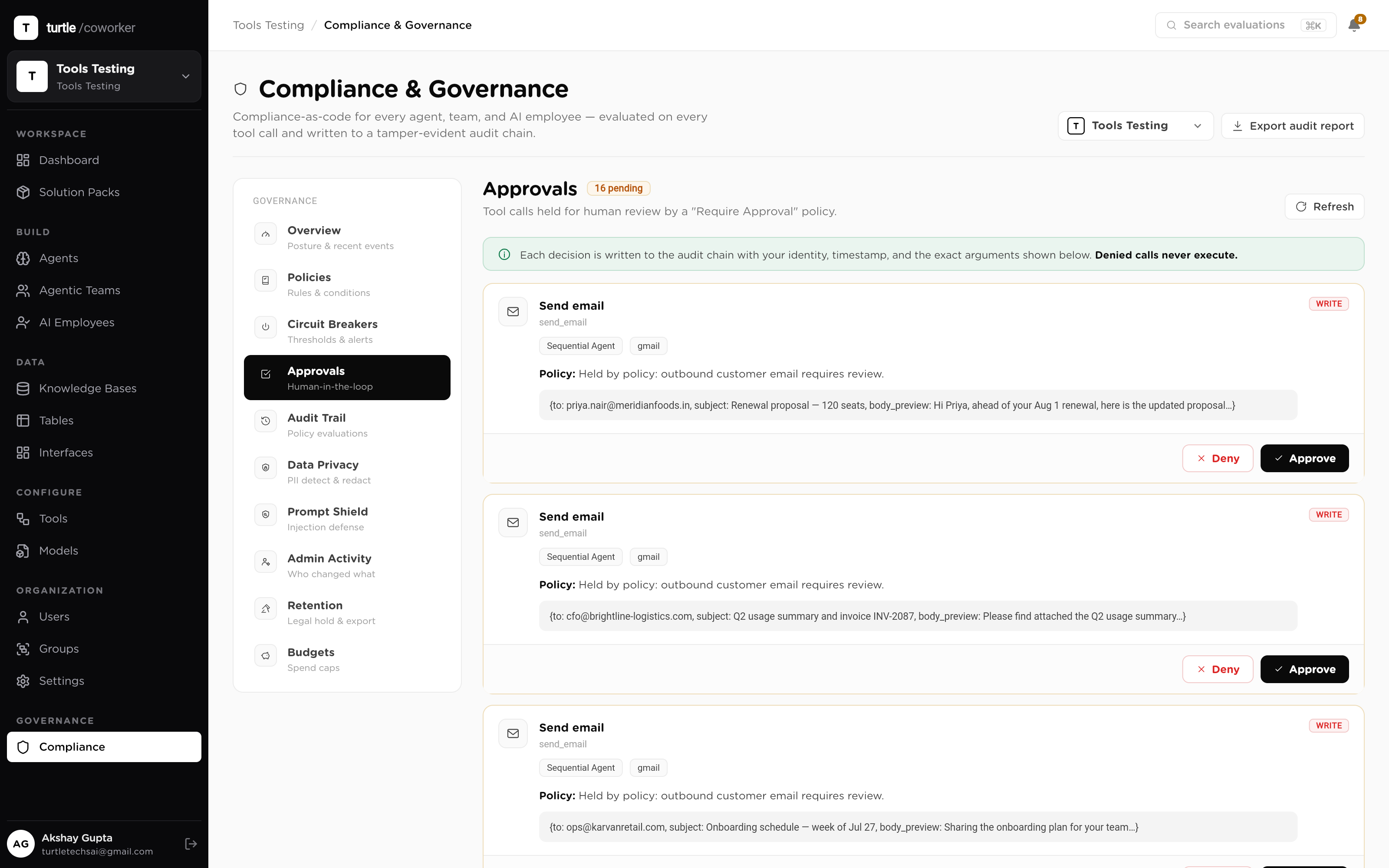
  • Writes are gated at execution time, not on the honor system
  • Single-use grants: one approval releases one action, then expires
  • An injected or unapproved plan step cannot perform a side effect
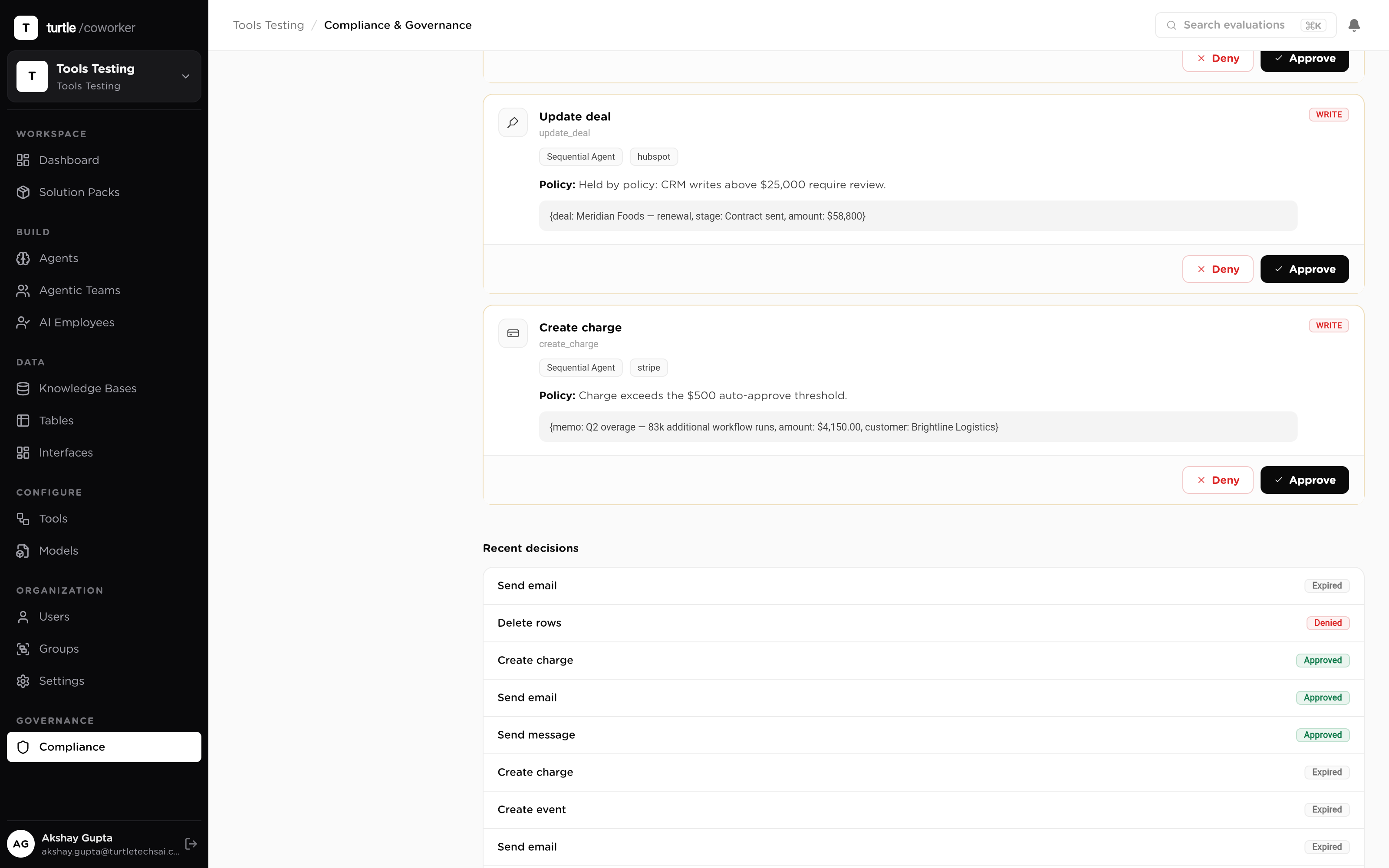
A run paused at the runtime gate: the held tool call, the policy that held it, and approve/deny controls
A write, held at the floor until a human releases it
04 · Autonomy scopes

Four scopes, dialed per worker.

Autonomy is not a switch, it's a dial with four positions: human-in-the-loop, supervised, bounded, full. Each AI employee carries its own scope, with hard caps on actions per turn, and moves up only when its record earns it. Widening autonomy is one change; narrowing it back is one change too — and both are versioned.
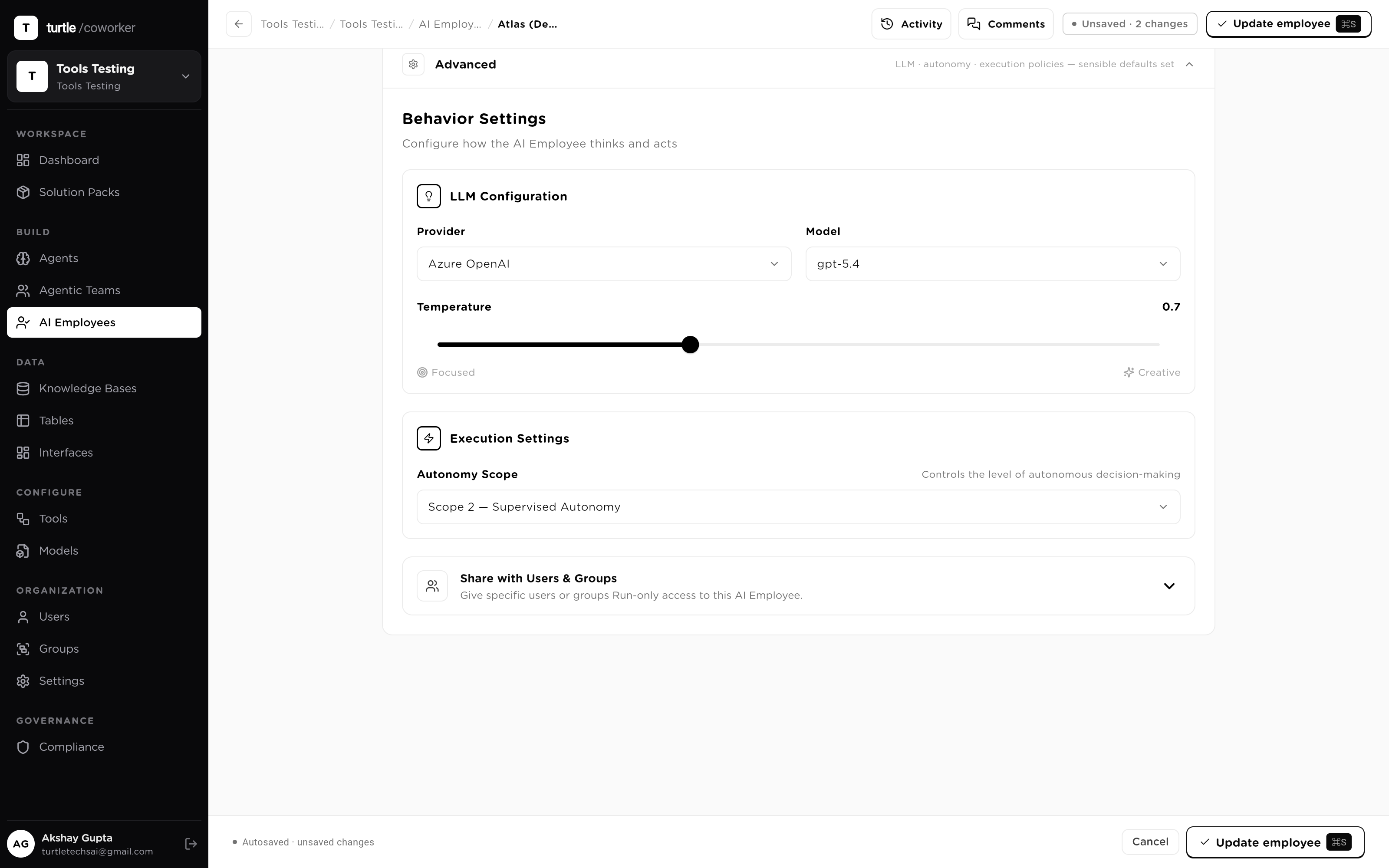
  • Scope 1 → 4: human-in-the-loop, supervised, bounded, full
  • Hard caps on actions per turn, whatever the scope
  • Reversible in one move, with the change itself audited
The autonomy control on an AI employee: four scopes with the current one selected, plus per-turn action caps
The dial: four scopes, one worker at a time
05 · Data protection

PII policy and an injection shield, per workspace.

Two policies watch the data itself. A PII policy detects emails, phone numbers, SSNs, card numbers, addresses and names in what agents read and write, and masks, hashes, removes or flags them — your choice, with allowlists for the exceptions. A prompt-injection shield scans untrusted content — tool results, knowledge chunks, table rows, webhook payloads — before it re-enters a model's context, and flags, wraps or blocks anything that looks like an instruction.
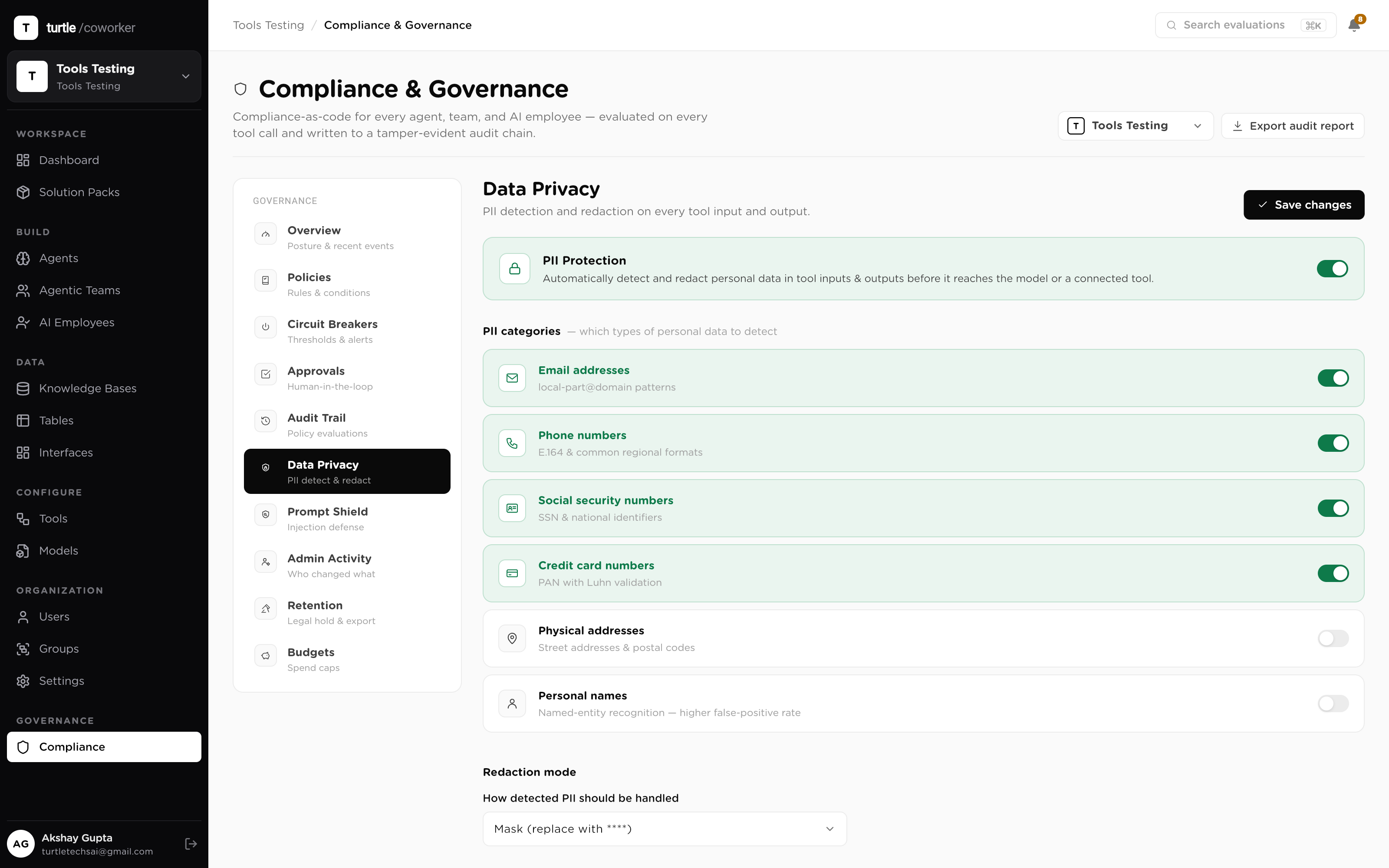
  • PII detection with four redaction modes: mask, hash, remove, flag
  • Prompt-injection shield over tool results, KB chunks, rows and webhooks
  • Secrets and keys redacted before anything is stored
Workspace data-protection settings: PII categories with redaction mode, and the prompt-injection shield mode
The data policies: what's detected, and what happens to it
06 · Budgets & breakers

Spend is a ceiling, not a surprise.

Budgets are hard caps, per day or per month, per workspace, employee or team. The platform forecasts spend against the period and shows the breach date before it happens. Circuit breakers watch cost and error thresholds live and auto-pause a worker the moment one trips — a runaway loop burns a ceiling, not a quarter's budget. Critical halts page the right people even through quiet hours.
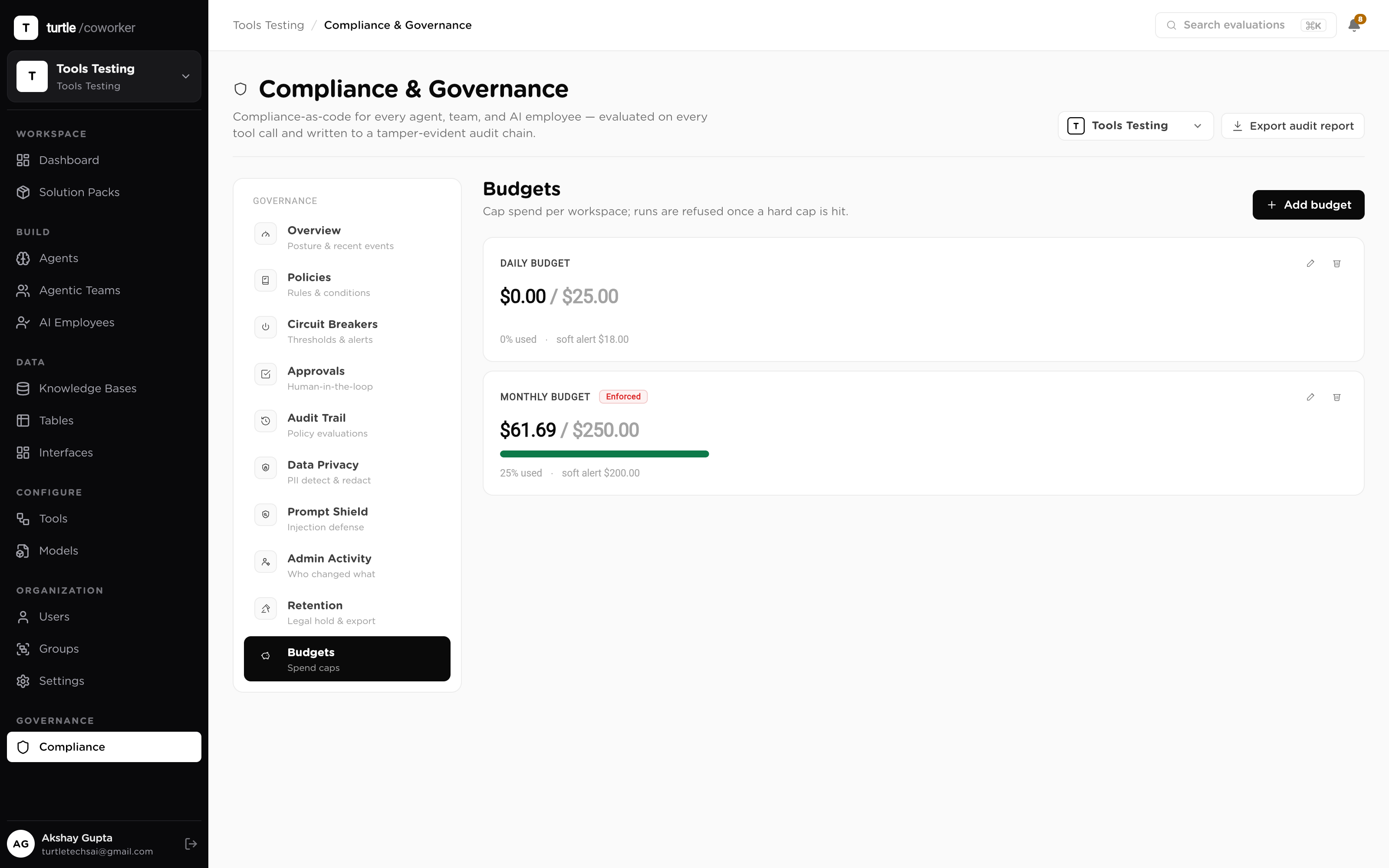
  • Hard caps per day and per month, with period-end forecasting
  • Circuit breakers auto-pause a worker when a threshold trips
  • Critical alerts override quiet hours; routine ones don't
The budget view: spend against cap with a forecast line and projected breach date, plus circuit-breaker status
Forecast vs cap, with the breach date in view
07 · Audit & versioning

Every action, and the exact config that produced it.

Every run and every tool call lands in the audit trail: inputs and outputs sanitized, PII flagged, read-vs-write classified, filterable by worker, integration, user and date. And because configuration is immutably versioned, each run is pinned to the exact configuration it executed under — so 'what was this agent allowed to do on March 3rd' is a lookup, not an argument.
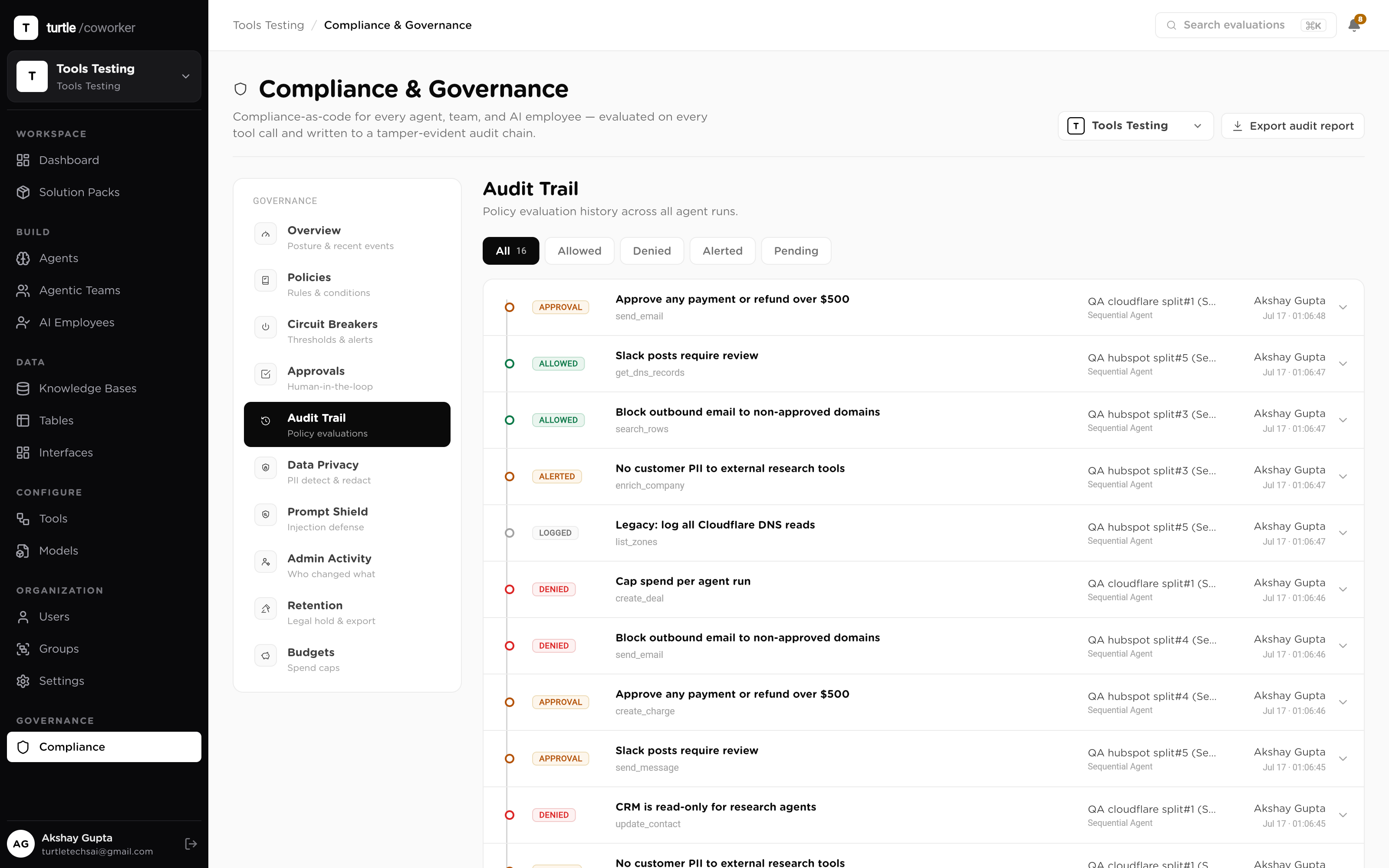
  • Every run and every tool call logged, sanitized, classified
  • Immutable config versions: each run pinned to the config it ran under
  • Entity-scoped trails: the full history of any one worker, table or policy
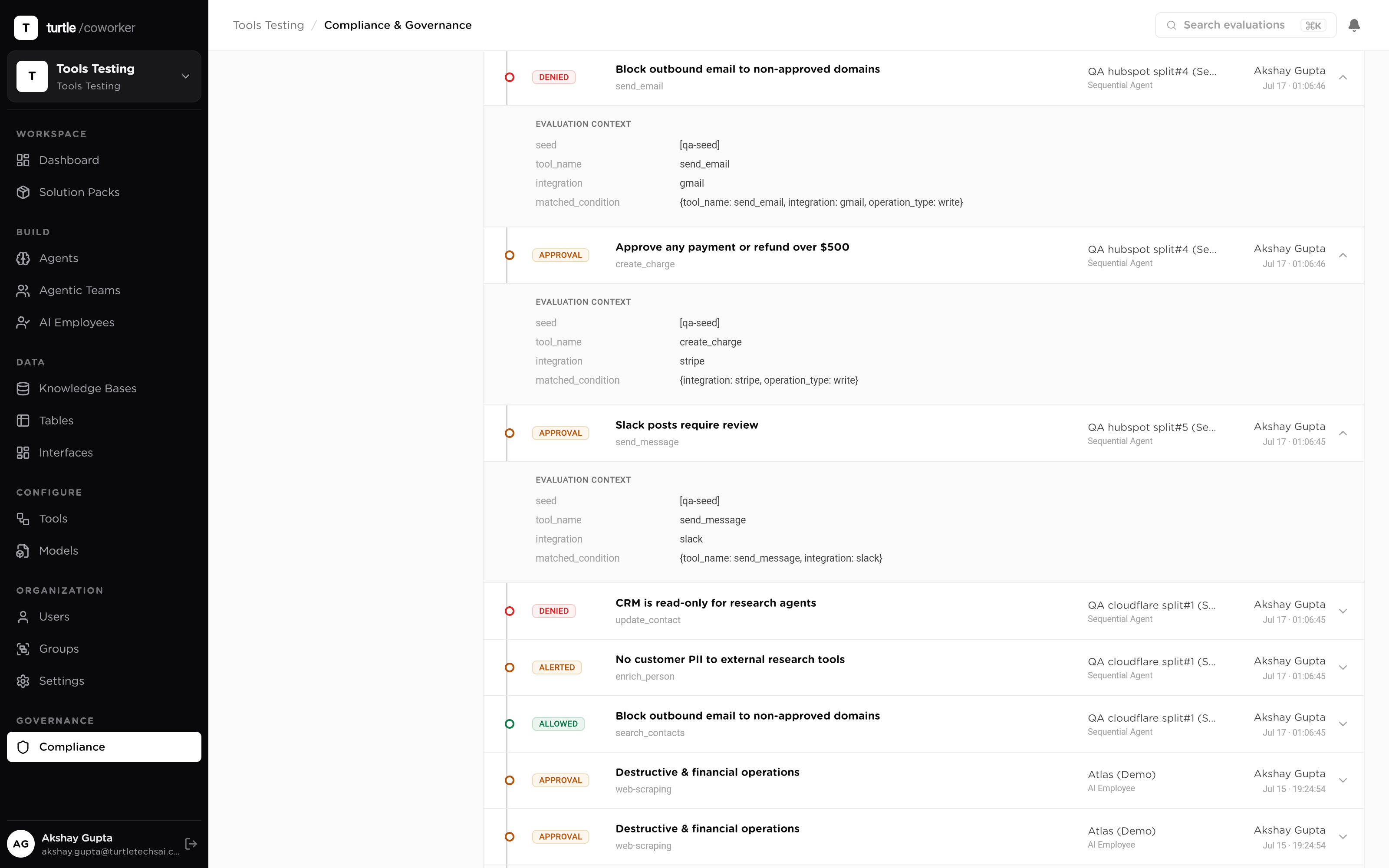
The audit trail: a run expanded to its per-tool-call records with sanitized inputs, PII flags and the pinned config version
One run, opened to every call it made
08 · Tenancy & access

Isolation by organization, authority by role.

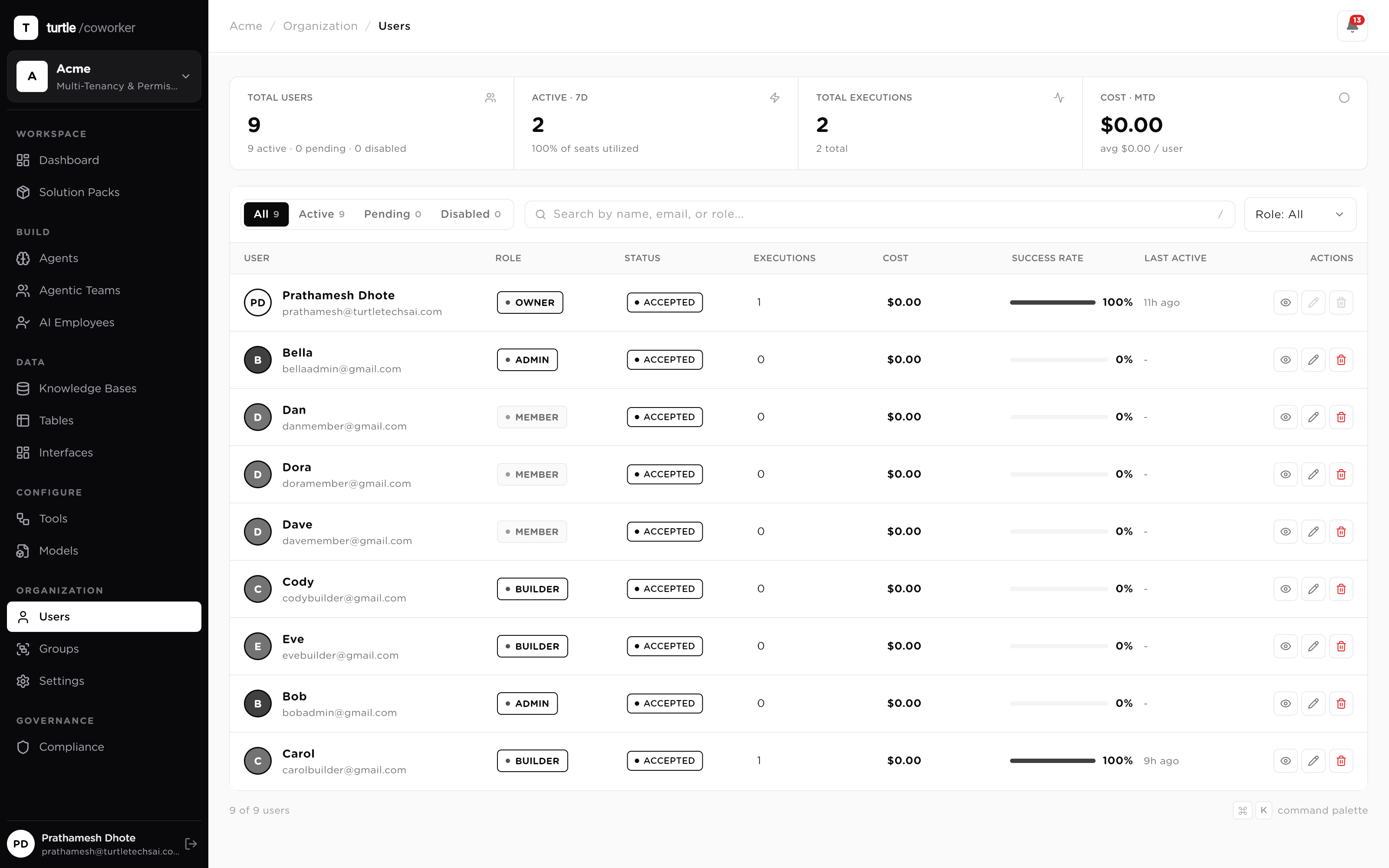
Every object in the platform is scoped to an organization and a workspace — data, workers, policies, budgets, audit. Inside the org, a single authorization matrix decides what each role can do: Owner, Admin, Builder, Member, one role per person, every API check answered from the same matrix. Groups share access to specific resources without escalating anyone's authority, and SSO, 2FA and session limits sit underneath it all.
  • Org → workspace isolation on every object, enforced server-side
  • One role × action matrix answers every permission check the same way
  • Groups grant access, never authority; SSO, 2FA, concurrent-session caps
The organization roster: members with their single role, status, and access summary
One row, one role, one answer for what they can touch
One action, every layer

What actually happens when an agent tries to send money out.

Follow a single consequential action — an AP agent releasing a vendor payment — through the layers it crosses. Not a workflow you configure step by step; this is what the runtime does, every time, on its own.
Scope
Can this worker even reach the tool?
The agent holds a scoped grant to the payments tool and Read + Update on the invoices table, nothing else. If the grant isn't there, the call never leaves the runtime.
Policy
The engine evaluates the call
The call matches a rule bound to the exact function — a write, over a cost threshold, to an external system. Verdict: require approval. The evaluation is logged either way.
Hold
The run pauses; a human is asked
The payment sits in the approval queue with the policy that held it, the sanitized payload, and the invoice it came from. The approver sees why it was held, not just that it was.
Release
One approval, one action
The grant is single-use: it releases exactly this payment. The next payment asks again. If the approver is away, their delegate decides, stamped as on-behalf-of; if nobody acts, it escalates.
Record
The trail writes itself
Run, tool call, policy verdict, approver, timestamps and cost land in the audit trail — pinned to the immutable config version the agent ran under. Six months later, the whole story is a lookup.
An approval request opened in the queue: the held payment, the policy that held it, the sanitized payload and approve/deny controls
The hold, as the approver sees it: the action, the rule, the evidence
Sixty seconds of proof

Policy to approval to audit, live.

A write, held and released60s
video: demo-governanceScreen recording: write a policy rule in the builder (require approval on an external write function picked from the catalog), an agent run hits it and pauses, the request appears in the approvals queue with the rule shown, it's approved from the mobile app, the run resumes and completes, and the audit trail shows the tool call with approver and config version.
Controls you get

Eight controls, one runtime.

Policy rules

Six rule types, five verdicts, priority-ordered and versioned. Evaluated on every tool call; every evaluation logged.

Function catalog

1,095 functions across 50 integrations, named and read/write-classified, so policies bind to exactly what you mean.

Runtime authorization floor

Writes gated at execution time. Approvals are single-use grants that expire; unapproved steps cannot run.

Autonomy scopes

Four scopes per worker, human-in-the-loop to full, with hard per-turn action caps. Reversible in one move.

PII & injection policies

PII detected and masked, hashed, removed or flagged. Untrusted content screened before it reaches a model.

Budgets & circuit breakers

Hard daily and monthly caps with breach-date forecasting; breakers auto-pause a worker when a threshold trips.

Immutable audit

Every run and tool call recorded and sanitized, each pinned to the exact config version it executed under.

Retention policies

How long run data, audit records and conversation history live is a policy you set, not a vendor default.
The payoff
1,095
integration functions catalogued and read/write-classified, so policies bind to exactly what you mean.
1
use per approval grant: each approval releases one action, then the next one asks again.
4
autonomy scopes per worker, human-in-the-loop to full, reversible in one audited move.
100%
of runs traced, tool call by tool call, each pinned to the immutable config version it ran under.
app.turtlecoworker.com/audit/runs
A run in the audit trail expanded to its tool calls: operation type, integration, sanitized input and output, PII flags, and the config version badge
The audit trail, opened one level down: every tool call with its verdict, its data sanitized, and the config version it executed under.
From the live catalog

Every pack runs inside these controls.

All templates
Procurement Ops Control Tower Pack
Solution Pack · Operations

End-to-end procurement operations solution pack with vendor registry, purchase request review, contract path assessment, embedded review team, and AI employee coordination.

3 agents3 tables1 employee
Official · ~35 min
CA Firm: Compliance & Practice Pack
Solution Pack · Professional Services

Complete operating system for a Chartered Accountant practice. Tracks clients, engagements, statutory deadlines, and IT/GST notices. Includes AI agents for notice triage, GST reconciliation, filing reminders, and client communication. Comes with an AI Employee (Priya) who coordinates compliance work end-to-end.

4 agents5 tables1 employee
Official · ~15 min
Recruiting and Staffing Ops
Solution Pack · Recruiting

Move candidates faster without cutting corners on fair hiring. Riley, your AI recruiting coordinator, screens each new candidate against the job's must-haves with must-have-by-must-have reasoning, coordinates interview scheduling by drafting availability requests, drafts honest candidate outreach and status updates, builds submittal packages for hiring managers or clients mapping experience to requirements, and gives the team a daily pipeline read. Screening never considers anything beyond skills and qualifications, and it never rejects a candidate or extends an offer; those stay human decisions. Everything else is draft-and-approve: candidate messages are prepared for a human to send, and interview times are proposed, never confirmed, by the agent. Four tables hold your job orders, candidates, interview scheduling, and pipeline metrics. A knowledge base holds your screening standards, submittal format, communication voice, and compliance guardrails, which every assessment and message follows. Automations included: new candidates are screened on arrival, plus an optional daily pipeline digest. Works out of the box with the roles and candidates you add; connect an ATS or job board later to sync candidates, and Gmail and Calendar to send outreach and confirm interviews from the platform. Best first step: replace the placeholder screening standards and compliance rules with your own and add an open job.

5 agents4 tables1 employee
Official · ~20 min
Sales Engine
Solution Pack · Sales

A complete outbound-to-pipeline sales engine for a small team. Define your ideal customer profile once in the ICP Profiles table and paste your product details into the Product Knowledge Base, then Sasha, your AI SDR, discovers and vets target accounts, enriches prospects, researches companies, scores leads, and drafts outreach, all grounded in your data. Inbound leads and your deal pipeline live in tables the founder can watch. Automations included: new prospects are auto-enriched on arrival, and an optional daily discovery run finds fresh accounts from your Active ICP. Requires an LLM provider plus the Apollo, Serper, Exa, and Google Search connectors. Replace the sample knowledge base content and the example ICP row with your own.

6 agents5 tables1 employee
Official · ~20 min
Customer Support Ops
Solution Pack · Support

Answer more support tickets, faster, without losing the human touch. Sam, your AI support specialist, classifies every incoming ticket by category, sentiment, and priority, drafts an accurate reply grounded only in your knowledge base, and escalates anything it is not confident about instead of guessing. It matches recurring problems to approved canned responses, mines new tickets into known issues so answers stay consistent, tracks the feature requests buried in tickets, and produces a weekly insights digest of volume, deflection, and top drivers. Everything is draft-and-approve: replies are prepared for a human to review and send, and sensitive tickets (anger, churn, refunds, account deletion, legal or privacy) are always escalated. Four tables hold tickets, known issues, feature requests, and daily metrics. A knowledge base holds your help-center content and support voice, which every reply cites. Automations included: a reply is drafted the moment a ticket arrives, plus an optional daily sweep of anything still unanswered. Works out of the box with no external tool; connect Gmail later to send from the platform and Slack for the digest. Best first step: replace the placeholder knowledge base with your real help-center articles or URLs.

5 agents4 tables1 employee
Official · ~20 min
Sales Engine Pro
Solution Pack · Sales

A complete, full-lifecycle sales engine for a growing team, spanning outbound prospecting and account management across one shared data layer, with a companion inbound concierge. Outbound: Sasha, your AI SDR, discovers and vets accounts, enriches prospects, scouts buying signals, researches companies, scores leads, and drafts cold email, LinkedIn, and nurture outreach. Account management: Maya, your AI Account Manager, qualifies opportunities, drafts and reviews proposals, flags pipeline risk, forecasts renewals and expansion, and keeps the CRM clean. Seven tables hold ICP profiles, target accounts, prospects, website leads, CRM contacts, opportunities, and customer accounts. Automations included: new prospects are auto-enriched on arrival, and an optional daily discovery run finds fresh accounts from your Active ICP. For the inbound engine, install the companion Website Sales Concierge team template, which routes visitor questions to product, pricing, and objection specialists and captures leads into the Website Leads table. Requires an LLM provider plus the Apollo, Serper, Exa, and Google Search connectors. Replace the sample knowledge base content and the example ICP row with your own. Outreach and proposals are drafted for a human to review and send.

15 agents7 tables2 employees
Official · ~25 min
Questions

The details, up front.

Is this governance layer bolted on, or in the execution path?
In the path. The policy engine evaluates every tool call before it executes, the runtime authorization floor gates writes at the moment they happen, and the audit logger records from inside the run loop. There is no way to invoke a tool that goes around it — the same gate covers chat, schedules, triggers, API calls and MCP clients.
What stops a prompt injection from making an agent do something it shouldn't?
Two independent layers. The prompt-injection shield screens untrusted content — tool results, knowledge chunks, table rows, webhook payloads — before it re-enters a model's context, and flags, wraps or blocks suspected instructions. And even if something slips through, the runtime authorization floor means an unapproved write still cannot execute: approval is checked at the call, not in the plan.
How granular do policies get?
Down to a single named function. The catalog covers 1,095 functions across 50 integrations, each classified read or write. A rule can target one integration, one function, or one class of operation — 'require approval on every external write', 'block Delete row everywhere', 'alert on any GitLab merge approval' — with a priority order deciding which rule wins.
Who approves, and what happens when they're away?
Approvals land in one queue, visible on web and mobile, with aging indicators and the policy that held each item shown alongside it. Identical asks group so one decision clears them all, up to fifty at a time. Approvers can delegate their authority for out-of-office windows — every decision made under delegation is stamped as such — and anything that sits too long auto-escalates to org admins.
Can we prove to an auditor what an agent did six months ago?
Yes, and also what it was allowed to do at the time. Every run and tool call is recorded with sanitized inputs and outputs, and every run is pinned to an immutable config version — the exact instructions, permissions and policy set it executed under. Scoped views export. Retention is a policy you control.
How is tenant isolation enforced?
At the data layer, not the UI. Every object carries its organization and workspace scope, every query is filtered server-side, and a single role × action authorization matrix answers every permission check — the same matrix for the web app, the mobile app and the API. Access reviews before an offboarding are a filtered export, not a project.
Do all these controls slow the work down?
Only where you tell them to. Allow-verdict policies add a check, not a pause; approval gates pause only the actions you've marked consequential. The point of the layer is that 'can we let agents do this?' stops being a meeting — the answer is yes, inside these rules, and here's the record.
Go deeper

The human side of the gate: Approvals & human-in-the-loop.

Approvals & HITL Trust Center