
Most AI pilots fail for organizational reasons, not technical ones: no defined job for the AI, no named owner, no workflow it plugs into, no access to company data, and no success metric. Fix those five things — a role, a sponsor, a wired workflow, grounded data, a 30-day measure — and the same models that shrugged at your team start producing.
If you’ve already run the experiment — bought some licenses, sent the “we should all be using AI” email, watched usage flatline by week three — you’re in the majority. Ask around and you’ll hear the same story: most business AI pilots quietly stall before reaching production — and the failures rarely trace back to the model. The model answered fine. Everything around the model was missing.
Why do AI pilots fail? The five patterns
Watch enough pilots die and the autopsies get repetitive. It’s almost always one of these five — usually three of them at once.
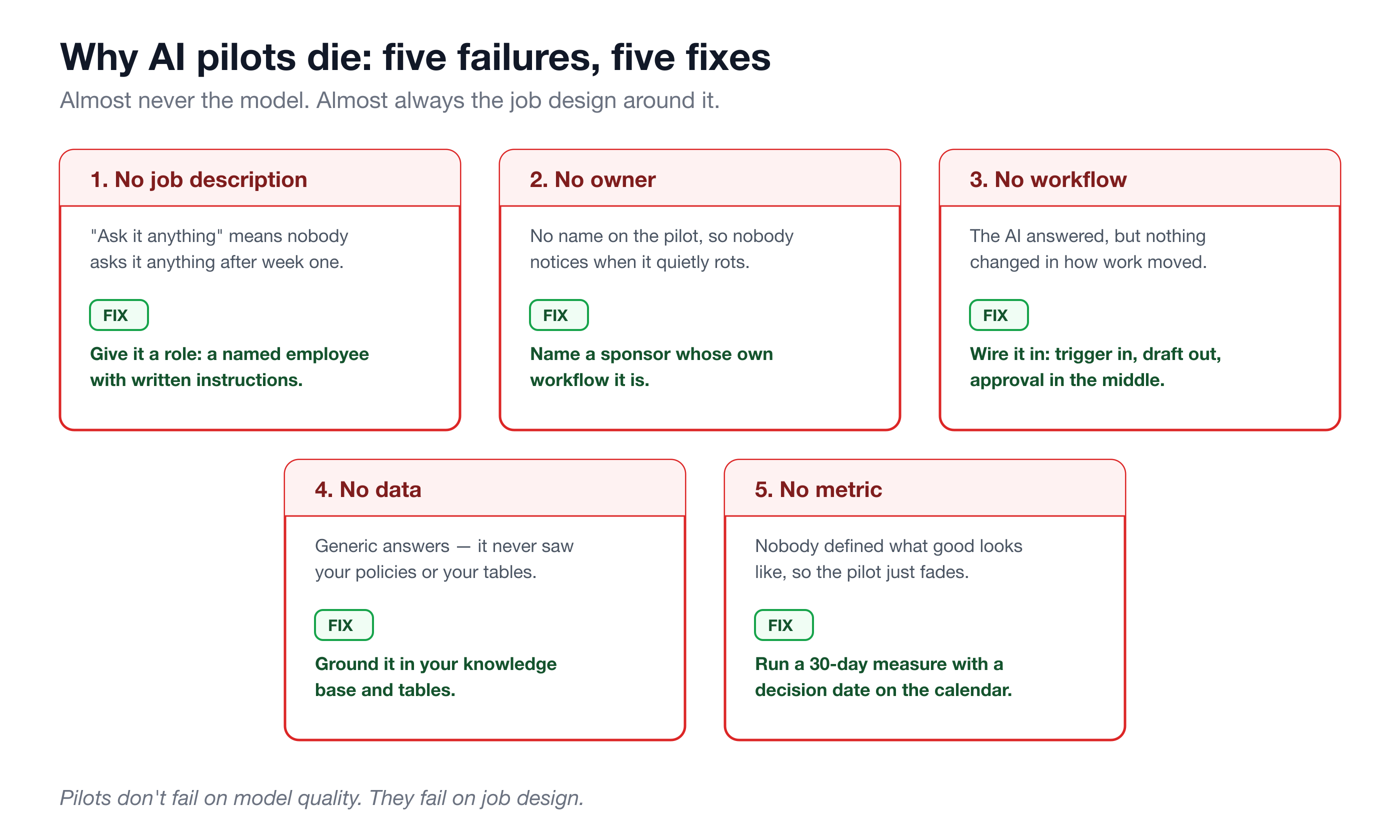
1. No job description. The pilot was “here’s an AI, ask it anything.” But ask it anything means nobody is responsible for asking it anything, so after the novelty week, nobody does. A human hire with no job description would drift exactly the same way. Open-ended access is a toy; a role is a tool.
2. No owner. Nobody’s name was on the pilot. Nobody’s Monday depended on it working. Pilots without a named human sponsor rot quietly — there’s no one to notice the drop-off, fix the friction, or defend the follow-through when week two gets busy.
3. No workflow. The AI produced answers, but nothing changed in how work actually moved. The draft it wrote wasn’t connected to the queue where drafts get sent. The summary it produced didn’t land where decisions get made. Output with nowhere to go is indistinguishable from no output.
4. No data. The AI never saw your policies, your price list, your ticket history, your invoice table — so it gave the same generic answers anyone on the internet could get. Your team correctly concluded “this doesn’t know our business,” and stopped asking.
5. No success metric. Nobody defined what good looks like before starting, so at the end there was nothing to point at. A pilot that can’t fail also can’t succeed — it can only fade.
Notice what’s not on the list: model quality, hallucinations, “our industry is too specialized.” Those are the reasons people expect. They almost never turn out to be the cause of death.
The fix maps one-to-one
Here’s the encouraging part: each failure has a direct, structural fix. Not “better prompting.” Structure.
- No job description → give it a role. A named AI employee with plain-language instructions: what it owns, what it escalates, what it never does. “Chase overdue invoices with escalating reminders” is a job. “Ask it anything” is not.
- No owner → name a sponsor. One human whose workflow this is — the AR clerk, the support lead, the recruiter. They review the drafts, tune the instructions, and answer for the result in week four.
- No workflow → wire it into how work moves. The AI’s output lands where work already happens: a draft appears when an invoice goes overdue, a screening note appears when a candidate arrives. Trigger in, draft out, approval in the middle.
- No data → ground it in your tables and knowledge base. Your policies, playbooks, and records become the only things it answers from. Grounded answers are the difference between “generic” and “knows our business.”
- No metric → run a 30-day measured pilot. Decide up front what you’ll count — drafts approved vs. edited, hours saved, cycle time — and put a decision date on the calendar.
If that list sounds like a lot of assembly, it’s worth knowing it can come pre-assembled. This mapping — role, resources, guardrails, workflow — is exactly what a Solution Pack packages: the tables, the knowledge base, the automations, and a named AI employee with a written job, installable in 15–35 minutes. The guardrails come built in too — draft-and-approve by default (the AI drafts, a human sends), escalation rules for sensitive cases, and a full activity history — which matters for pilots specifically, because a team that trusts the safety rail actually uses the thing.
How do you run an AI pilot that actually works? The 30-day playbook
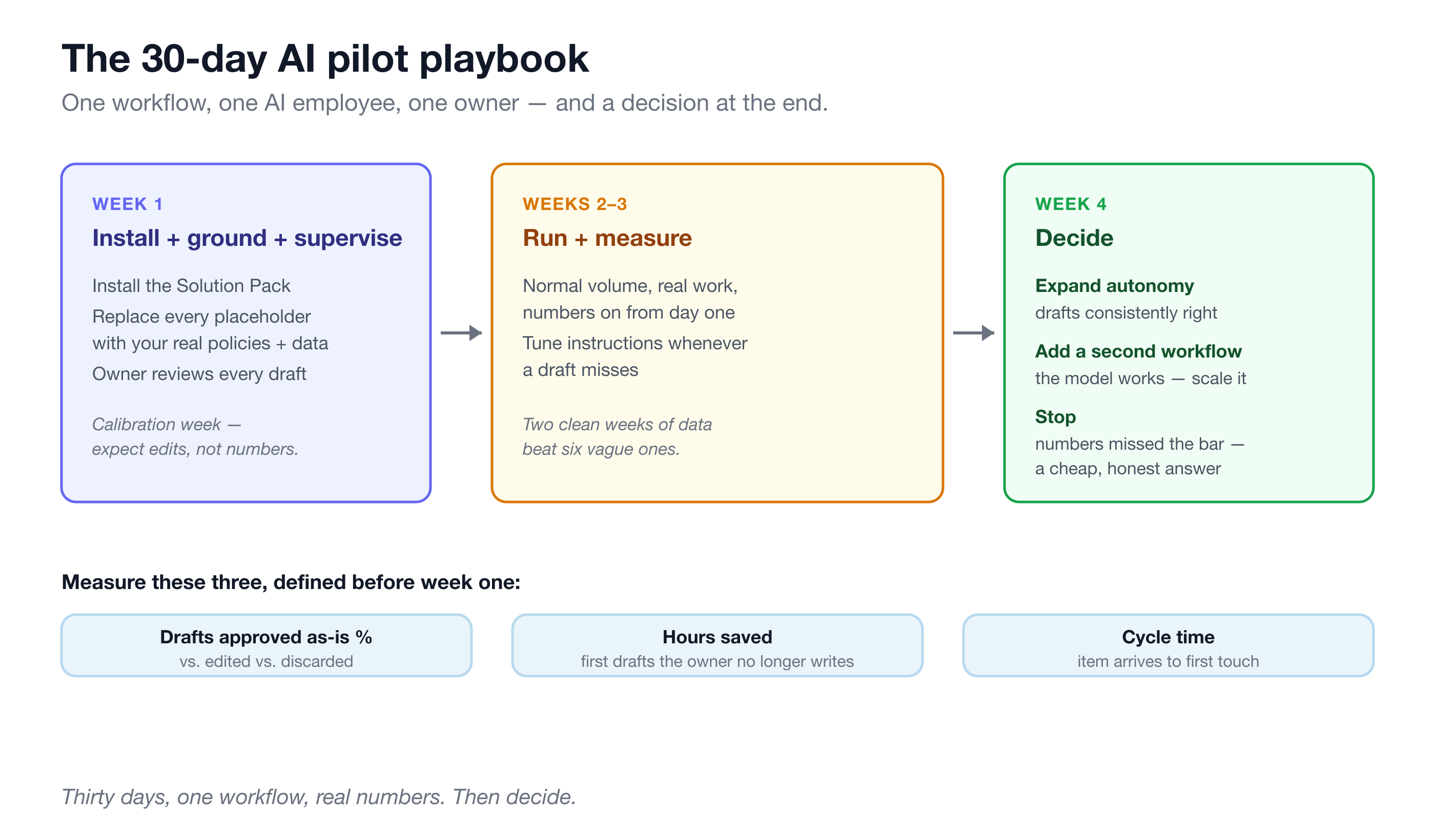
One workflow, one AI employee, one owner, thirty days. Here’s the week-by-week shape.
Week 1 — Install, ground, supervise. Install the pack for the workflow that hurts most. Replace every placeholder with your reality: your collections playbook, your screening standards, your return policy, your real invoices or tickets or candidates. Then run it fully supervised — the owner reviews every single draft. Expect edits; this week is calibration, not measurement.
Weeks 2–3 — Run and measure. Normal volume, real work, numbers on. Track three things: what share of drafts get approved as-is versus edited versus discarded; hours the owner isn’t spending on first drafts anymore; and cycle time — how long an invoice, ticket, or candidate waits before the first touch. Keep tuning the instructions when a draft misses — that’s the job-description equivalent of week-two feedback to a new hire.
Week 4 — Decide. Sit down with the numbers and pick one of three outcomes: expand autonomy (the drafts are consistently right — loosen a specific permission, deliberately, one at a time), add a second workflow (the model works — point it at the next pile), or stop (the numbers didn’t clear the bar — shut it down and keep the learning). All three are wins over a pilot that just fades. The arithmetic for the decision is straightforward, and we’ve laid out how to run it in the ROI of an AI employee.
Take a concrete example scenario: a 5-person team piloting AR collections. Suppose 60 overdue invoices a month, 20 minutes each to look up history and write a chaser — that’s 20 hours of clerk time. If in weeks 2–3 the AI’s drafts run 70% approved-as-is and 25% approved-with-edits, the owner is spending roughly 5 hours reviewing instead of 20 writing. That’s a real number you can put in front of week four. If instead the approval rate is 30%, that’s also a real number — and “stop” is a legitimate, cheap answer.
When should you conclude the answer is no?
An honest pilot needs a real exit, so here’s when “no” is correct:
- The process is too broken to automate. If your team can’t agree on what the escalation ladder is, an AI can’t follow it. AI amplifies a process; it can’t invent one. Fix the process first — sometimes the pilot’s most valuable output is discovering you don’t have one.
- The volume is too low to matter. Six overdue invoices a month don’t justify a pilot, however good the drafts are. Save it for a pile that actually costs you hours.
- The judgment share is too high. If most items in the workflow genuinely need a human’s call — not just a human’s approval — the AI’s addressable slice may be too thin. Draft-and-approve helps most where volume is high and judgment is the exception.
A pilot that ends in a clear, evidenced “no” cost you thirty days and taught you where your process stands. That’s a far better outcome than the usual one — a pilot nobody can say failed because nobody defined what success was.
Frequently asked questions
How long should an AI pilot run?
Thirty days is the sweet spot: one calibration week, two measured weeks at normal volume, one decision week. Shorter and you’re measuring the novelty period; longer without a decision date and the pilot drifts into the fade-out failure mode it was designed to avoid.
Who should own the AI pilot?
The person whose workflow it is — the AR clerk, support lead, or recruiter who reviews the drafts daily — with a manager as sponsor if budget sign-off is needed. Not IT, and not a committee. Pilots without one named owner whose week visibly improves are the ones that rot.
What should we measure in an AI pilot?
Three numbers: the share of drafts approved as-is versus edited versus discarded (quality), hours the owner no longer spends producing first drafts (cost), and cycle time from item arriving to first touch (speed). Define all three before week one, and put the week-four decision meeting on the calendar on day one.
What if the team just doesn’t use it?
That’s a symptom, not a verdict — almost always of failure patterns one and three: no defined job and no workflow wiring. If the AI drafts work automatically when a ticket or invoice arrives, “using it” stops being a habit the team must remember; the draft is simply there, waiting for approval. If usage still lags, ask the owner what they’re editing out of every draft — the answer is usually a missing instruction.
If you’ve got a pilot graveyard behind you, don’t run the same experiment harder. Pick the one workflow that costs the most hours, install the matching Turtle Solution Pack, name an owner, and run the 30-day playbook with the three numbers on. In thirty days you’ll have a decision instead of a shrug — and that alone puts you ahead of most AI adoption in business.