
An AI employee is an autonomous digital worker you delegate an ongoing responsibility to — it plans multi-step tasks, works across your real tools (email, CRM, tables), pauses for your approval on anything sensitive, and reports back on what it did. A chatbot answers the question in front of it and forgets. An AI employee carries a job.
If you’ve searched for “what is an AI employee” and landed on pages that describe a smarter chatbot, you’ve been given the wrong mental model. The difference isn’t intelligence. It’s ownership — and it changes what you can actually hand off.
Why “chatbot” is the wrong mental model
Most of us met AI through a chat window. You type a question, it types an answer, and when you close the tab, the whole exchange evaporates. That shape — ask, answer, forget — is so familiar that we project it onto everything with “AI” in the name.
But think about what actually eats your week. It isn’t unanswered questions. It’s unfinished work: the overdue invoices nobody chased, the support tickets sitting in the queue, the candidate who never got a status update. None of that is a question-and-answer problem. It’s a follow-through problem, and a chat window doesn’t follow through on anything.
A chatbot can tell you how to write a payment reminder. It cannot look at your invoice table every morning, notice that invoice #1042 just went 15 days overdue, pull the customer’s history, draft an on-brand reminder at the right escalation level, and queue it for your approval. That gap — between answering and doing — is exactly what an AI employee exists to close.
How is an AI employee different from a chatbot?
The AI employee meaning becomes obvious when you put the two side by side:
A chatbot:
- Waits for a question
- Answers from what it knows
- Handles one exchange at a time
- Forgets everything when the conversation ends
- Touches nothing outside the chat window
An AI employee:
- Is given a responsibility, not a prompt (“keep our receivables moving”)
- Plans the steps a task requires, then works through them
- Uses your real tools: reads and writes your tables, drafts emails, checks your knowledge base, works with your CRM
- Pauses at approval points instead of acting unilaterally on anything sensitive
- Reports back on what it did and why
- Remembers your preferences and standing instructions across tasks
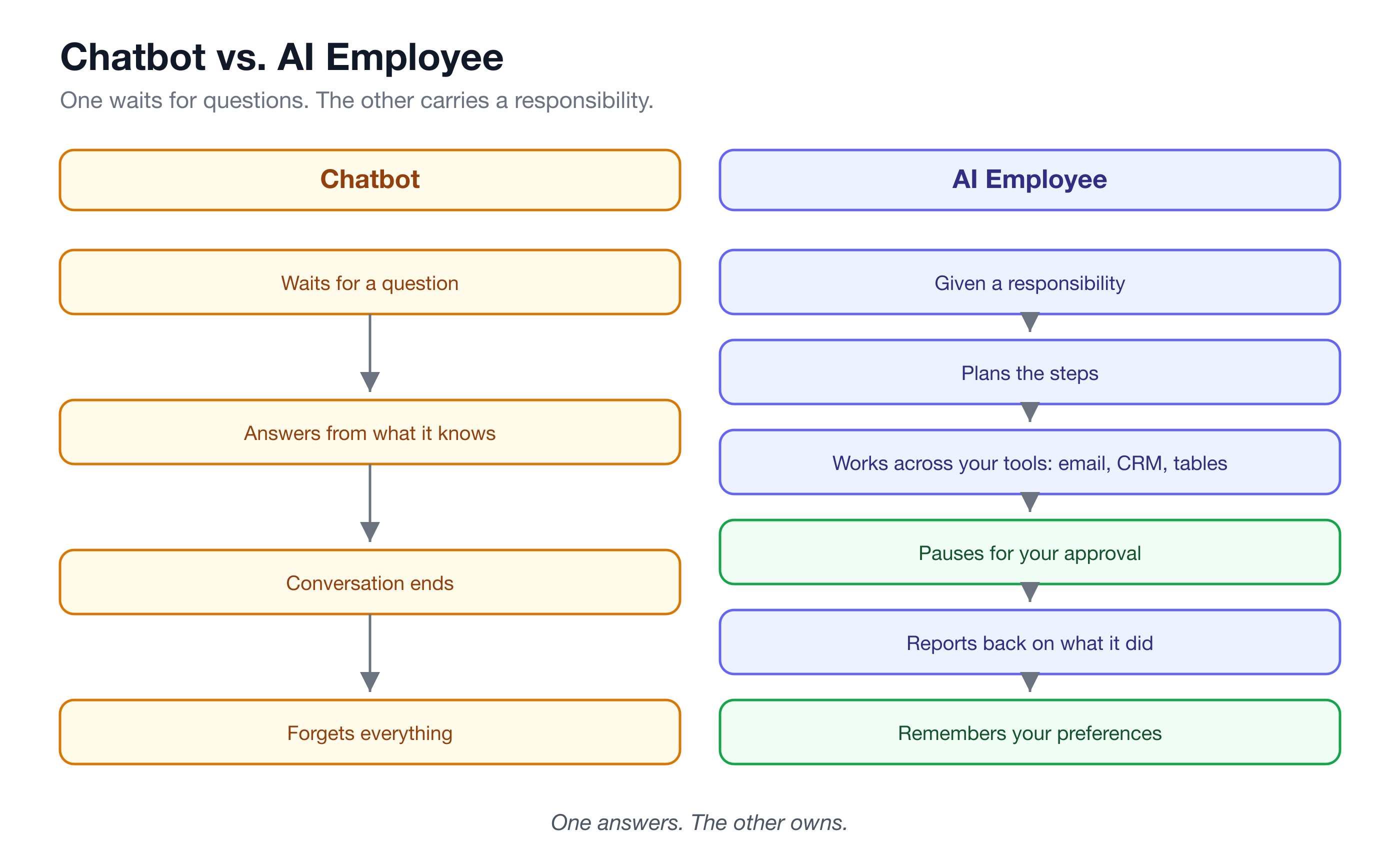
Notice that several of those bullets are about restraint, not capability. A good AI employee is defined as much by when it stops — to ask for approval, to escalate a case it isn’t confident about — as by what it can do. In the AI employee vs chatbot comparison, the chatbot never needs guardrails because it never does anything. The AI employee needs them precisely because it does.
How do you actually work with one? The delegation mental model
The most useful frame for an AI employee isn’t “software you configure.” It’s “hire you onboard.” On a platform like Turtle AI Coworker, that onboarding has three parts:
1. Plain-language instructions. You write what you’d tell a new hire on day one: “Chase overdue invoices with escalating reminders. Never concede a disputed charge. If a customer promises to pay, log it and follow up if the date slips.” No code, no flowcharts — instructions in your own words become the employee’s operating manual.
2. The resources it may touch. You explicitly grant access: these tables, this knowledge base, this email integration. An AI employee can’t wander into systems you didn’t hand it, the same way a new AR clerk doesn’t get the company credit card on day one.
3. The autonomy you grant. Per-employee autonomy settings decide what it can do alone and what needs a human sign-off. The default across Turtle is draft-and-approve: the AI drafts, a human reviews and sends. As trust builds, you can loosen specific permissions — deliberately, one at a time.
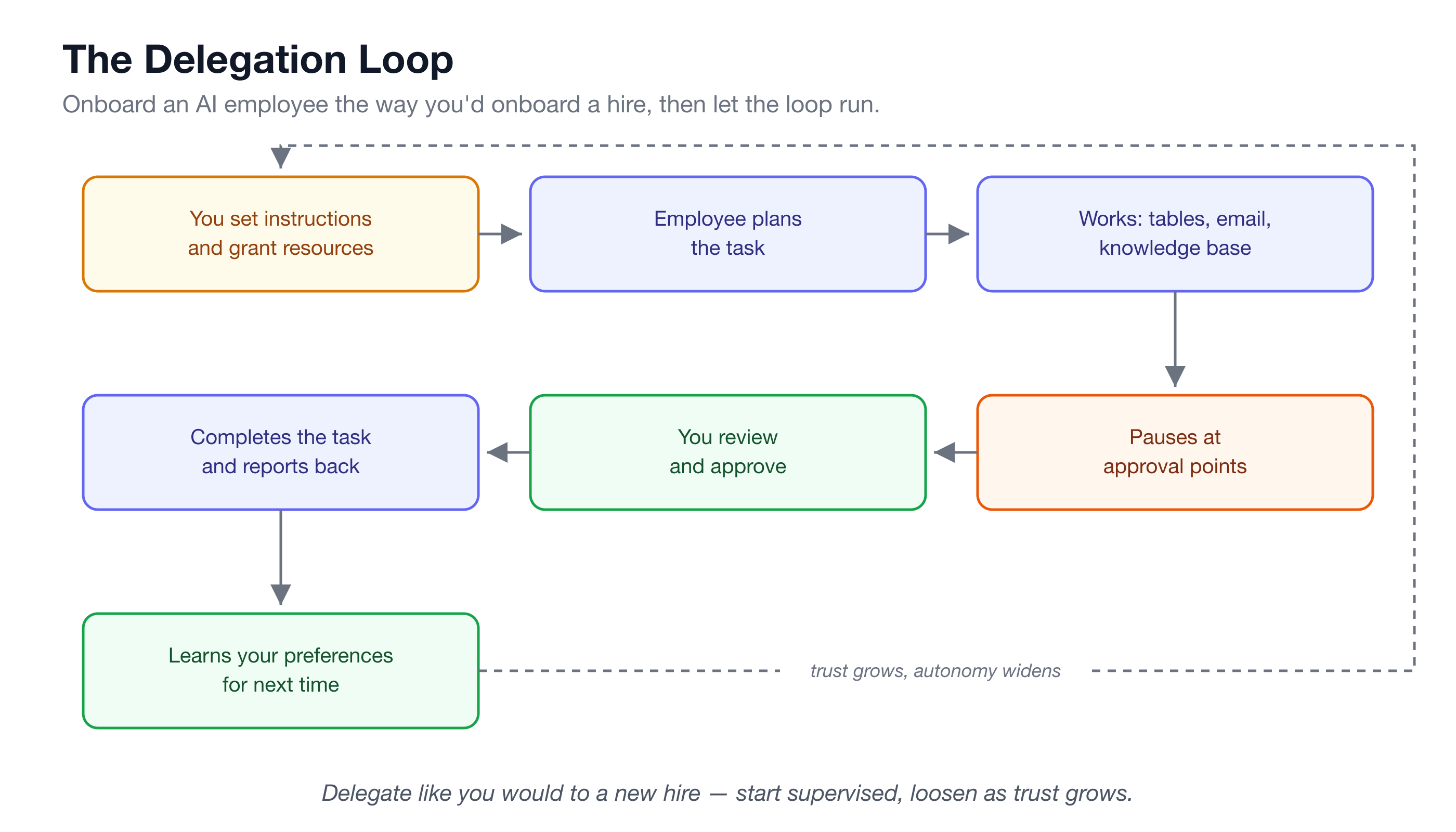
Then the loop runs: the employee picks up work, plans the steps, executes across its tools, pauses at approval points, and reports back. Every action lands in an activity history you can audit. It’s the same supervision arc you’d use with any junior hire — start with everything reviewed, expand autonomy as the work proves out.
What does a day of delegated work look like?
Abstract definitions only go so far, so here are three real AI employees from Turtle’s Solution Packs and what an ordinary day looks like for each:
Cash, an AI accounts receivable assistant. An invoice gets marked Overdue in your invoice table, and Cash picks it up the moment it happens: drafts an escalating, on-brand reminder that follows your Collections Playbook’s tone ladder, logs the draft, and waits for you to approve and send. If the customer promised to pay last Tuesday and didn’t, Cash notices the broken promise-to-pay and follows up. If a customer disputes a charge, Cash acknowledges and routes it — it never concedes on its own. You get a daily AR aging digest. Nothing is ever auto-sent.
Sam, an AI support specialist. A ticket arrives; Sam classifies it by category, sentiment, and priority, then drafts a reply grounded only in your knowledge base — not in whatever the model half-remembers from the internet. Anything Sam isn’t confident about gets escalated instead of guessed at, and sensitive tickets — anger, churn risk, refunds, account deletion, legal or privacy — are always escalated to a human. Along the way, Sam mines recurring problems into known issues and tracks the feature requests buried in tickets.
Riley, an AI recruiting coordinator. A new candidate comes in and Riley screens them against the job’s must-haves, with reasoning shown for each requirement — and screening never considers anything beyond skills and qualifications. Riley drafts availability requests to coordinate interviews and drafts honest status updates for candidates, but it never rejects a candidate, never extends an offer, and never confirms an interview time. Those stay human decisions, by design.
Three different domains, one identical shape: the AI employee does the volume work — the chasing, classifying, drafting, tracking — while a human keeps the judgment calls and the send button.
Why the draft-and-approve model matters
The single biggest objection to autonomous AI at work is the right one: “What if it sends something wrong to a customer?” The honest answer is that any system that can act can act badly — which is why the trust model matters more than the model.
Draft-and-approve inverts the risk. Instead of the AI acting and you auditing after the fact, the AI prepares and you approve before anything leaves the building. The failure mode of a bad draft is thirty seconds of your time; the failure mode of a bad sent email is a customer relationship. Layered on top: escalation rules for sensitive cases, per-employee autonomy settings, spend budgets, and a full activity history of every step taken. Domain guardrails are built into each pack — the legal pack never gives legal advice, the insurance pack never binds coverage.
You are not trusting the AI to be perfect. You’re supervising it the way you’d supervise a capable new hire in week one.
What an AI employee is NOT
Honesty is cheaper than disappointment, so let’s be precise:
- Not AGI. An AI employee is scoped to a responsibility with defined resources and guardrails. It’s very good at high-volume, well-specified work. It is not a general intelligence you can point at anything.
- Not a replacement for human judgment. Rejecting a candidate, conceding a dispute, approving a refund over threshold, interpreting a contract — these stay with humans, and the packs are built so they must.
- Not a chatbot widget. It doesn’t sit on your website waiting for questions (though Turtle’s Agent Teams can do live chat). An AI employee works whether or not anyone is talking to it — that’s the point.
- Not fire-and-forget. It needs onboarding, real instructions, and early supervision, exactly like a person would. Teams that skip the onboarding get mediocre results, exactly like with a person.
Frequently asked questions
Is an AI employee the same as an AI agent?
Related, but not the same. An agent is typically a single defined task that runs on a trigger or schedule — “when a row is added, enrich it.” An AI employee is a named worker that carries an ongoing responsibility, plans its own multi-step tasks, uses multiple tools, and holds memory across tasks. On Turtle, agents and AI employees are separate building blocks that work together.
Do I need technical skills to set one up?
No. You onboard an AI employee with plain-language instructions — the same words you’d use with a human hire — and grant it access to specific tables, knowledge bases, and integrations by selection, not by code. Turtle’s Solution Packs come pre-wired for a specific workflow and install in roughly 15–35 minutes.
What happens when the AI employee is unsure?
It stops and asks. Escalation is a designed behavior, not a failure state: Sam escalates any ticket it isn’t confident about rather than guessing, and sensitive cases are always routed to a human. Between draft-and-approve defaults and escalation rules, uncertainty flows to people instead of into your customers’ inboxes.
How long does it take to set up an AI employee?
With a pre-built Solution Pack, 15–35 minutes to install, then a short calibration period: replace the placeholder policies with your own, add real data, and review its early drafts closely. Expect the first week to feel like supervising a new hire — because that’s exactly what it is.
If the delegation model clicks for you, the fastest way to feel it is to run it on one real workflow. Pick the pile that hurts most — overdue invoices, the ticket queue, candidate screening — install the matching Solution Pack, and spend a week approving drafts. Treat it as a 30-day pilot with one AI employee and one responsibility; you’ll know within days whether the ownership model holds up in your inbox.