
An AI Solution Pack is a pre-wired bundle — tables, automations, a named AI employee, and a knowledge base — built for one specific business workflow, ready to install in 15–35 minutes. Instead of designing an AI system from scratch, you install one that already works, then replace its placeholder policies with your own.
The empty-canvas problem
Here is the uncomfortable truth about most AI tools: they are impressive and useless in the same breath. You sign up, and you get a blank prompt box. The model can write anything, answer anything, draft anything — and yet on Monday morning your overdue invoices are still overdue, your support queue is still 40 tickets deep, and nobody knows what to type into the box to change that.
The hard part was never the AI. The hard part is everything around it: deciding where the data lives, what triggers a task, what the AI is allowed to do on its own, what a human must approve, what tone the third payment reminder should take versus the first, and what happens when a customer disputes a charge. That is workflow design, and it is genuinely difficult — the kind of thing companies pay consultants for.
A blank prompt box makes you the consultant. A Solution Pack ships the consulting already done.
What exactly is in a Solution Pack?
Every pack bundles the same four ingredients, pre-connected so they work together on day one:
- Tables — spreadsheet-like workspaces where your data lives and both humans and AI read and write.
- A named AI employee — an autonomous worker with a defined job, not a general chatbot.
- A knowledge base — the policies and playbooks that ground every draft the AI produces.
- Automations — triggers that start work the moment something changes, no prompting required.
The best way to see how these click together is to open one up.
Anatomy of a pack: AR Collections and Dunning
Take the AR Collections and Dunning pack — a 15-minute install for anyone tired of chasing overdue invoices.
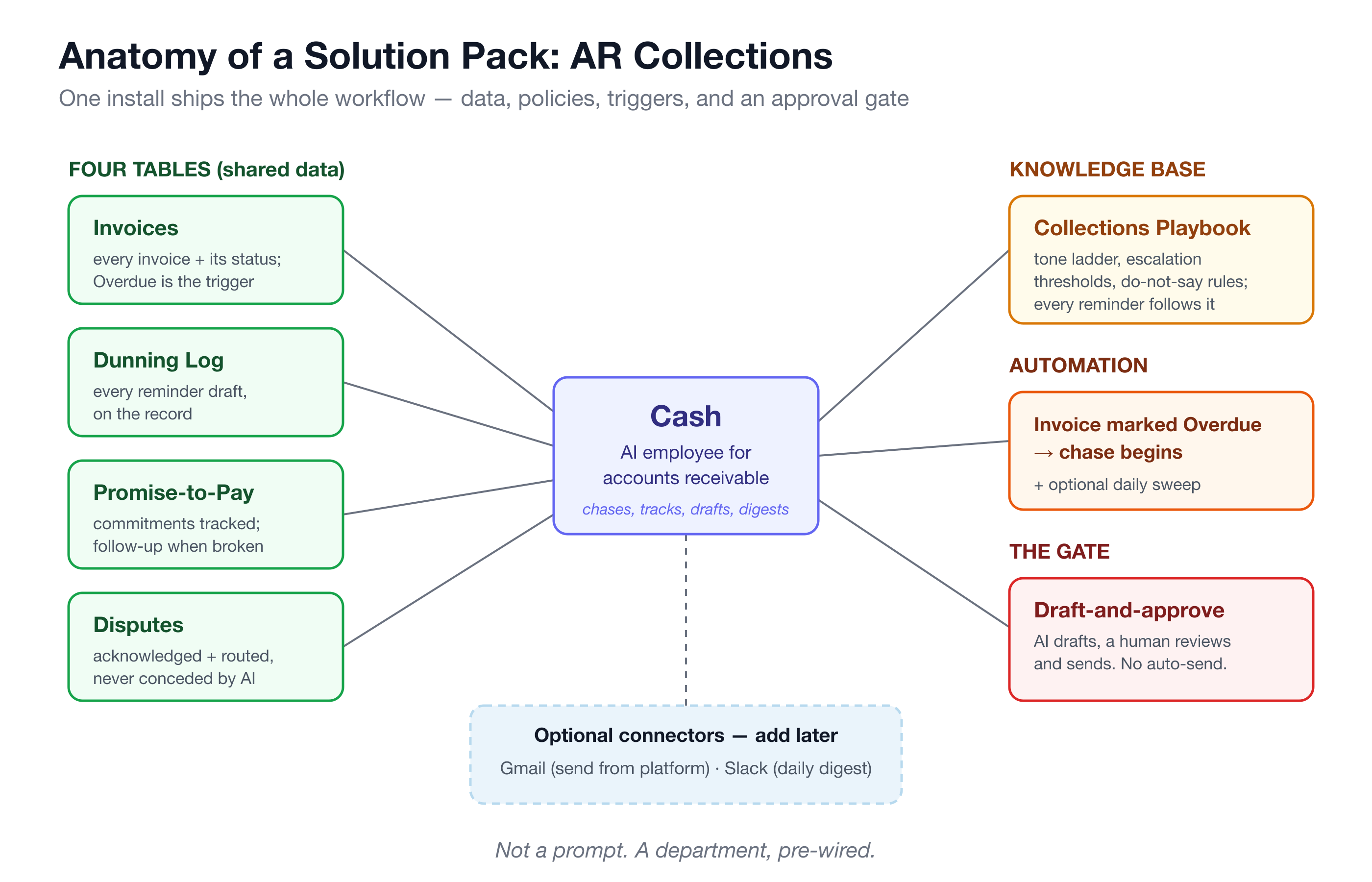
At the center is Cash, an AI accounts receivable assistant. Cash chases overdue invoices with escalating, on-brand reminders, consolidates a customer’s overdue invoices into one clean statement, tracks promise-to-pay commitments and follows up when they break, acknowledges and routes billing disputes without ever conceding on its own, and sends you a daily AR aging digest.
Around Cash sit four tables: your invoices, a dunning log of every draft (dunning is just the collections term for payment-reminder sequences), promise-to-pay commitments, and disputes. Cash reads and writes these; so do you. There is no separate “AI data” hiding in a chat history — the state of every collection effort is visible in a table your whole team can open.
Grounding everything is the Collections Playbook knowledge base: your tone ladder, escalation thresholds, and do-not-say rules. Every reminder Cash drafts follows it. Change the playbook, and Cash’s behavior changes — no retraining, no prompt engineering.
Then the automation: the moment an invoice is marked Overdue, the chase begins. An optional daily sweep continues the escalation. Nobody has to remember to ask.
And the gate that makes all of this safe: draft-and-approve. Every message is drafted for you to review and send. There is no auto-send, so a human always approves the message and stays in control of the customer relationship.
That is one pack: one employee, four tables, one knowledge base, one trigger, one approval gate. Not a prompt — a small, pre-wired department.
Why do packs beat DIY prompting?
You could build the above yourself with a general AI tool. People try. Weeks later they usually have a prompt document nobody follows and a workflow that lives in one person’s head. Packs win for three reasons.
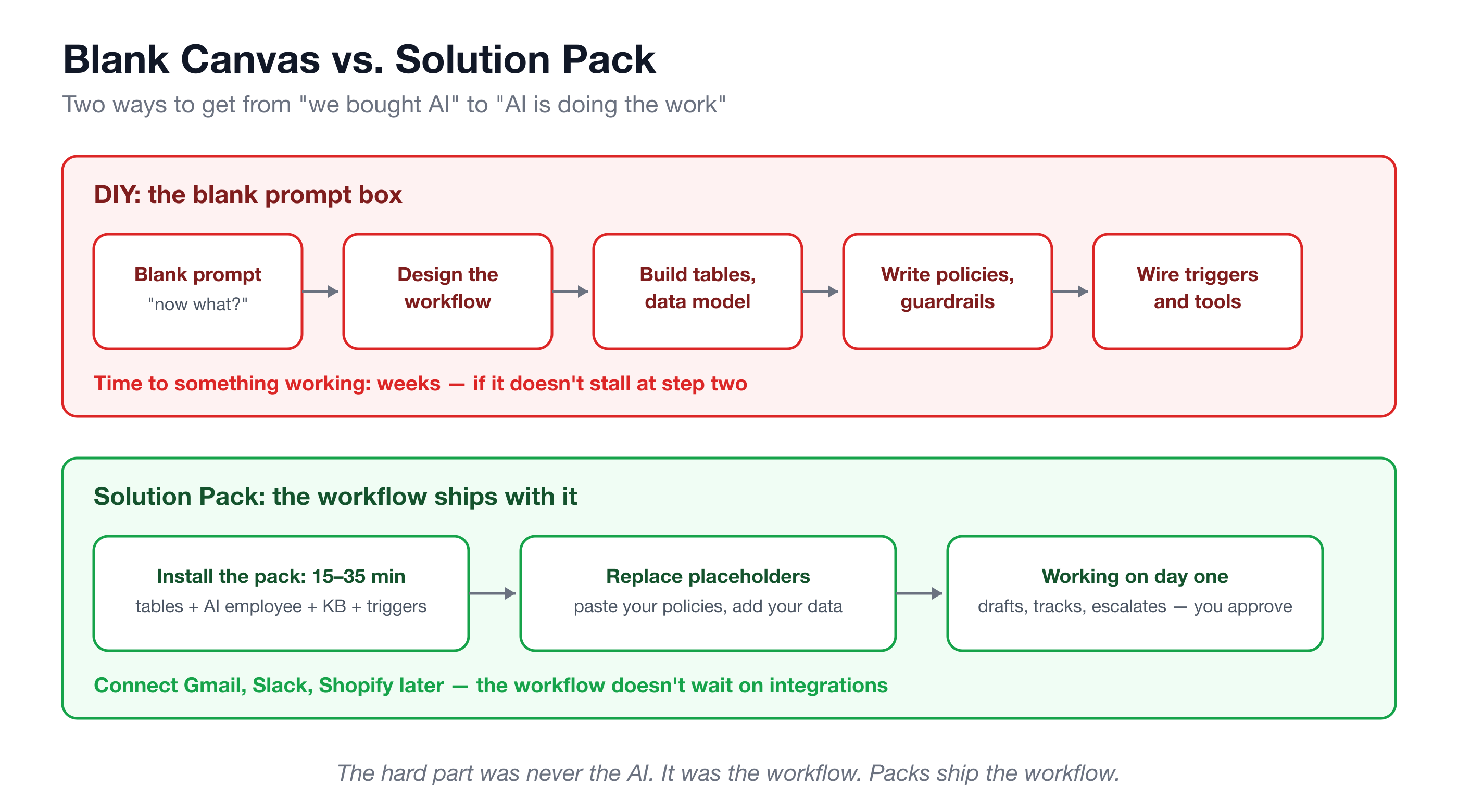
The workflow is the product. A pack encodes decisions you would otherwise have to make from scratch: which tables, which fields, which trigger, which escalation ladder. You inherit a working design instead of inventing one.
Domain guardrails come baked in. This is the part DIY prompting almost never gets right. Each pack carries opinionated limits for its domain: the legal pack never gives legal advice, assesses a matter’s merits, or clears a conflict of interest. The recruiting pack screens only on skills and qualifications, and never rejects a candidate or extends an offer. The insurance pack never quotes a premium or binds coverage. The IT helpdesk pack never asks for or repeats a credential. These are not suggestions in a prompt — they are how the pack is built.
A human approval gate is the default, not an afterthought. Across the catalog, the pattern is consistent: the AI drafts, a human sends. Sensitive cases — angry customers, refunds, legal questions — escalate to a person instead of being guessed at.
How big is the catalog?
Nineteen packs, spanning finance to hospitality. Scannable version:
- Sales — Revenue Ops Orchestration, Sales Engine (Sasha, AI SDR), Sales Engine Pro (adds Maya, AI account manager)
- Finance — AR Collections and Dunning (Cash), Bookkeeping Practice Ops (Bailey)
- Customer support — Customer Support Ops (Sam)
- E-commerce — E-commerce CX and Returns (Remy)
- Insurance — Insurance Renewal and Retention (Ivy)
- Recruiting — Recruiting and Staffing Ops (Riley)
- Marketing — Agency Client Reporting (Quinn), Marketing Content Engine (Marlow)
- Legal — Legal Intake and Paralegal Ops (Justice)
- Real estate — Real Estate Transaction Coordination (Harper)
- IT services — IT Managed Services Helpdesk (Byte)
- Field trades — Field Trades Back-Office (Casey)
- Nonprofit — Nonprofit and Grants Ops (Sage)
- Hospitality — Restaurant and Hospitality Back-Office (Remy)
- Professional services — CA Firm Compliance & Practice (Priya, for Indian chartered accountants)
- Operations — Procurement Ops Control Tower
Setup runs 15 to 35 minutes depending on the pack. If you want to see what each one handles day to day, the use-cases-by-industry guide walks through them.
What happens after install?
A pack works out of the box, but it ships with placeholders on purpose — an example invoice, a sample playbook, a generic chart of accounts. Your first hour is spent making it yours:
- Swap the placeholder policies for your real ones. Paste your actual tone rules into the Collections Playbook, your real screening standards into the recruiting knowledge base, your true return policy into the CX pack. The AI’s behavior follows immediately.
- Add your data. Import your invoices, your candidates, your open matters into the tables.
- Connect external tools when you’re ready — not before. Packs run entirely inside the platform without any external connection. Later, connect Gmail to send from the platform, Slack for digests, Shopify to sync orders, or your calendar for scheduling. The workflow doesn’t wait on an integration project.
That ordering matters. Most AI rollouts stall at “first, connect everything.” Packs invert it: working workflow first, integrations when they earn their place.
Frequently asked questions
Do I need developers to install a Solution Pack?
No. Installing a pack is a guided setup of 15–35 minutes, not an engineering project. The tables, automations, AI employee, and knowledge base arrive pre-connected. The work left for you is editorial — replacing placeholder policies with your own and adding your data — not technical.
What if my process is different from the pack’s?
The pack’s behavior is governed by its knowledge base and its tables, and both are yours to edit. Change the escalation thresholds, rewrite the tone ladder, add fields to a table, and the AI employee follows the new rules. You start from a working default instead of a blank page, then bend it to your process.
Can I modify a pack after installing it?
Yes — that is the intended path. Edit knowledge base content, adjust autonomy and approval settings per employee, add or disable automations, and connect integrations like Gmail, Slack, or Shopify whenever you’re ready. Nothing about a pack is frozen at install time.
What does it cost to run?
Packs run on your platform plan plus the LLM usage the AI employee consumes, and spend budgets let you cap that usage per employee. Because the default is draft-and-approve, volume stays proportional to real work — the AI drafts when there is something to draft, not on an idle loop.
If the blank prompt box has been the reason AI hasn’t stuck at your company, pick the workflow that hurts most — overdue invoices, a swollen ticket queue, renewal season — and install that one Turtle pack. Thirty minutes later you’ll have something no prompt ever gave you: a working department, with your name on the approval button.