
AI employee use cases follow one pattern across industries: a named AI worker takes over a repeatable back-office responsibility — chasing invoices, triaging tickets, screening candidates, tracking deadlines — drafts every output for a human to approve, and follows guardrails written for that domain. The industry changes what the work is; the architecture that does it safely stays the same.
This is the hub for our whole series. Below is one entry for every Solution Pack live on Turtle AI Coworker today — pre-wired bundles of tables, agents, a knowledge base, and a named AI employee that install in 15–35 minutes. (New to packs? Start with what AI solution packs are and why they beat building from scratch.)
How to read this gallery: each entry follows the same beat — the pain, the AI employee that takes it over, and what you’d see in the first week. Find your industry, or read a neighboring one; the pattern transfers.
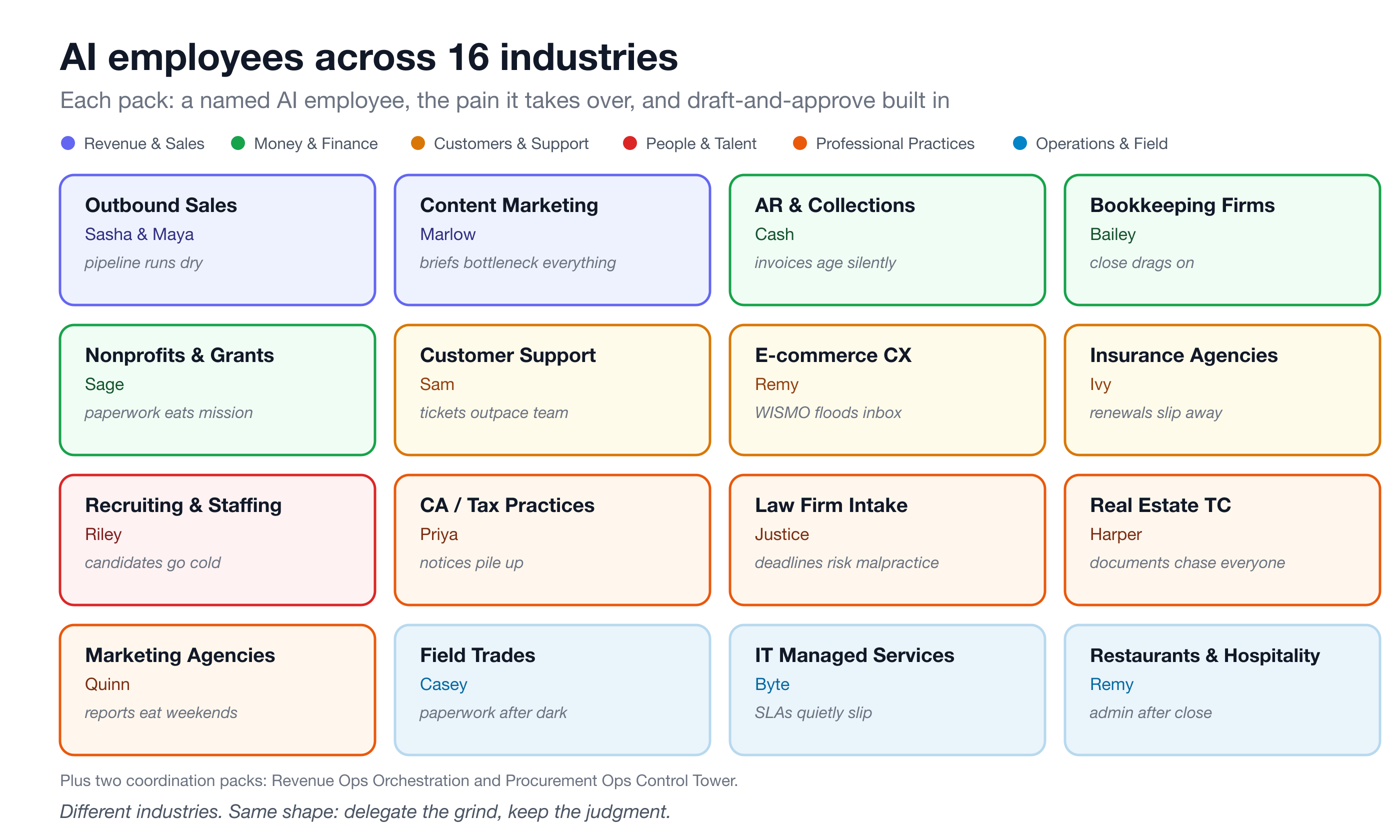
Revenue & Sales
Outbound sales — Sasha and Maya
The pain: prospecting is the job everyone agrees matters and nobody has time for, so the pipeline runs on bursts of guilt. The AI employee: the Sales Engine pack installs Sasha, an AI SDR who discovers and vets accounts against your ideal customer profile, enriches prospects, researches companies, scores leads, and drafts outreach grounded in your product knowledge base. Sales Engine Pro adds Maya, an AI account manager who qualifies opportunities, drafts proposals, flags pipeline risk, and forecasts renewals across seven shared tables. First-week wins: new prospects auto-enriched on arrival, a daily discovery run finding fresh accounts, and a queue of drafted cold emails waiting for your review — a human sends every one. How an AI SDR runs your outbound engine.
Revenue operations
The pain: leads arrive faster than anyone routes them, and follow-up depends on who noticed the notification. The AI employee: the Revenue Ops Orchestration pack wires lead intake, enrichment, and team follow-up into one flow, with an agent team handling specialist steps and an AI employee coordinating the handoffs. First-week wins: every new lead lands in a table, gets enriched automatically, and is routed for follow-up instead of aging in an inbox — and the founder can watch the whole pipeline in one place.
Content marketing — Marlow
The pain: every piece of content stalls at the brief, and the calendar is a shared doc nobody trusts. The AI employee: Marlow, the Marketing Content Engine’s AI coordinator, turns each content request into a complete brief grounded in the campaign and your brand standards, slots approved content into the calendar, drafts visual concepts for social (never captions or copy, by design), and suggests SEO keyword direction. Claims and statistics are only used if they’re on record — missing data gets flagged, not fabricated. First-week wins: a brief drafted the moment a request arrives, a calendar that fills itself with sensible dates, and a weekly performance digest.
Money & Finance
Accounts receivable — Cash
The pain: invoices age because chasing them is awkward, and DSO (days sales outstanding — how long cash sits in other people’s accounts) creeps up while everyone avoids the nagging. The AI employee: Cash chases overdue invoices with escalating, on-brand reminders, consolidates a customer’s overdue invoices into one statement, tracks promise-to-pay commitments and follows up when they break, and routes disputes without conceding on its own. There is no auto-send — every message is drafted for a human to approve. First-week wins: an invoice chased the moment it’s marked overdue, and a daily AR aging digest. How AI collections works without torching relationships.
Bookkeeping practices — Bailey
The pain: the monthly close drags because categorization, client questions, and reconciliation notes compete with everything else across every client. The AI employee: Bailey suggests a category from your chart of accounts for each new transaction, flags anything unclear, sets up the standard close checklist per client and period, drafts batched client questions, and preps reconciliation review notes. Nothing posts to the ledger and no reconciliation is marked complete without you. First-week wins: transactions categorized on arrival and a daily read on where every client’s close stands. The monthly close with an AI assistant.
Nonprofits & grants — Sage
The pain: grant deadlines and funder reports eat the hours that were supposed to go to the mission. The AI employee: Sage honestly screens new grant opportunities against your actual eligibility profile, drafts application narrative sections from your real program metrics, preps the compliance reports funders require, and drafts stewardship communications. Nothing is invented — any figure not on record is flagged for staff to confirm, and nothing is submitted without a human. First-week wins: every new opportunity screened for eligibility on arrival and a weekly pipeline digest of deadlines and reports due.
Customers & Support
Customer support — Sam
The pain: ticket volume outgrows the team, and consistency degrades first — the same question gets three different answers. The AI employee: Sam classifies every ticket by category, sentiment, and priority, drafts a reply grounded only in your knowledge base, and escalates anything it isn’t confident about instead of guessing. Anger, churn risk, refunds, and legal or privacy issues are always escalated. First-week wins: a reply drafted the moment a ticket arrives, recurring problems matched to approved responses, and a weekly digest of volume and top drivers. AI support ticket automation, done honestly.
E-commerce CX — Remy
The pain: WISMO — “where is my order?” — plus returns and refund questions bury a small store’s inbox after every promotion. The AI employee: Remy matches each case to the real order and drafts a status reply with tracking and ETA, triages returns against your policy (steering size-and-fit issues toward exchange or store credit first), preps refunds for approval, and turns happy resolutions into review requests. Nothing is sent or refunded automatically. First-week wins: order-status cases answered on arrival and returns triaged the moment they land. Taming WISMO and returns with AI.
Insurance agencies — Ivy
The pain: renewals are dates-and-sequences work, and the 90/60/30 sequence runs on whoever has a free hour — so the book leaks. The AI employee: Ivy drives the renewal sequence off your policy table, drafts the right touch at each stage, preps plain-English review summaries for client calls, spots coverage gaps as internal notes, and drafts win-back outreach for lapsed clients. Built to respect E&O (errors-and-omissions liability): nothing quotes a premium or binds coverage, and a licensed human sends every message. First-week wins: the sequence starts automatically when a policy enters the 90-day window. Renewal and retention on autopilot — with a licensed human in the loop.
People & Talent
Recruiting & staffing — Riley
The pain: time-to-fill stretches because screening, scheduling, and status updates all queue behind the recruiter’s calendar, and candidates go cold in the gaps. The AI employee: Riley screens each new candidate against the job’s must-haves with reasoning you can audit, drafts availability requests and honest status updates, and builds submittal packages mapping experience to requirements. Screening never considers anything beyond skills and qualifications, and Riley never rejects a candidate or extends an offer — those stay human decisions. First-week wins: every new candidate screened on arrival and a daily pipeline read. What an AI recruiting coordinator actually does.
Professional Practices
Chartered accountant firms — Priya
The pain: an Indian CA practice juggles GST filings, ITR deadlines, audits, and a steady drip of IT and GST notices across dozens of clients — and one missed statutory date is a real problem. The AI employee: the CA Firm Compliance & Practice pack tracks clients, engagements, statutory deadlines, and notices, with agents for notice triage, GST reconciliation, filing reminders, and client communication — coordinated end-to-end by Priya. First-week wins: every client’s deadline calendar in one table and notices triaged instead of sitting in someone’s inbox. The close-and-deadline discipline rhymes with bookkeeping’s monthly close.
Law firm intake — Justice
The pain: intake stalls, document requests trickle, and deadline tracking lives in a paralegal’s head — where a missed date is malpractice risk. The AI employee: Justice screens every new intake and flags it for a conflict check, drafts the standard document request list per practice area, prepares candidate deadlines that always require attorney confirmation, and drafts client communications from real matter records. No agent gives legal advice, assesses merits, predicts outcomes, or clears conflicts — ever. First-week wins: intake screened and flagged on arrival, plus a daily practice digest. How deadline-driven practices use AI safely.
Real estate transactions — Harper
The pain: every deal from contract to close is a checklist of documents and dates chased across buyers, sellers, lenders, and inspectors. The AI employee: Harper sets up the milestone timeline and document checklist the moment a transaction goes under contract, drafts plain-English status updates for buyers and sellers, and preps a closing-readiness checklist showing exactly what’s outstanding. No milestone is marked complete and no document marked received unless a human recorded it; legal interpretation stays with the client’s attorney. First-week wins: milestones auto-created on every new contract and a daily pipeline read. More on deadline-driven work.
Marketing agencies — Quinn
The pain: account managers lose days to report writing, and the account trending the wrong way is only obvious in hindsight. The AI employee: Quinn turns campaign data into insight judged against each client’s actual goals rather than generic benchmarks, drafts the client-facing report in the right format, preps you for client calls by anticipating likely questions, and scans the book weekly for at-risk accounts. Insight never invents a cause the data can’t support, and risk is flagged internally first. First-week wins: insight generated when new performance data arrives and reports drafted for your review. Client reporting without the Sunday-night scramble.
Operations & Field
Field trades — Casey
The pain: an HVAC, plumbing, or electrical shop does its paperwork after dark — estimates, scheduling, invoicing — because the day belongs to the trucks. The AI employee: Casey classifies every new service request by type and priority, flags any safety hazard for immediate human attention (hazard language auto-sets priority to Emergency), drafts estimates from your pricing guide, proposes scheduling windows per your dispatch policy, and preps invoices from completed jobs. Nothing is dispatched, sent, or charged without a human confirming. First-week wins: requests triaged on arrival and a daily read on what needs attention.
IT managed services — Byte
The pain: an MSP’s ticket queue mixes password resets with genuine security signals, and SLA breaches surface only when a client complains. The AI employee: Byte classifies every ticket, treats anything resembling a security incident as Critical with immediate human escalation, drafts first-step troubleshooting guidance from your knowledge base, flags warranty and license renewals before they lapse, and watches SLA risk per client tier. No agent ever handles a credential or remotely accesses a client system. First-week wins: tickets triaged on arrival and a daily client health digest.
Procurement operations
The pain: purchase requests, vendor onboarding, and contract review crawl through email threads with no single owner. The AI employee: the Procurement Ops Control Tower pack installs a vendor registry, purchase request review, contract path assessment, and an embedded review team, with an AI employee coordinating the flow end-to-end. First-week wins: every request in one table with a clear review path, and vendor information in a registry instead of attachments.
Restaurants & hospitality — Remy
The pain: reservations, vendor orders, guest reviews, and staffing gaps all demand back-office attention the floor never allows. The AI employee: Remy proposes seating windows the moment a reservation comes in, drafts vendor orders from your standard lists and par levels, drafts warm responses to guest reviews, and flags staffing gaps against your minimum coverage rules. No food safety or allergen claim is ever made without a manager or chef, and no table is seated, order sent, or review posted without a human. First-week wins: seating windows proposed on every request and a daily ops digest.
The common threads
Read back across all sixteen and the same anatomy repeats. Every pack ships a named AI employee with a defined responsibility; tables where humans and AI share the same working data; a knowledge base holding your policies, voice, and playbooks so every draft follows your rules; automations that trigger work the moment it arrives; draft-and-approve as the default trust model — the AI prepares, a human sends; and domain guardrails written for that industry’s specific risk, whether that’s E&O, fair hiring, unauthorized practice of law, or food safety. Every pack works out of the box with data you add, connects to your real tools later, and installs in 15–35 minutes.
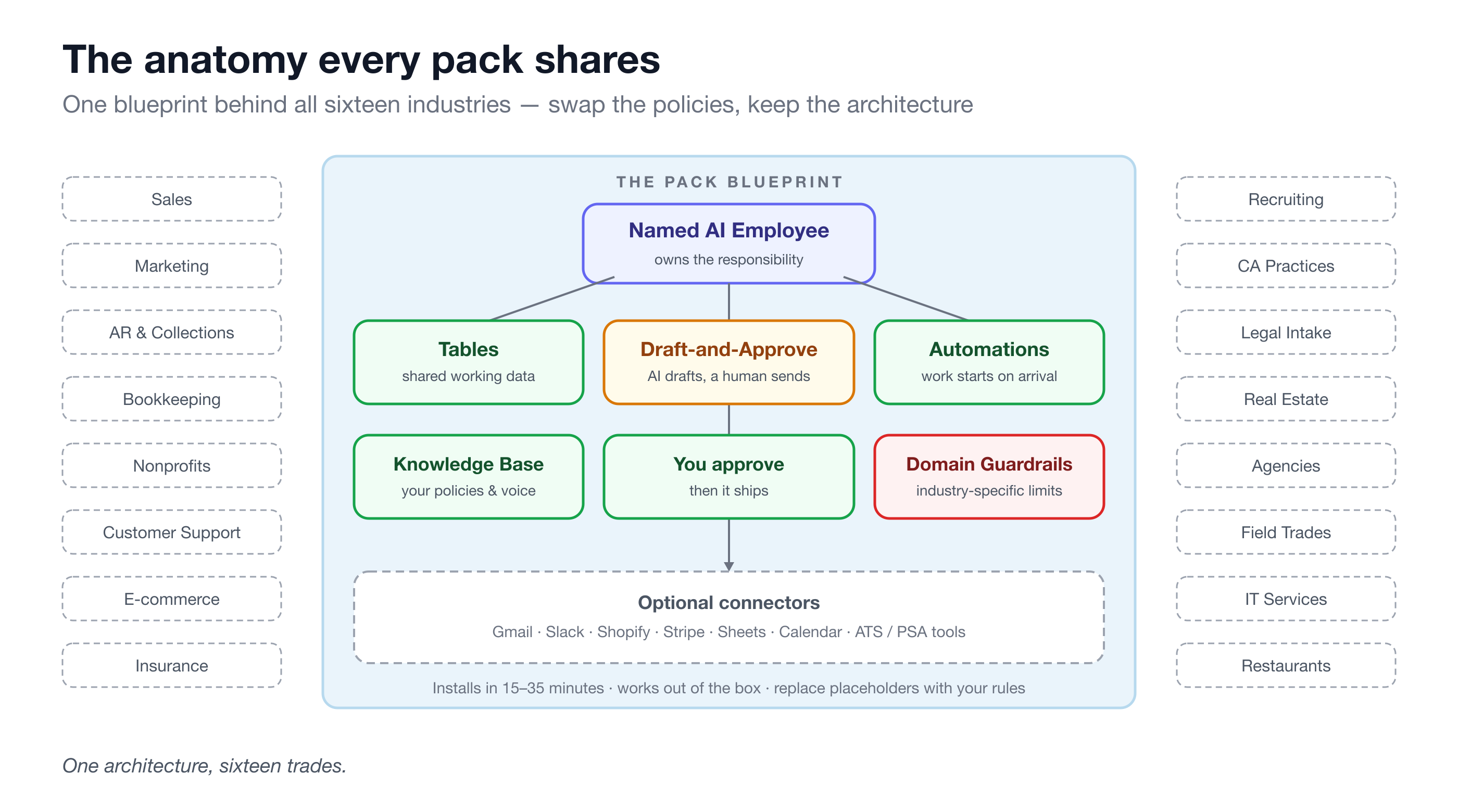
That’s the real finding of this gallery: the industries differ, the shape doesn’t. Delegate the grind, keep the judgment.
Frequently asked questions
Which industries have ready-made AI employee packs?
Sixteen and counting: outbound sales and revenue ops, content marketing, accounts receivable, bookkeeping, nonprofits and grants, customer support, e-commerce CX, insurance agencies, recruiting and staffing, chartered accountant firms, legal intake, real estate transactions, marketing agencies, field trades, IT managed services, procurement, and restaurants. Each installs in 15–35 minutes with tables, a knowledge base, automations, and a named AI employee pre-wired.
What if my industry isn’t listed?
Packs are pre-wired bundles of the platform’s building blocks — agents, agent teams, AI employees, tables, and knowledge bases — and those blocks are available directly. If your workflow is “structured data plus repeatable drafting plus human approval,” you can assemble it yourself: create a table for the work, write your rules into a knowledge base, and give an AI employee the responsibility.
Are the packs customizable?
Yes — customizing them is the expected first step. Every pack ships with placeholder policies, sample rows, and example knowledge base content that you replace with your own: your pricing guide, your screening standards, your tone ladder. Autonomy is adjustable per employee, and you can add tables, agents, and connectors to any installed pack.
Do all packs require external integrations?
No. Most packs work out of the box with the data you add — invoices, tickets, candidates, transactions — and connectors are optional upgrades: Gmail to send from the platform, Slack for digests, Shopify to sync orders, an ATS or PSA to sync records. Sales Engine is the main exception; it requires an LLM provider plus prospecting connectors like Apollo and Serper.
If one entry above made you wince in recognition, that’s your starting point: install that pack, replace the placeholder policies with your own, and run it as a 30-day pilot on real work. And before you size the decision, read the honest ROI math for an AI employee — recovered hours and recovered revenue, counted without hand-waving.