
An AI approval workflow — often called draft-and-approve — means the AI prepares every customer-facing action but a human reviews and sends it. This is the standard AI human in the loop pattern: nothing reaches a customer, posts to a ledger, or confirms a commitment until a person approves it. Autonomy expands later, deliberately, one permission at a time.
Let’s name the fear directly, because it’s the real reason most teams haven’t handed customer communication to AI: one bad AI email to a customer can cost you more than a month of saved hours. A tone-deaf reply to an angry client, a refund promised that policy doesn’t allow, a confident answer that’s simply wrong — the damage lands on a relationship you spent years building, and it lands with your name on it. If you’re asking “can you trust AI with customers,” you’re not behind the curve. You’re asking exactly the right question.
The honest answer is: not unconditionally, and no serious product should ask you to. Trust isn’t something you grant on installation day. It’s something the system has to earn — visibly, action by action — while a human holds the send button.
What does “human in the loop” actually mean in practice?
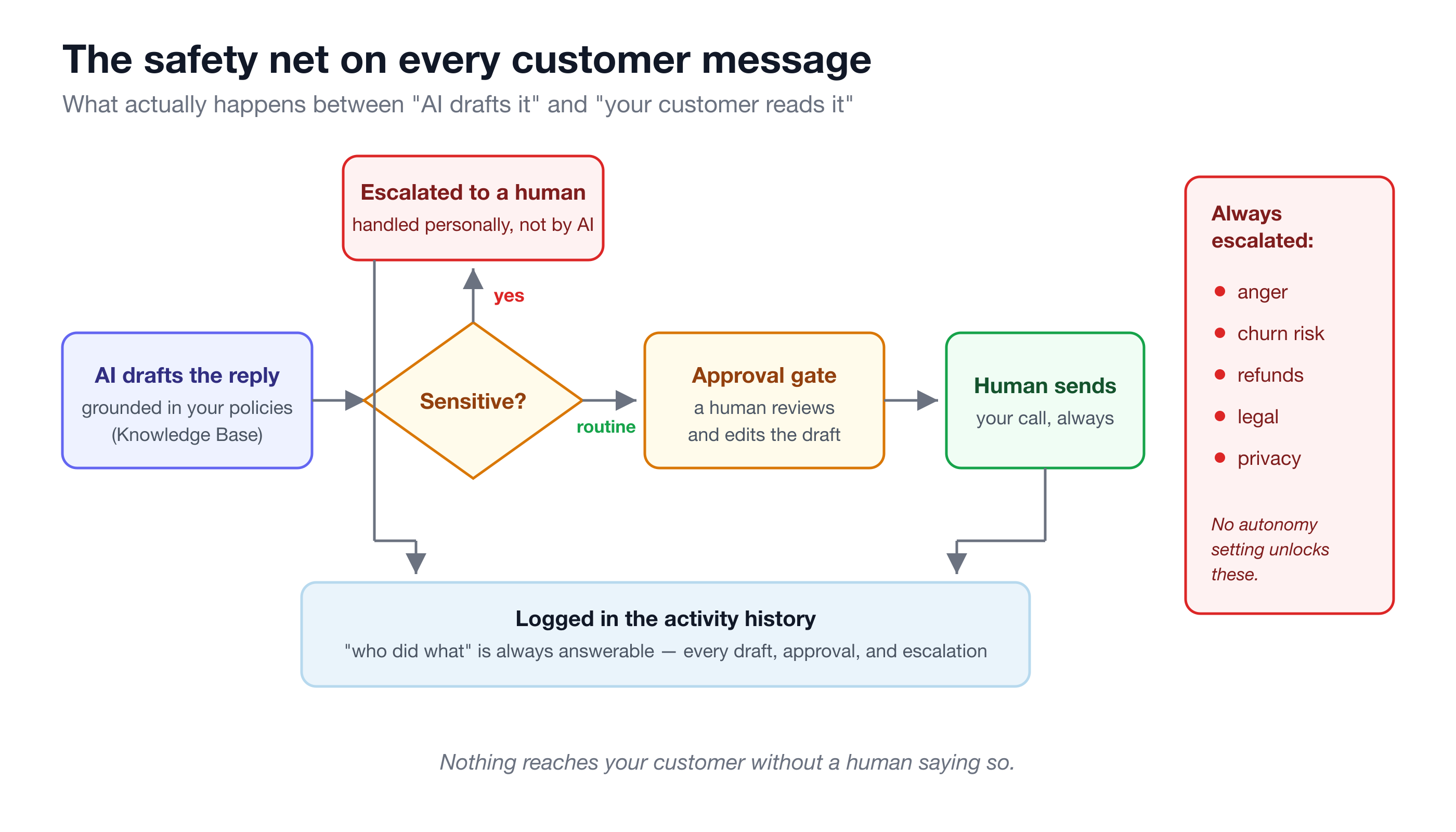
The phrase gets used loosely, so here’s the concrete version. On Turtle AI Coworker, every AI employee works inside an approval workflow with three moving parts:
The draft. The AI does the work — reads the ticket or invoice, checks your knowledge base for the relevant policy, and writes the reply, the estimate, the reminder. This is where the hours are saved: the thinking, looking-up, and writing that eats an afternoon happens in seconds.
The gate. The draft stops at an approval point. A human reads it, edits it if needed, and sends it — or rejects it. The customer only ever sees what a person released.
The log. Every action — what was drafted, what was approved, who approved it, what was escalated — lands in a full activity history. “Who did what” is always answerable, which matters enormously the first time a manager, an auditor, or an anxious co-founder asks.
That’s the loop. The AI is never the last pair of eyes before your customer.
Autonomy is a dial, not a switch
The mistake in most “should AI talk to customers?” debates is treating it as binary: either a human writes everything, or a bot runs loose. In practice, autonomy is a dial with (at least) three useful positions.
Level 1: draft everything. The AI prepares every action; a human approves every send. This is the default across every Turtle Solution Pack, and the pack descriptions say it plainly — the AR Collections pack’s own words are “there is no auto-send, so a human always approves the message and stays in control of the customer relationship.” Day one starts here, always.
Level 2: auto for the routine, approval for the sensitive. Once the drafts have proven themselves, you loosen specific, bounded permissions. The shape is always a threshold: refunds under a dollar amount you set can proceed, refunds over it wait for sign-off. A first friendly payment reminder can go out on schedule; the firmer escalation email still needs a human. Order-status replies flow; anything touching a complaint does not. You’re not trusting “the AI” — you’re trusting one narrow, observed behavior at a time.
Level 3: trusted autonomy, fully audited. For work that has run cleanly for months, the AI acts and you supervise through the activity history instead of through a queue — the way you’d manage a proven employee through their results rather than their keystrokes. The log never goes away; the pre-approval gate does, for that task only.
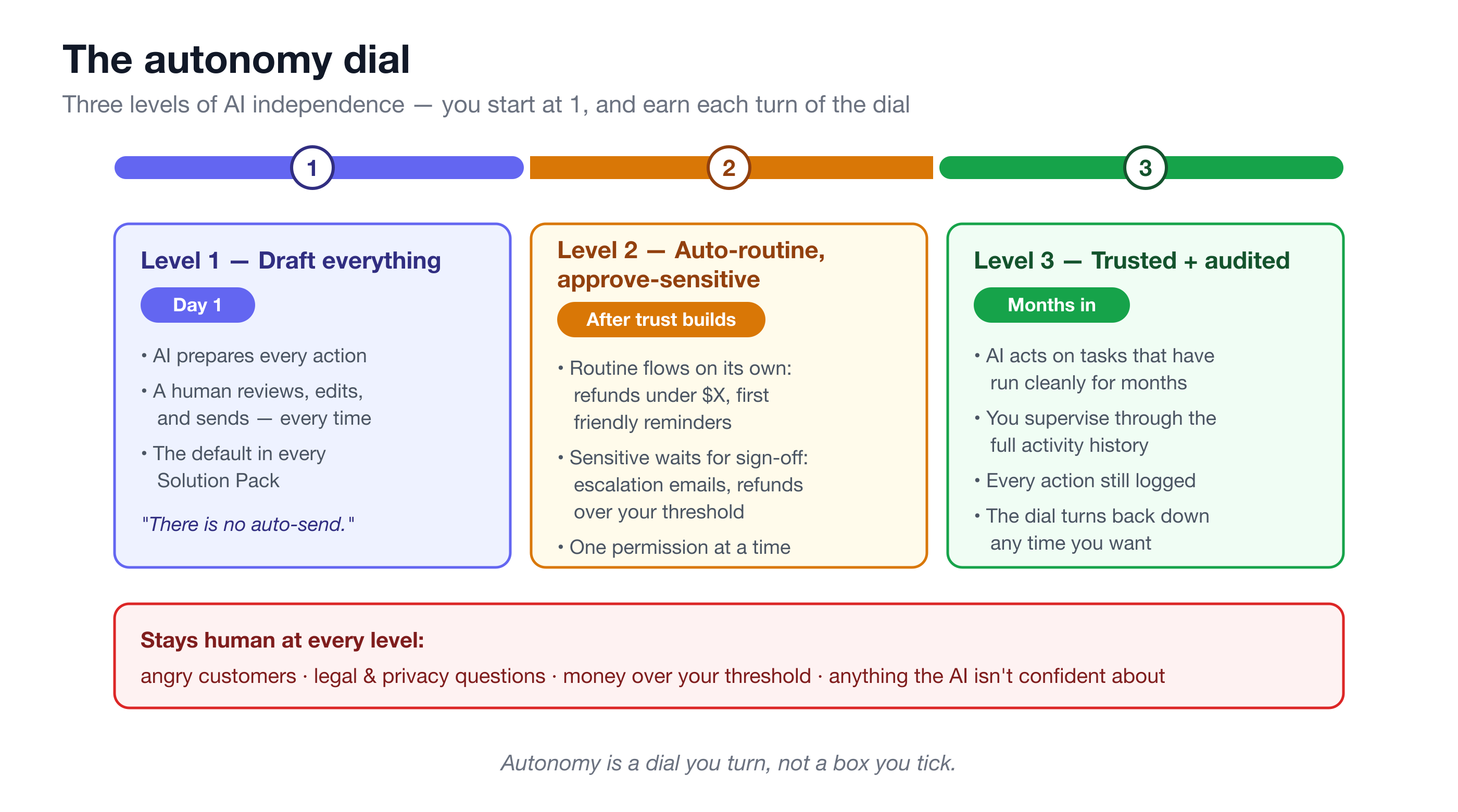
Two things make this a dial rather than a cliff. Autonomy settings are per-employee and per-task — your AI support specialist can be at level 2 on order-status replies while your AR assistant is still at level 1 on everything. And the dial turns both ways: if something makes you uncomfortable, you tighten it back to full approval in a minute, no re-implementation required.
What never gets automated, at any level?
Here’s the part that should matter most in an evaluation: the categories that stay human even at the loosest setting. Turtle’s packs ship with escalation rules — a standing list of situations where the AI stops drafting-to-send and instead routes the case to a person.
Sam, the AI support specialist in the Customer Support Ops pack, always escalates tickets involving anger, churn risk, refunds, account deletion, or anything legal or privacy-related — and escalates whatever it isn’t confident about instead of guessing. Remy, the CX concierge in the E-commerce pack, always escalates denials, over-threshold refunds, damaged items, and angry customers, and never sends or refunds anything automatically.
On top of escalation rules sit domain guardrails — hard lines built into each pack that no autonomy setting unlocks:
- Ivy (insurance renewals) never quotes or confirms a premium and never binds coverage; a licensed human sends every client touch.
- Justice (legal intake) never gives legal advice, never assesses a matter’s merits, and never treats a computed deadline as final without attorney confirmation.
- Riley (recruiting) screens only on skills and qualifications, and never rejects a candidate or extends an offer — those stay human decisions.
This is worth reading as a signal, not a limitation. A vendor that leads with what its AI won’t do has thought about your downside. If you’re comparing platforms, our governance checklist for AI buyers turns this into a list of questions to ask any vendor.
Draft-and-approve is also your training period
Here’s the underrated part: the approval queue isn’t just a safety net. It’s how you learn what to automate next.
Every draft you approve untouched is a data point: this category of work is safe. Every draft you edit shows you precisely where the AI’s judgment and yours diverge — and because AI employees remember standing instructions and preferences, “we never offer discounts in a first reminder” becomes a rule it follows from then on, not a correction you repeat.
Suppose your team reviews 30 drafted support replies a week. In week one, you edit ten of them. By week four, after a handful of standing instructions, you’re editing two — and both are edge cases you’d want a human on anyway. Now you have evidence, not vibes: order-status replies have gone out untouched for a month, so they’re a sensible candidate for level 2. Refund conversations still get edited, so they stay gated. The trust curve isn’t a feeling that grows over weeks — it’s an approval history you can point at.
That’s the real answer to “can you trust AI with customers”: you don’t decide to trust it. You watch it earn specific trust for specific work, with the receipts to show for it.
Frequently asked questions
What if the AI drafts something wrong?
Then you edit it before it goes anywhere — that’s the point of the gate. The customer never sees the bad draft; they see what you sent. And the correction isn’t wasted: standing instructions and preferences carry forward, so the same mistake shouldn’t need fixing twice.
Can different AI employees have different autonomy levels?
Yes. Autonomy settings are per-employee, and effectively per-task within an employee’s work. A support specialist can auto-handle routine order-status replies while your collections assistant still drafts everything for approval — and sensitive categories stay escalated for both.
Can I dial autonomy back down?
Yes, at any time. The dial turns both ways: if a loosened permission makes you uncomfortable, return it to full draft-and-approve in minutes. The activity history is there either way, so you can review exactly what happened before deciding.
Does draft-and-approve kill the time savings?
No — reviewing a well-grounded draft takes a fraction of the time writing one does. The research, policy lookup, and composition are done; you’re doing a 30-second read instead of a 10-minute write. Most of the saved hours survive the approval gate.
If you want to see the approval workflow with your own work in it, install a Solution Pack in your domain — support, collections, recruiting, and a dozen others set up in 15–35 minutes, with draft-and-approve on by default. Run it for 30 days, count the drafts you stopped editing, and let the approval history tell you where to turn the dial.